Sales handover: can AI sort out pricing rules? It can draft them
AI can draft them. Give ChatGPT, Claude or Gemini a year of quotes for key customers to find each one's discounts, terms and exceptions. Three prompts, what to confirm, and the next step.
Key takeaways
- Ask AI directly: upload 12 months of quotes and orders for your key customers, have it compare actual and list prices to find the terms that keep showing up, and help you prepare questions for your senior reps.
- Check three things: every rule traces back to the original quotes, the senior rep confirms the reasons and end dates, and prices come from confirmed rules. Replace customer names with codes before uploading.
- Keep a rules table with access controls, sorted into fields, rules and notes, each with a source and an expiry date, and one ground rule: nothing goes on a quote unless it's in the table and approved.
- As customers and rules grow, connect AI to your ERP and quote screen: terms fill in and calculate automatically, anything outside the rules goes to a manager, and every price change is logged.
Table of contents
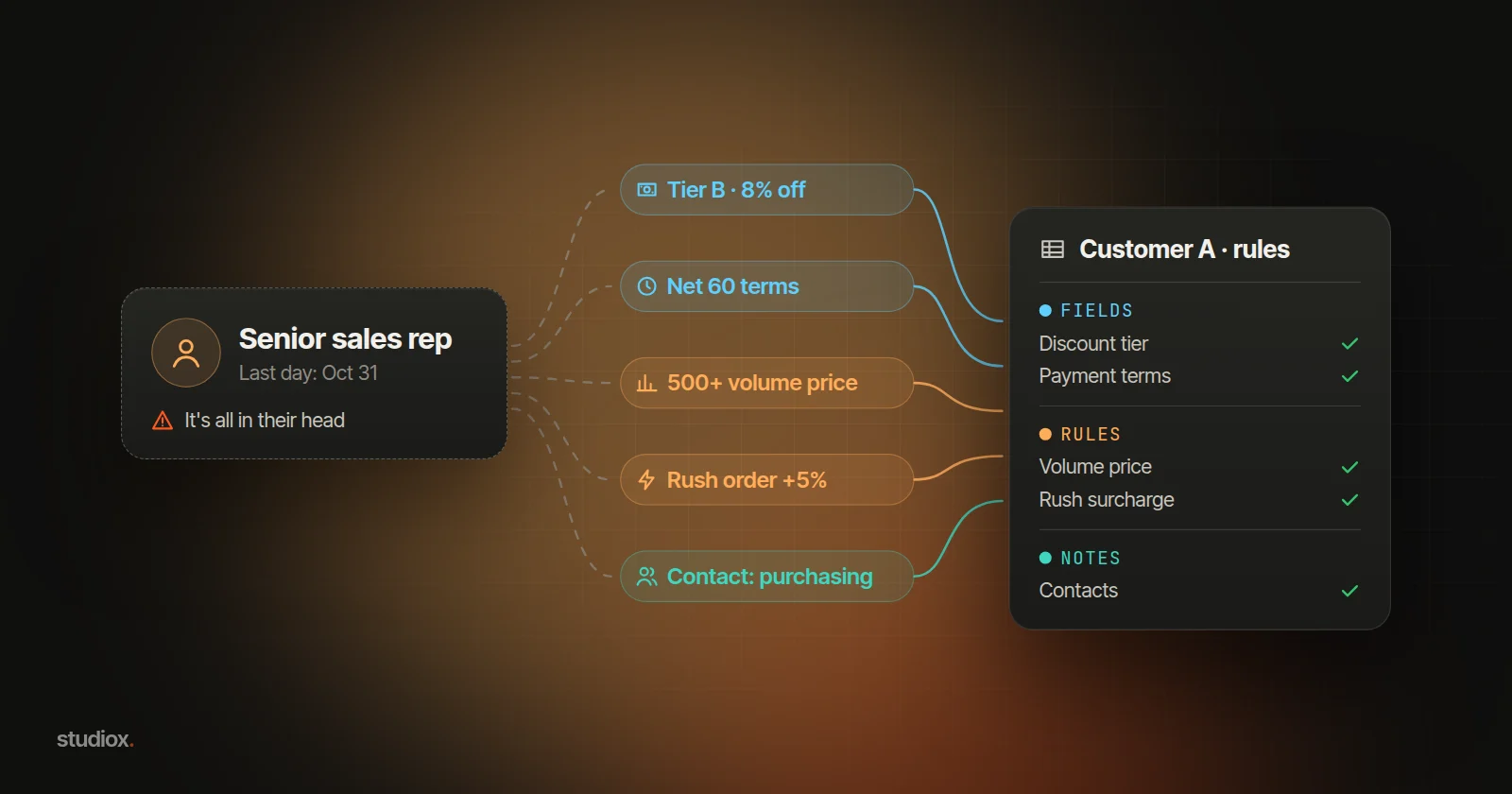
AI can draft your pricing rules for you. Export your key customers' quotes, orders and credit notes for the past 12 months from your ERP (Excel or CSV) and give them to an AI assistant such as ChatGPT, Claude or Gemini. Ask it to compare actual prices with list prices and find each customer's consistent discounts, payment terms, freight habits and exceptions, sorted into fields, rules and notes. It can also list the questions to go through with your senior reps, and turn your interview notes into a rules table. The senior rep still confirms the reasons and which terms to keep.
A B2B quote is rarely just list price times quantity. In trading, wholesale and manufacturing, every customer has its own discount, payment terms, freight arrangement, and exceptions for rush jobs and small orders. Sales reps and customers have worked these terms out over years. Senior reps know them by heart, and customers trust them for it. The goal: when accounts change hands, these terms stay with the company, and a new rep can quote the same prices as their predecessor from day one. When someone is out, a colleague can step in. This article starts with prompts you can copy, then covers what to check, how a rules table helps, and the next step: putting the rules on the quote screen.
Ask AI directly: 3 prompts to copy
Copy these and swap in your own customers, products and numbers (the ones below are examples).
Find the rules in old quotes
Attached are the past 12 months of quotes and orders for our top 20 customers (customer code, item, product line, quantity, list price, actual price, payment terms, who pays freight, rush order or not). Compare actual prices with list prices by customer and product line, and find the differences that keep showing up: for example, one product line always 8% below list, the next price tier above 500 units, no surcharge on rush orders. Label each one a "field" (fits in one value), a "rule" (has an "if… then…") or "possibly a one-off exception," and list the quote numbers it's based on and how many times it appears. Give me the result as a table I can paste into a spreadsheet.
Prepare for the interview with your senior rep
Based on that table, list the questions I should go through with our senior rep, customer by customer: who agreed each term and when, whether it has an expiry date, and the reason behind it (an annual volume commitment, or a one-time concession). Also add what handover checklists often miss: who in purchasing places orders, who in accounting handles statements, what must always go with a quote, and any habits the customer has.
Turn interview notes into a rules table
Below are my notes from going through Customer A with our sales rep (pasted). Put them into a rules table: customer, type (field, rule or note), details, source, expiry date. Where the notes don't mention a source or expiry date, write "To confirm" instead of guessing.
After AI sorts the terms, check these 3 things
- Does it match the original quotes? Spot-check a few rules by opening the quotes it lists. Anything that appears only once or twice is an exception until someone confirms otherwise.
- It doesn't know the reasons or end dates. AI sees only the numbers. It can't tell whether a discount came with an annual volume commitment or was a one-time concession. A person confirms every item, ideally the senior rep, otherwise the sales manager. If you're not sure, record it as a note first.
- Don't let AI estimate prices. What AI produces is a draft of the rules. On a quote, the price comes from confirmed rules, and anything the rules don't cover goes to a manager to approve.
Customer-specific prices and terms are business information. Use your company's enterprise plan, or replace customer names with codes and delete columns you don't need, such as contacts, before you upload.
Make it easier: your rules table and AI working together
1. Sort into fields, rules and notes
Sorting takes one question: does this fit in a single value, does it have an "if… then…", or does it need human judgment?
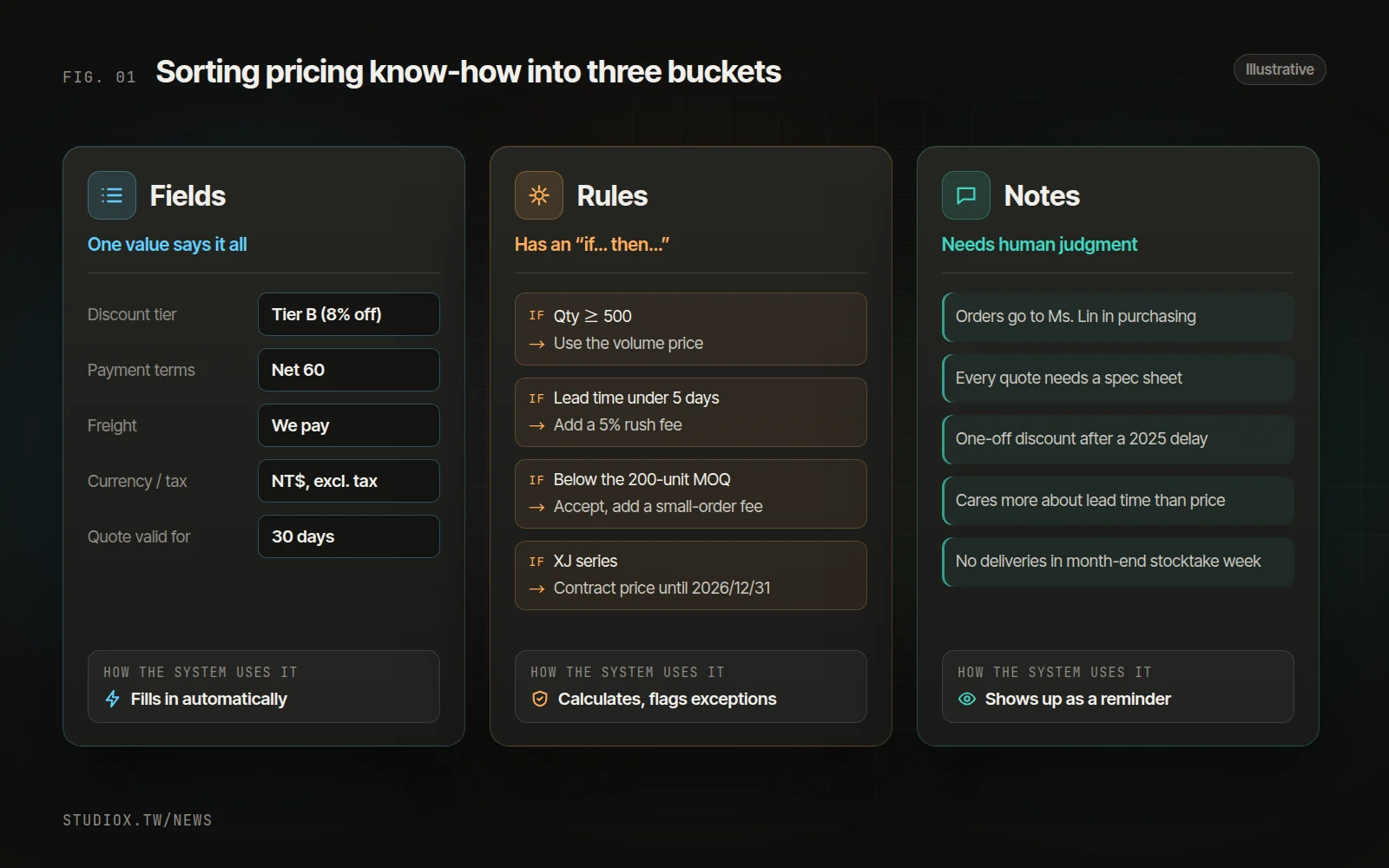
| Type | How to tell | Examples | How a system uses it later |
|---|---|---|---|
| Field | One value says it all | Discount tier, payment terms, who pays freight, quote currency and tax basis | Filled in as soon as you pick the customer |
| Rule | Has an "if… then…" | Volume price breaks, rush surcharges, handling of orders below the minimum, contract prices and their expiry dates | Calculated automatically on the quote; anything outside goes for approval |
| Note | Needs judgment | Contacts and their preferences, past disputes and concessions, a customer's particular habits | Shown alongside the quote as a reminder |
Give every rule a source and an expiry date: who agreed it, when, and until when. That way a one-off concession won't turn into a permanent discount. "This owner cares more about lead time than price" matters, but it's a note for a person; don't force it into a rule.
2. Build a rules table with access controls
Keep it in OneDrive, SharePoint or Google Drive, open only to sales reps and managers. One row per term: customer, type, details, source and expiry date. Use Data Validation to make Type a drop-down, and conditional formatting to turn rules that are close to expiry yellow. With fixed columns, attach it the next time you ask AI to look at new quotes, and it can flag anything that doesn't match.
3. Set one ground rule and review every quarter
A new special price or exception can't go on a quote unless it's in the rules table and approved. When verbally agreed prices are written down and entered in the system, orders and invoices also match more easily (see how to reconcile wholesale orders, shipments and invoices). Each quarter, give AI your recent quotes along with the rules table, and ask it to list sales made outside the rules and exceptions that keep coming up. When the same exception keeps appearing, discuss whether it should become a new rule.
Doing it routinely makes handovers easier
Here's an illustrative scenario. A senior rep with twelve years at the company leaves at the end of the month. The handover list covers the customer list, open orders and quotes still waiting for an answer. Two months later, a long-standing customer calls: "Didn't you always cover freight? And we've always been on net 90." Those terms lived in the previous rep's memory, a personal spreadsheet and chats on LINE (the messaging app most Taiwanese businesses use), so the handover files didn't have them. If AI had drafted the rules from old quotes beforehand and the rep had gone through them customer by customer, the new rep could look them up in the rules table.
The handover window is usually short. Under Article 15 of Taiwan's Labor Standards Act, an employee on an open-ended contract who resigns gives notice using the periods in Article 16, which is 30 days after three or more years of service. So once a senior rep resigns, the company often has about a month, while they're still selling and visiting customers. That's why this works best as routine work.
Confidentiality is another reason. Customer-specific prices and terms are information used in sales and business operations. Under Article 2 of Taiwan's Trade Secrets Act, one of the conditions for protecting that kind of information is that the owner has taken reasonable measures to keep it confidential. Whether something qualifies as a trade secret depends on the case; keeping the rules in a file or system with access controls lets the company carry them forward and makes it easier to show they are managed with care. Using an enterprise plan, or codes instead of customer names, when AI helps sort the terms follows the same thinking.
When to consider the next step
A rules table plus AI can serve you for a long time. It's worth looking at the next step when:
- Every quarter you export quotes, upload them to AI and paste the results back into the rules table.
- You already quote in your ERP or another system, and want terms to fill in as soon as you pick the customer.
- New reps want to ask "What are Customer A's payment terms?" and get an answer without asking a senior colleague each time.
- You need every price change logged: who changed it, why, and who approved it.
The next step: connect AI to your ERP and quote screen
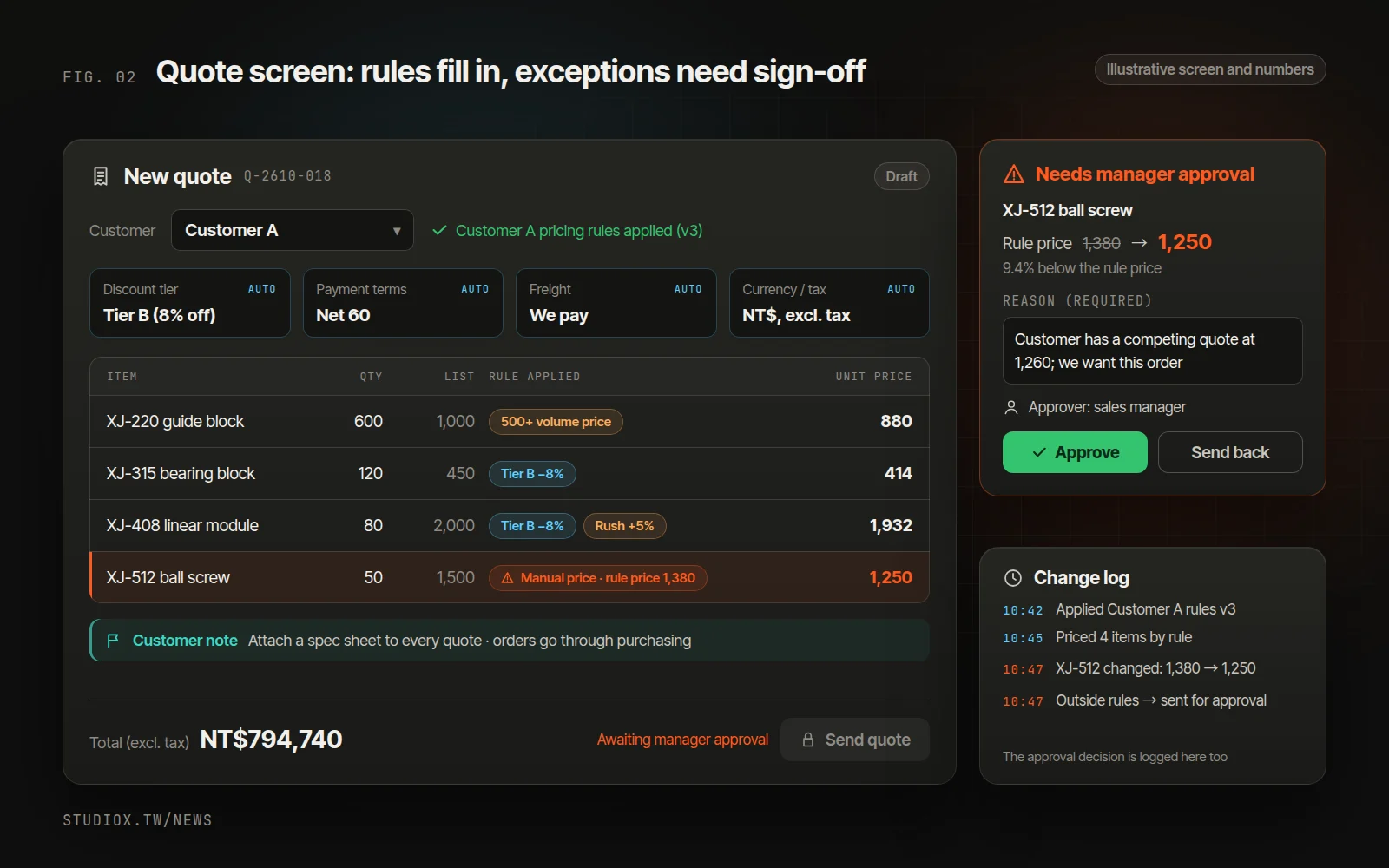
The next step is to put the rules on the screen where quotes are made, so nobody has to open a separate file:
- Pick the customer and the fields fill in: payment terms, discount tier, who pays freight, currency and tax.
- Add items and the rules do the math: the system prices each line based on quantity, lead time and contract prices, and shows which rule it applied.
- Anything outside the rules goes to a manager: a price below the rule price, a waived rush fee or an order below the minimum all need a reason and a manager's approval, and the quote can't be sent until it's approved.
- Every price change is recorded: who changed it, to what, why, and who approved it.
AI helps sort the material; rules set the price
Once AI is connected to your ERP, new quotes and orders come in on their own, with no exporting or uploading. AI checks them against the rules table, flags sales made outside the rules and proposes rules, such as "Customer A: all 23 past quotes used net 60 terms; suggest making it the default" (illustrative). It can also read old quotes and PDFs in all sorts of formats (see reading orders and quotes with AI). But AI only proposes; it doesn't decide. A rule changes only after a person confirms the suggestion.
If your back office has a built-in AI assistant such as Xena AI, a new rep can simply ask "What are Customer A's payment terms and special prices?" and it answers from the rules and notes, within that person's permissions. This is a different job from customer-facing AI support: a RAG knowledge base handles information you can share with customers. Pricing rules are internal data, visible only to people with access, and prices are calculated from defined rules, never estimated by AI.
Roll it out in phases, without replacing your ERP
If your ERP has nowhere to store these rules, you don't necessarily have to replace it. A pricing-rules layer can sit alongside it and read customer and order data through exports or an API (see connecting legacy systems without replacing them). The rules table you've already built can be imported directly. Early on, the spreadsheet keeps running alongside, and you switch over once both agree. The first phase typically goes live in about 4–6 weeks.
A senior rep's experience is valuable. Sort it into fields, rules and notes, have a person confirm it, and build it into quoting, and that experience stays with the company and helps new colleagues get up to speed. To find out where to start, try a free AI Health Check, or look at our business systems development service and AI services. You're also welcome to tell us how you quote today.