Legacy systems don't need a rewrite: link ERP and e-commerce via APIs
Your decade-old ERP still runs, but the online store, accounting and warehouse each have their own system, and staff re-key data between them. Here's a safer path than replacing everything at once.
Key takeaways
- The most valuable parts of a legacy system are its data and processes. A full rewrite is risky and slow, and often not the best choice.
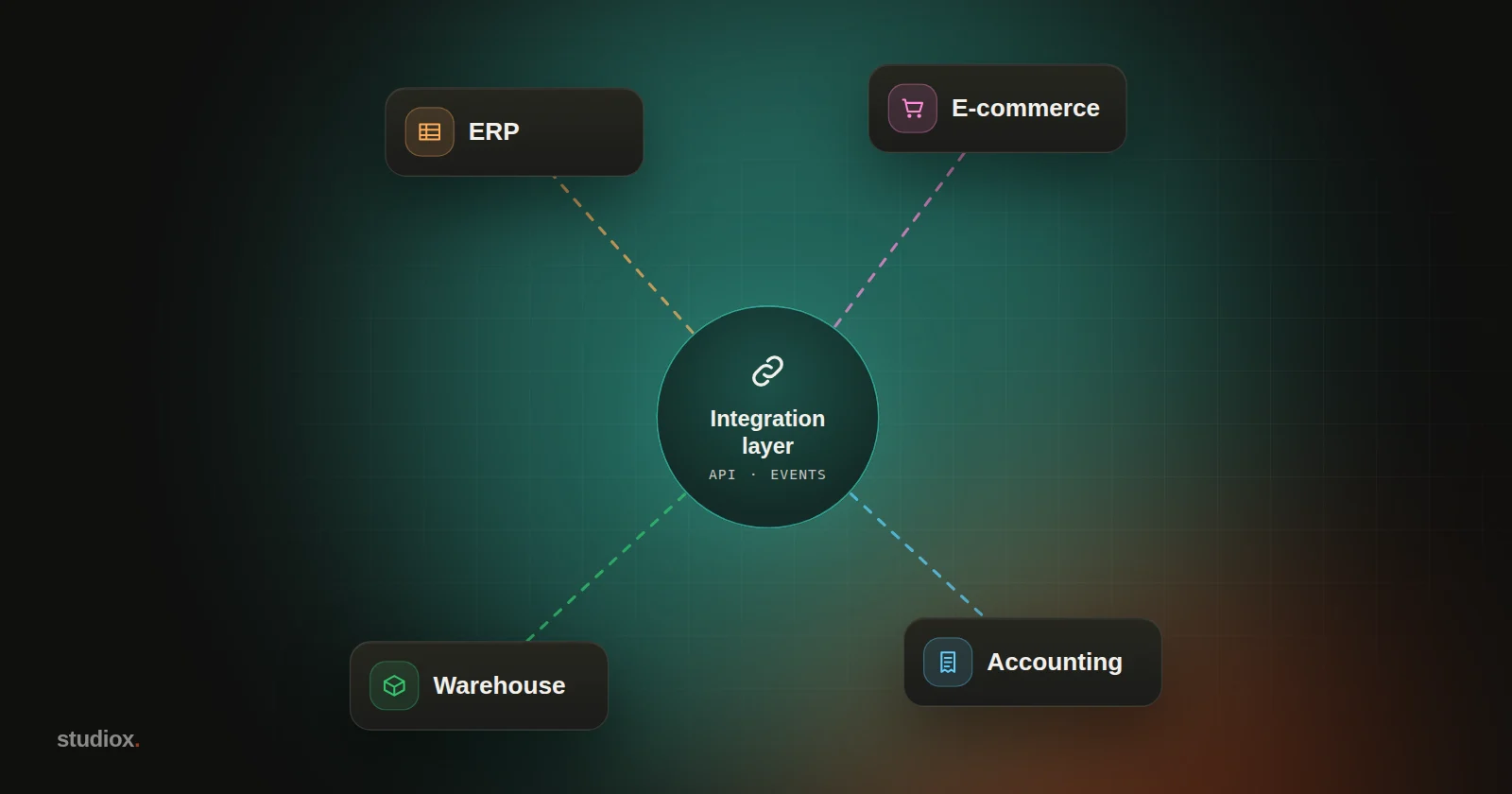
- An integration layer translates and syncs data between systems, so no system needs to know about the others directly.
- Drive syncing with events: when an order is placed, shipped or paid for, the relevant systems are notified automatically.
- Replace in phases: wrap the old system in APIs first, build new features in new systems, and move the core last.
Table of contents
Many companies' systems look something like this: an ERP that has been in use for over a decade sits at the core of operations. The online store, added later, runs on a different platform. Accounting uses off-the-shelf accounting software, the warehouse has its own warehouse management system, and sales tracks customers in spreadsheets or a CRM. Each one works, but none of them talk to each other.
The result: someone has to key online orders into the ERP by hand, update the store once the order ships, and at month end, accounting exports reports from every system to reconcile them. A single order's data might be moved by hand three or four times, and every move is a chance for a mistake.
Faced with this, many people's first instinct is "Let's replace it all with one new system." But that's usually the riskiest, slowest and most expensive option.
Why we don't recommend starting from scratch
- Legacy systems hide a lot of rules: more than a decade of exception handling, special pricing and customer-specific processes, much of it undocumented and living only in the code. It's easy to miss things in a rewrite.
- The cutover is risky: on go-live day every process changes at once. If one piece fails, the whole operation can grind to a halt.
- It takes too long: rewriting a large system often takes a year or two. The business keeps changing in the meantime, and by the time you're done, the requirements may have moved on.
A safer approach is to connect the systems first, then replace them in phases.
The integration layer: a translator between systems
An integration layer (also called middleware or an integration platform) is a separate service that translates and passes data between systems. Each system only talks to the integration layer; none of them need to know about the others directly.
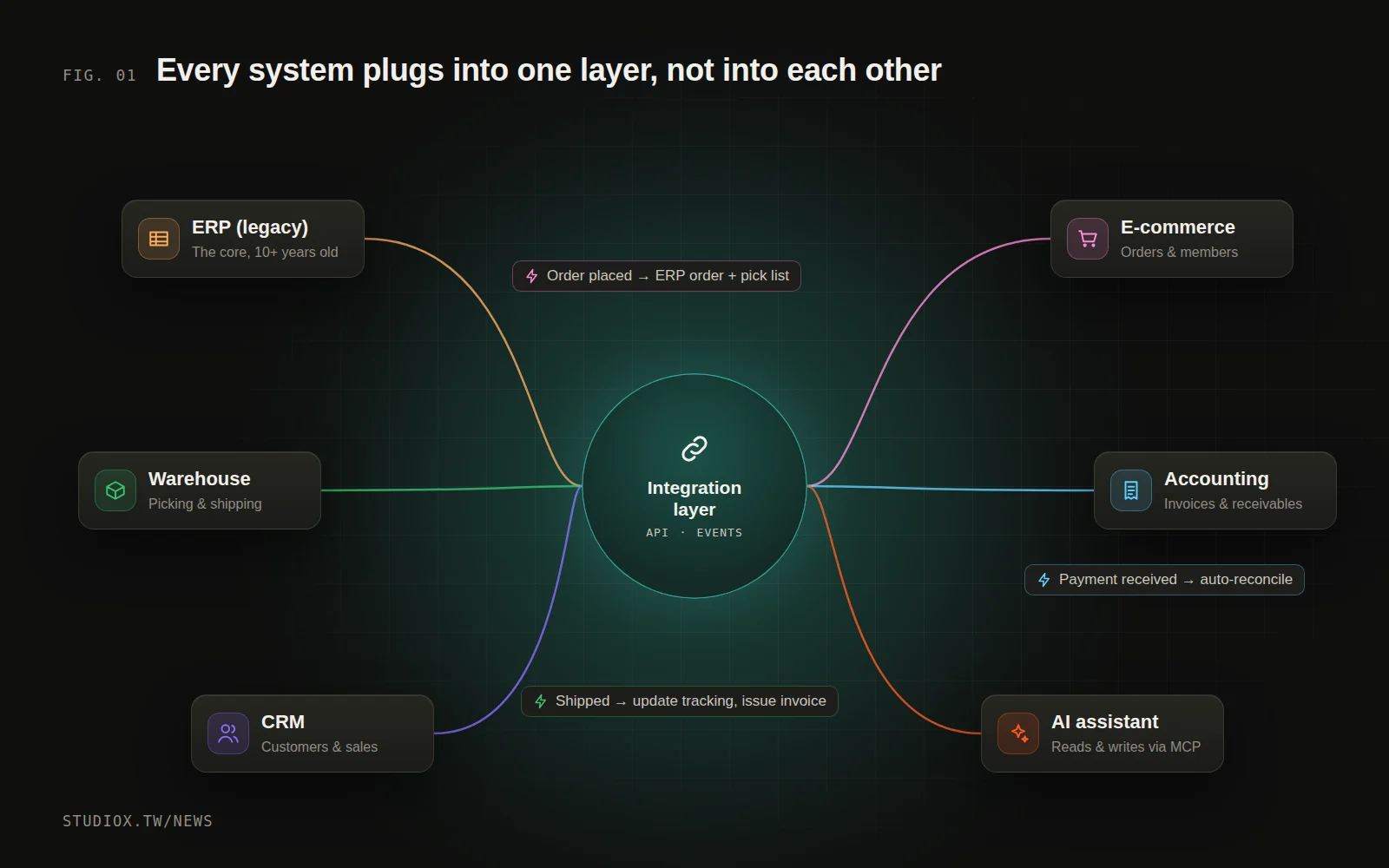
An integration layer typically takes care of a few things:
- A unified interface (API): wrapping the old system's database, import/export files and vendor interfaces in consistent, easy-to-use APIs.
- Format translation: orders look different in the online store and in the ERP, and accounting has its own format for journal entries. The integration layer maps between them.
- Data sync: sending data to the systems that need it, triggered by events or on a schedule.
- Error handling and logging: if a system is temporarily unreachable, messages are queued and delivered once it recovers. Every sync is logged, so it can be traced and retried.
Drive it with events, not scheduled data dumps
The traditional approach is a nightly batch export and import, which means the data is always a day behind. A better way is to drive syncing with events:
- An order is placed in the online store → an order is created in the ERP and a pick list in the warehouse system, automatically
- The warehouse ships the order → the store's shipping status is updated, the customer is notified and the invoice is issued (in Taiwan, through the government e-invoice system)
- Accounting receives payment → the receivable is cleared and the order's payment status is updated, automatically
When an event happens, the relevant systems are in sync within seconds. That doesn't just save manual work: it also makes reconciliation much simpler, because every record has a clear source and a clear path.
Replace in phases: swap out the old system step by step
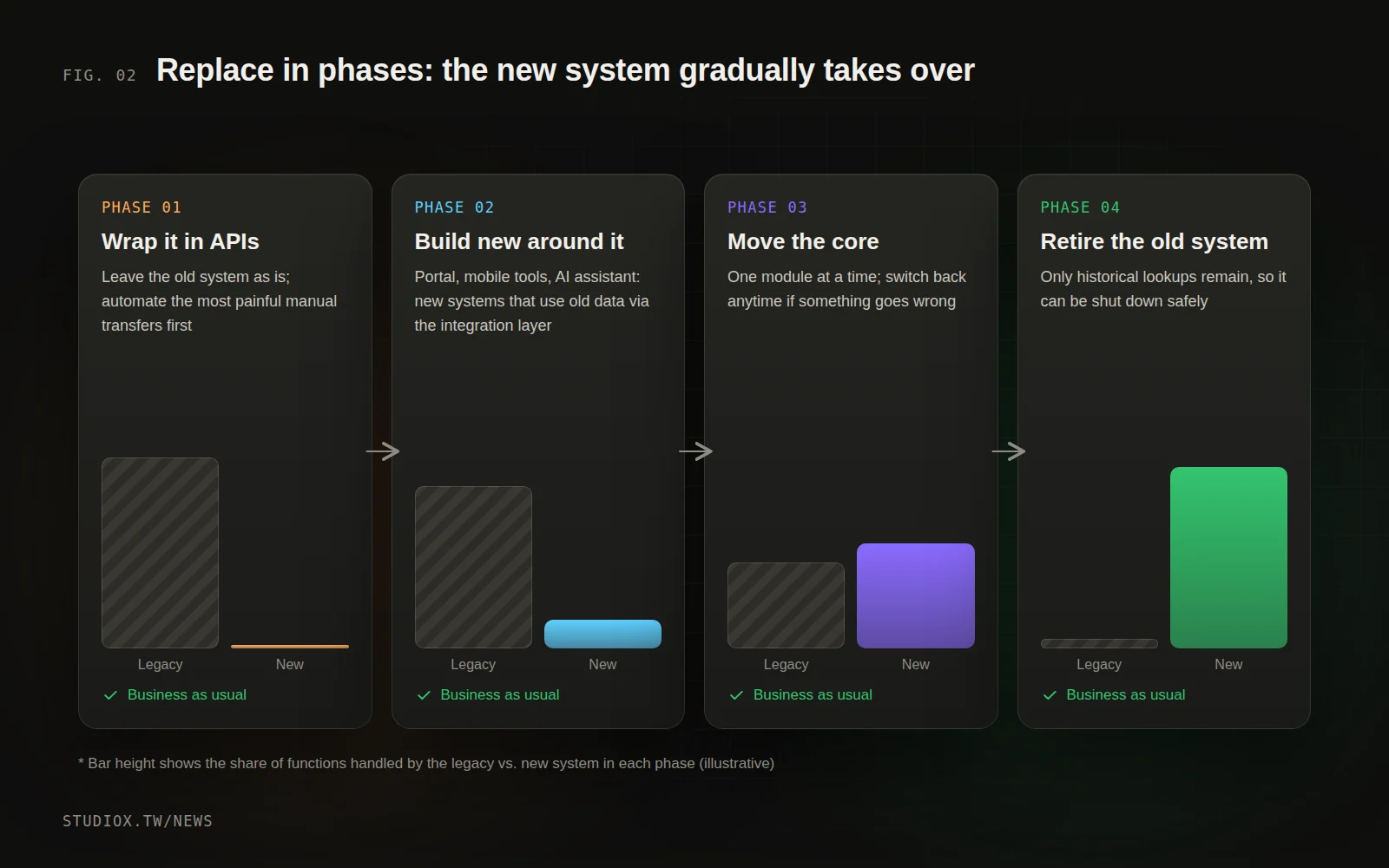
The integration layer has another big advantage: it makes gradual replacement possible. In software this is often called the strangler fig pattern. Like the strangler fig, which grows around a host tree, the new system slowly wraps around the old one until the old one can be safely retired.
Phase 1: Wrap it in APIs and connect
Leave the old system untouched and add an integration layer and APIs around it. Start with the most painful manual data transfer, such as getting online orders into the ERP automatically.
Phase 2: Build new features in new systems
Once the APIs are in place, new requirements (a customer portal, a mobile tool for the sales team, an AI assistant) are built directly in new systems, which read and write the old system's data through the integration layer. The old system stops accumulating new complexity.
Phase 3: Move core functions over gradually
Move one module at a time: say quoting first, then inventory, and finally the accounting functions. With each move, the integration layer switches traffic over, and if something goes wrong, you can switch back at any time.
Phase 4: Retire the old system
Once every function has moved and the old system is only used to look up historical data, it can be safely retired.
Building the integration layer: custom, iPaaS or off-the-shelf connectors?
There are several ways to build an integration layer. None of them is best in every case; it depends on how many systems you have, how customized they are and what your team can handle:
| Approach | What it is | Best for | Watch out for |
|---|---|---|---|
| Off-the-shelf connectors | Built-in integrations offered by e-commerce platforms and accounting software | Standard data flows between two common systems | Limited flexibility; special processes are hard to handle |
| Integration platform (iPaaS) | A cloud service where you configure data flows and transformation rules | Many systems with fairly standard processes | Billed by usage or number of flows; complex logic is hard to maintain |
| Custom integration service | An integration layer built around your company's needs | Legacy systems, lots of special rules, a need for full control | Requires development and ongoing operations, but offers the most flexibility |
In practice, a mix is common: off-the-shelf connectors for standard data flows, and a custom integration service for the legacy system and special processes. What matters is that every data flow has unified logging and monitoring, so when something breaks you know where to look.
What to monitor once integration is live
- Failed syncs and why they failed: which system is most often unreachable? Which type of data most often fails to convert?
- Latency: how long does it take from an event happening to the other systems receiving it?
- Data consistency: regularly compare key figures across systems (order counts, stock levels) to make sure nothing has gone missing.
Before you get started
- Map your systems: which systems do you have? How does data flow between them? Where is it moved by hand?
- Find the single most painful data flow: usually the one done every day, in high volume, and prone to errors.
- Check how each system can be read and written: does it have an API, import/export, or only direct database access?
- Decide who "owns" each type of data: which system is the source of truth for customer data? For prices? This keeps systems from overwriting each other.
A legacy system isn't dead weight. It holds years of your company's experience and rules. Rather than risk starting over, get it talking properly with your other systems first, then upgrade at your own pace. This is also the most solid foundation for connecting AI to your company's systems (see What is MCP?). To plan your integration roadmap, take a look at our integration and automation services, or tell us about your current systems.