RAG in practice: AI customer service that answers only from your data
AI customer service's worst habit is confidently making things up. RAG has the AI check your documents first and cite sources. How it works, the data pitfalls, and what to do when there's no answer.
Key takeaways
- RAG has the AI find the relevant passages in your documents first and answer from them, instead of guessing from memory.
- Answer quality depends mostly on the data: documents must be current, chunks must be split sensibly, and each topic should have just one correct version.
- Citing a source with every answer, and admitting it doesn't know and handing off to a person when nothing turns up, is the key to earning trust.
- After launch, keep reviewing the questions it couldn't answer and add them to the knowledge base.
Table of contents
"Will AI customer service just make things up?" That's the first question almost every business owner asks when they consider it.
It's a fair worry. Large language models are great at sounding convincing, but they don't know your return policy, your latest prices or this week's shipping schedule. Ask about something they don't know, and they may invent a perfectly plausible answer. This is what's known as hallucination.
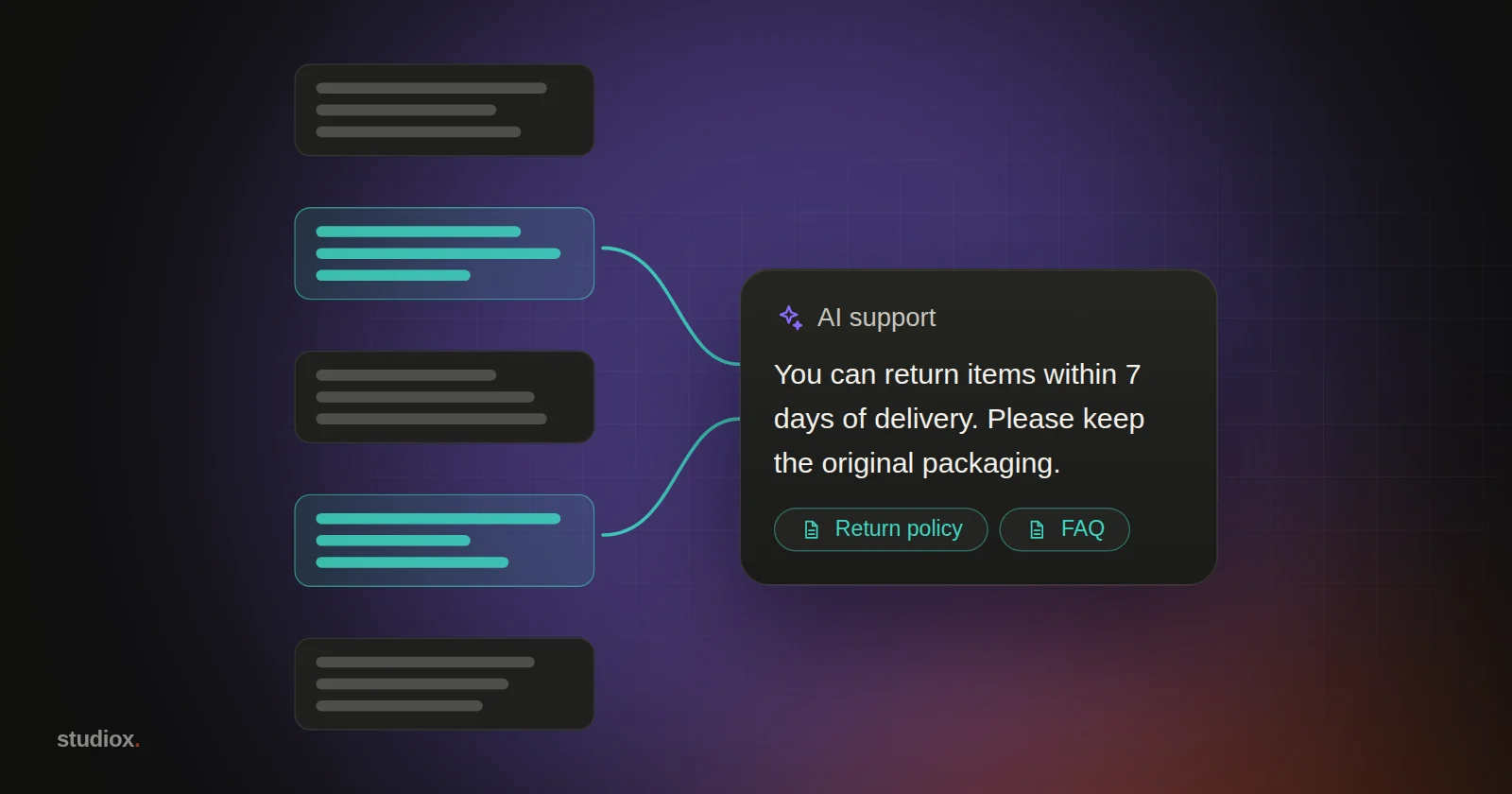
RAG (retrieval-augmented generation) is currently the most practical fix: before answering, the AI looks for the answer in your own data first, then answers based on what it found and cites its sources.
How does RAG work?
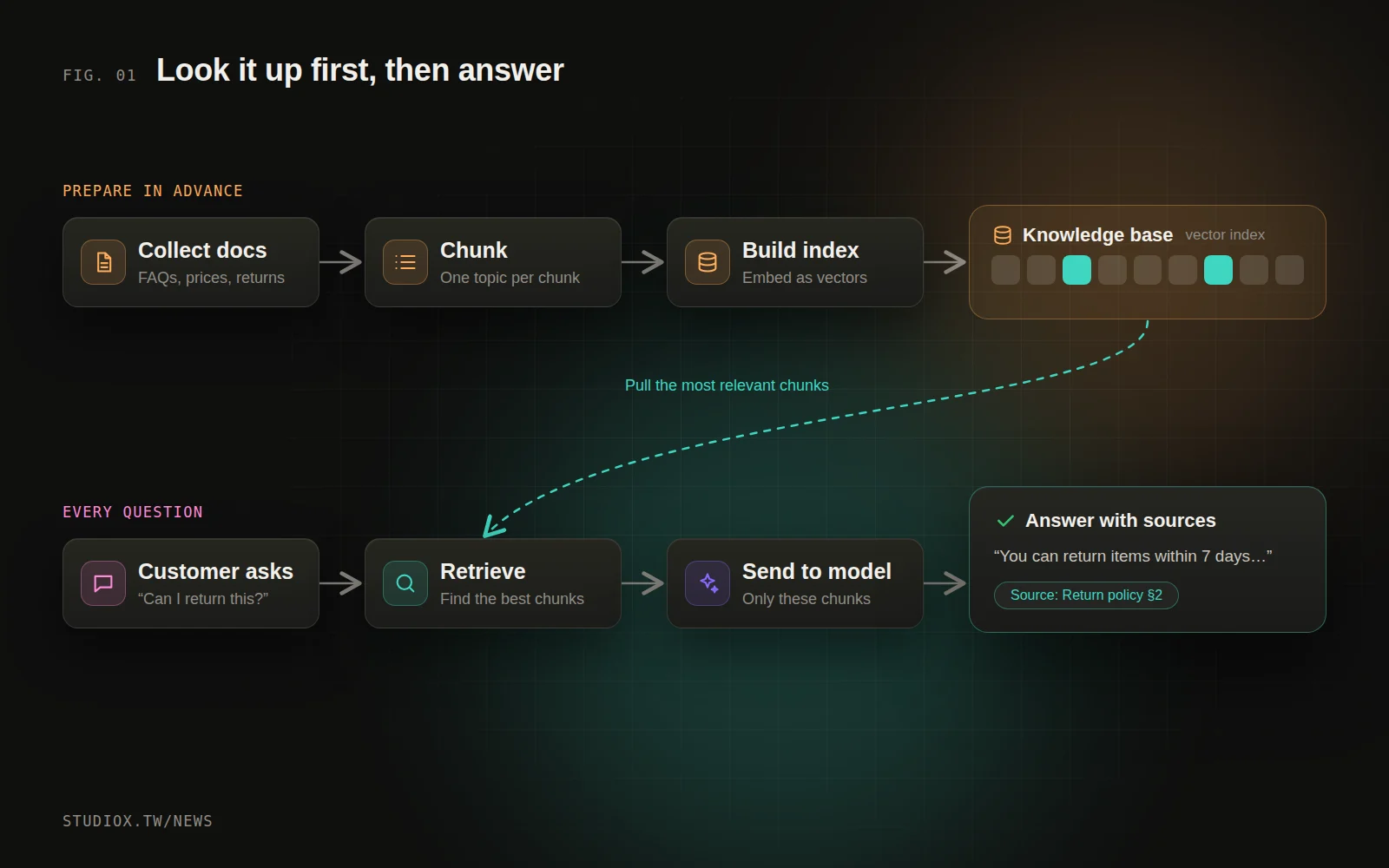
RAG has two phases: preparing the data in advance, and searching it in real time whenever someone asks a question.
Phase 1: Turn documents into searchable chunks
- Collect documents: product information, price lists, FAQs, return and exchange rules, terms of service and past customer service logs.
- Split them into chunks: break long documents into passages (a few hundred words each, say), with each chunk covering one complete topic.
- Build an index: use an embedding model to turn each chunk into a vector that represents its meaning, and store it in a vector database. Chunks with similar meanings end up with similar vectors.
Phase 2: When someone asks a question
- Retrieve: turn the question into a vector too, and find the few chunks closest to it in meaning. In practice this is usually combined with keyword search, so exact terms like model and part numbers aren't missed.
- Assemble: hand the retrieved chunks to the language model along with the question, with explicit instructions: "Answer only from the material below. If the answer isn't there, say you don't know."
- Answer with sources: the AI writes its answer and notes which documents it drew on.
Answer quality is 80% data
When a RAG project disappoints, the problem usually isn't the model; it's the data. These are the four pitfalls we see most often:
- Several versions of the same thing: if the old and new price lists are both in the knowledge base, the AI can't tell which is right. Outdated documents must be removed or clearly marked.
- Chunks that are too small or too large: too small, and a passage loses its context (the "above" in "as mentioned above" is gone); too large, and irrelevant content gets in the way. Splitting along the document's own headings and paragraphs usually works better than a fixed length.
- Tables and images that never get read in: prices and specs often live in tables or images. Make sure they come through correctly during conversion, and rewrite them as text if needed.
- Jargon only your staff understand: a customer asks "Can I return this?" but the document says "RMA process," so retrieval may miss the match. Add the words customers actually use to your documents.
When it can't find an answer matters more than when it can
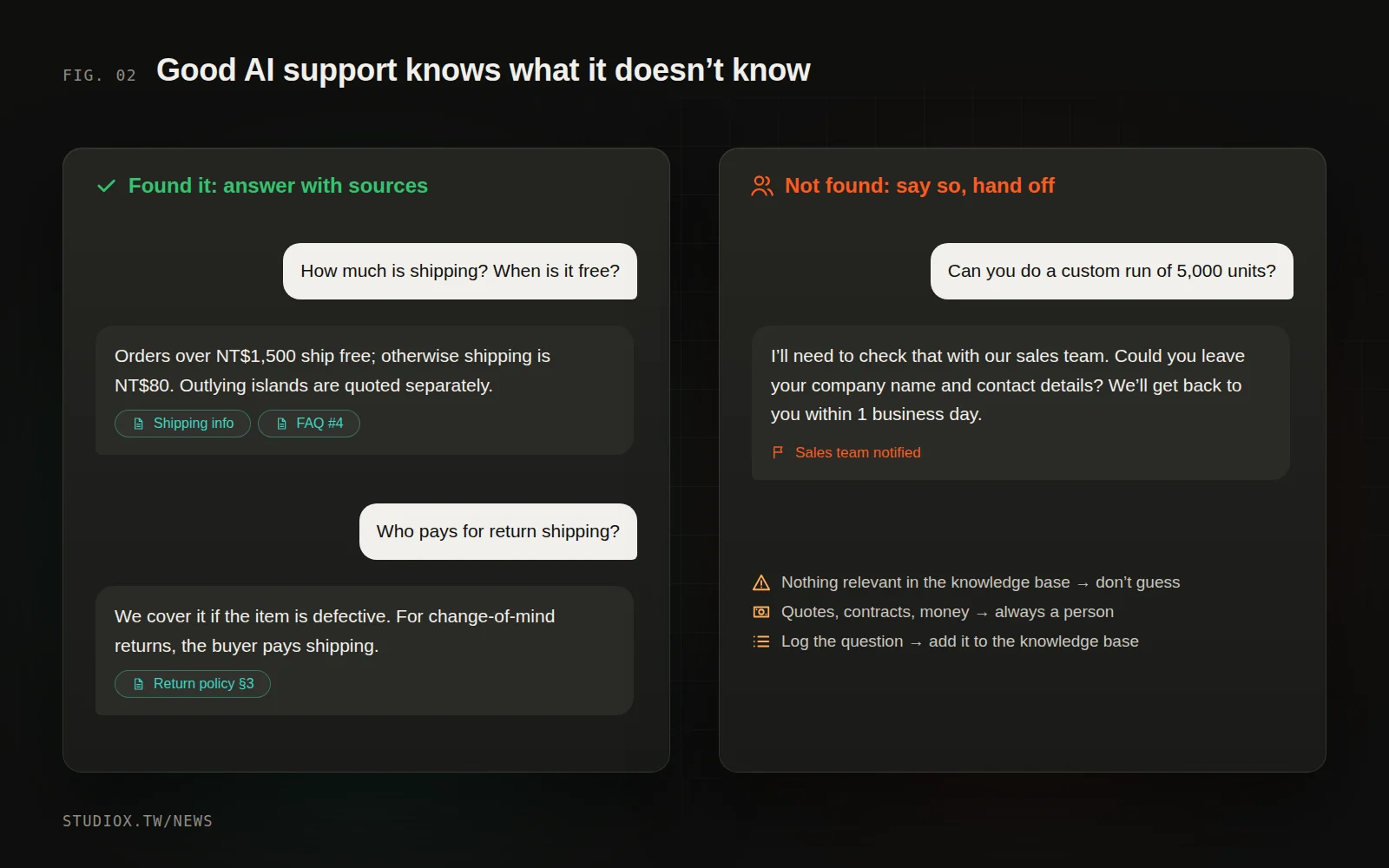
A trustworthy AI customer service assistant has to know what it doesn't know. These are rules we always build in:
- No relevant material, no detailed answer: use a standard reply instead, such as "I'll need to check with a colleague on this. Could you leave your contact details?"
- Anything involving money, contracts, or medical or legal matters always goes to a person.
- Cite a source with every answer: customers can open the original text, and support staff can verify the answer quickly.
- Point customers to the right page: instead of a long-winded reply, link to the "Returns & exchanges" page so customers can read the full policy themselves.
RAG, fine-tuning, or just pasting your data into the AI?
There are roughly three ways to get AI to understand your company's data. They aren't mutually exclusive, but each suits different situations:
| Approach | How it works | Good for | Limitations |
|---|---|---|---|
| Put it in the prompt | Give the AI the data along with every conversation | Very little data (a page or two) | Won't fit once there's more data, and gets expensive |
| RAG | Retrieve the relevant passages first, then have the AI answer | Knowledge bases, customer service, internal document search | Quality depends on the documents and the retrieval |
| Fine-tuning | Retrain the model on your data | A consistent tone and format, judgment in a specialized field | Expensive, slow to update, hard to verify what it "remembers" |
For most customer service and knowledge lookups, RAG is the most practical choice: changes take effect as soon as the data is updated, and every answer can be traced to its source. Fine-tuning is only worth considering when you need a particular writing style or highly specialized judgment, and even then it's usually used alongside RAG.
How does a typical RAG project run?
- Week 1: Organize the data. Take stock of existing documents, find duplicates and outdated versions, and fill in missing FAQs.
- Week 2: Build the index and a test set. Pick 50–100 real questions from past customer service logs to use as test questions.
- Week 3: Tune and sign off. Check each answer: is it correct, does it cite the right source, and does it hand off properly when it can't find the answer?
- Every week after launch: review the logs and add data. Add poorly answered questions to the knowledge base, then rerun the test set to make sure nothing else broke.
The test set is a step many projects skip, but it's crucial: every time you change the knowledge base, it lets you quickly confirm that overall quality hasn't slipped.
After launch: keep improving with data
Going live isn't the finish line; it's the starting line. Spend a little time each week on these three things, and quality will improve steadily:
| What to watch | What it tells you | How to improve |
|---|---|---|
| Questions it couldn't answer | The knowledge base is missing information | Add a document or an FAQ entry |
| Answers that trigger a follow-up question | The answer was unclear or incomplete | Rewrite the source document so the key point is clearer |
| Share of chats handed to a person | How much the AI can handle | Find questions that can be standardized and expand gradually |
Where to start
- Start with the 10–20 pieces of information customers ask about most: pricing, shipping, returns and exchanges, business hours, service area.
- Clear out duplicate and outdated versions, so each topic has one correct answer.
- Soft-launch it on your website first, keep every conversation in the admin panel, and review the unanswered questions every week.
- Once it's stable, connect other channels, such as your LINE Official Account (LINE is the messaging app most Taiwanese customers use).
RAG isn't mysterious technology. At heart it's "look it up before you answer," just like a conscientious new support hire. Get your data in order, and AI customer service can answer customers around the clock, consistently. Curious whether your website is a good fit for AI customer service? Take a look at our AI integration services, or come talk to us.