Can AI match ATM transfers to orders? It can take the first pass
Yes. Upload your bank statement and unpaid orders to ChatGPT, Claude or Gemini, and it can match payments by amount and last five digits. Three prompts to copy, what to check, and the next step.
Key takeaways
- Ask AI directly: upload your bank statement and unpaid orders, and have ChatGPT, Claude or Gemini match them by amount, last five digits and time, listing anything that doesn't match separately.
- Check three things afterwards: the counts and totals, whether it guessed, and what it can't know, such as someone else paying or a cancellation. Use an enterprise plan, or replace customer names with codes.
- Give the payment report form fixed fields, ask customers to put the order number in the transfer note, and write how to handle mismatches on one sheet you attach every time, so AI follows the same rules.
- When downloading and uploading every day gets old, bring statements and orders into a system where AI matches first and only asks a person when several orders fit or nothing matches.
Table of contents
Yes. Upload the deposits exported from online banking (Excel or CSV) and the unpaid orders exported from your back office to an AI assistant such as ChatGPT, Claude or Gemini, and ask it to match them by amount, last five digits and time. You'll have a matching table in minutes. Identical amounts and deposits with no matching order are listed separately, and the payment messages and screenshots customers send on LINE (the messaging app most Taiwanese customers use) can be turned into a table first.
A customer pays and sends a message on LINE: "Just sent NT$3,280, last five digits 45678." Someone opens online banking, finds the deposit and marks the order as paid. In Taiwan, ATM and online bank transfers are a common way for small online shops, group-buying sellers and B2B wholesalers to get paid: the customer transfers the money and reports the last five digits of the account they paid from. Sellers avoid credit card fees, checking by hand is simple, and an experienced person can tell at a glance whose payment it is. This article is about day-to-day payment matching (lining up orders, shipments and invoices at month-end is covered in how to reconcile wholesale orders, shipments and invoices). First, prompts you can copy; then what to check, how your form and spreadsheet can help, and what to do when you'd rather not download and upload files every day.
Ask AI directly: 3 prompts to copy
Copy these and swap in your own column names, amounts and dates (the ones below are examples).
A first pass at matching
Attached are two files: deposits exported from online banking (time, amount, last five digits of the sending account, note) and unpaid orders exported from our back office (order number, amount due, order time, last five digits the customer reported). Please match each deposit to an order. It counts as a match only when the amount is the same, the last five digits agree and the deposit arrived after the order was placed. If two or more orders have the same amount, the amount is off, or no order fits, don't pick one: mark it "To confirm" and explain why. Give me the result as a table (deposit time, amount, last five digits, suggested order, status, reason) that I can paste back into my spreadsheet.
Tidying up customers' payment reports
Below are today's payment messages and screenshots from customers on LINE. Please put them into a table: customer name, order number, amount, last five digits, time of transfer. Leave any field that's missing or unreadable blank and flag it. Don't fill anything in yourself.
Reminding customers who haven't paid
Today is 10/26. From the matching table you just made, list the orders placed more than 2 days ago that still have no matching payment, and write a LINE reminder for each: the amount due, the deadline of 10/28 and this bank account (paste your account), plus a note that unpaid orders will be cancelled. Keep it short and polite.
After AI matches, check these 3 things
- Do the counts and totals agree? The number of deposits and their total in the table should match the bank statement, and each deposit should match only one order (a combined payment should list the orders it covers). Ask the AI to double-check, then spot-check a few yourself.
- Did it guess? Identical amounts, a transfer fee taken off and combined payments should all be under "To confirm." If it picked an order on its own, ask it why, or decide yourself.
- It doesn't know everything. A family member or a company accountant paying, an order that was cancelled, something the customer said on the phone: tell it first, or handle those yourself. Take one more look before you mark orders as paid in the back office.
Statements include customer names and account numbers. Use your company's enterprise plan, or replace names with codes, keep only the last five digits of account numbers and delete columns you don't need, such as the balance, before you upload.
Make it easier: your bank statement, spreadsheet and AI working together
1. Give the payment report form fixed fields
Build a payment report form in Google Forms with order number, amount, last five digits and time of transfer, and use response validation so the digits field accepts only five numbers. Responses go straight into a Google Sheet. Put the form link on the rich menu of your LINE Official Account (the business version of LINE), or set a keyword auto-response so a customer who types "transfer" gets the link. Reports then arrive as a table you can attach as is, with no screenshots to read.
2. Export at set times, with consistent file names
At set times each day, say 10 a.m. and 3 p.m., download the transaction history from online banking and export unpaid orders from the back office into one folder, named by date. When every upload has the same format, AI matches more reliably and the results paste straight back.
3. Keep identical amounts from colliding
Ask customers to put the order number in the transfer note, or make each amount due slightly different at checkout, for example by taking a few NT dollars off. Then the note or the amount itself points the AI to the right order.
4. Write how to handle mismatches on one sheet, and attach it every time
| Case | How to handle it |
|---|---|
| Two or more orders with the same amount | Check the reported digits and the transfer note; if it's still unclear, ask the customer |
| Split or combined payments | Look for totals only within the same customer's orders; note which orders it covers |
| Amount differs (transfer fee deducted from the payment, shipping left out) | Within the tolerance you've set, a person confirms; beyond it, contact the customer |
| Someone else paid (family, a company accountant) | After checking with the customer, save that account under this customer |
| Payment arrives after the order was cancelled | The person in charge decides whether to restore the order or refund |
Attach this sheet and AI follows the same rules every time, and anyone who takes over knows what to do. Put the payment deadline, what happens after it and how refunds work on the checkout page too, so customers understand reminders and cancellations.
When to consider the next step
AI plus a spreadsheet can serve you for a long time. It's worth looking at the next step when:
- You download statements, upload them to AI and paste the results back every day.
- You'd like AI to see the bank statement and your orders directly, so orders paid in the evening or on weekends are confirmed and shipped sooner.
- You sell limited runs or have preorder cutoffs and need to lock stock the moment someone pays.
- You need a record of every match: which statement line, who confirmed it and when.
The next step: connect AI to your bank statement and orders
| Approach | How it works | Cost | Best for |
|---|---|---|---|
| A virtual account per order | The payment provider reports each payment back; the account number identifies the order | Per-transaction fees that vary by plan | Busy online shops that need instant confirmation |
| Import the bank statement and let AI match first | A system runs your rules every day and people handle only exceptions; customers pay the way they always have | A one-time system build | Many business customers; lots of B2B transfers |
Virtual accounts: with ECPay or NewebPay, two of Taiwan's major third-party payment providers, a customer who chooses ATM transfer at checkout gets a virtual account number that belongs to that order alone. When the deposit arrives, the provider notifies your website and the order is marked as paid automatically. According to ECPay's developer documentation, for example, an ATM virtual account is valid for 3 days by default and can be set to anywhere from 1 to 60 days. Many banks also offer virtual-account collection to businesses, which can give long-term wholesale customers a permanent account; fees and terms vary by bank and plan.
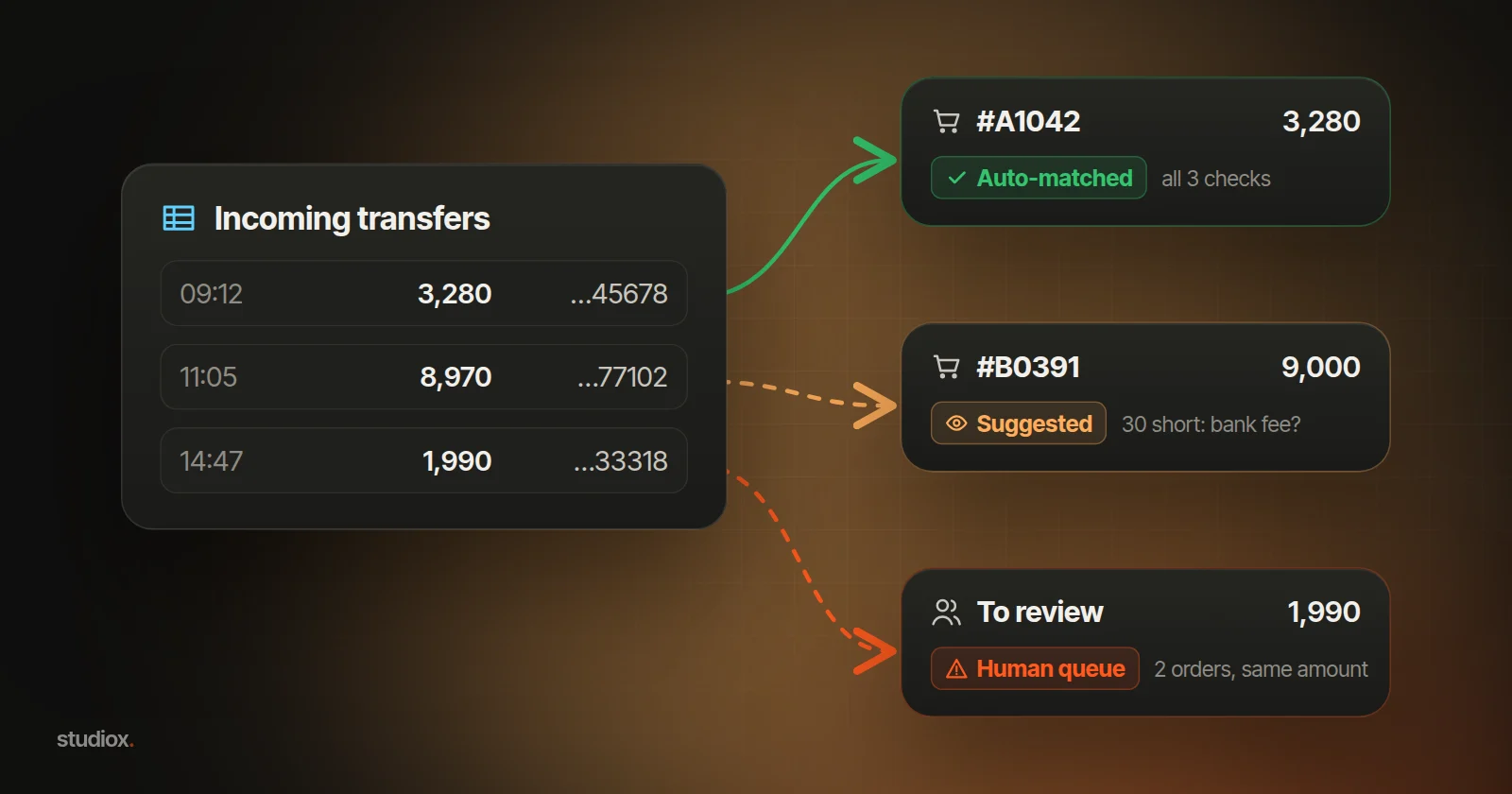
Importing the statement, with AI matching first: orders come in from your back office on their own, and the bank statement is imported once or twice a day (an exported file is enough; see the FAQ below). The system checks three things: amount (equal to an open order, or to several orders from the same customer), last five digits (what the customer reported, or an account this customer has paid from before) and time window (after the order was placed and before the payment deadline plus a few days' grace). Then it sorts each deposit into one of three tiers:
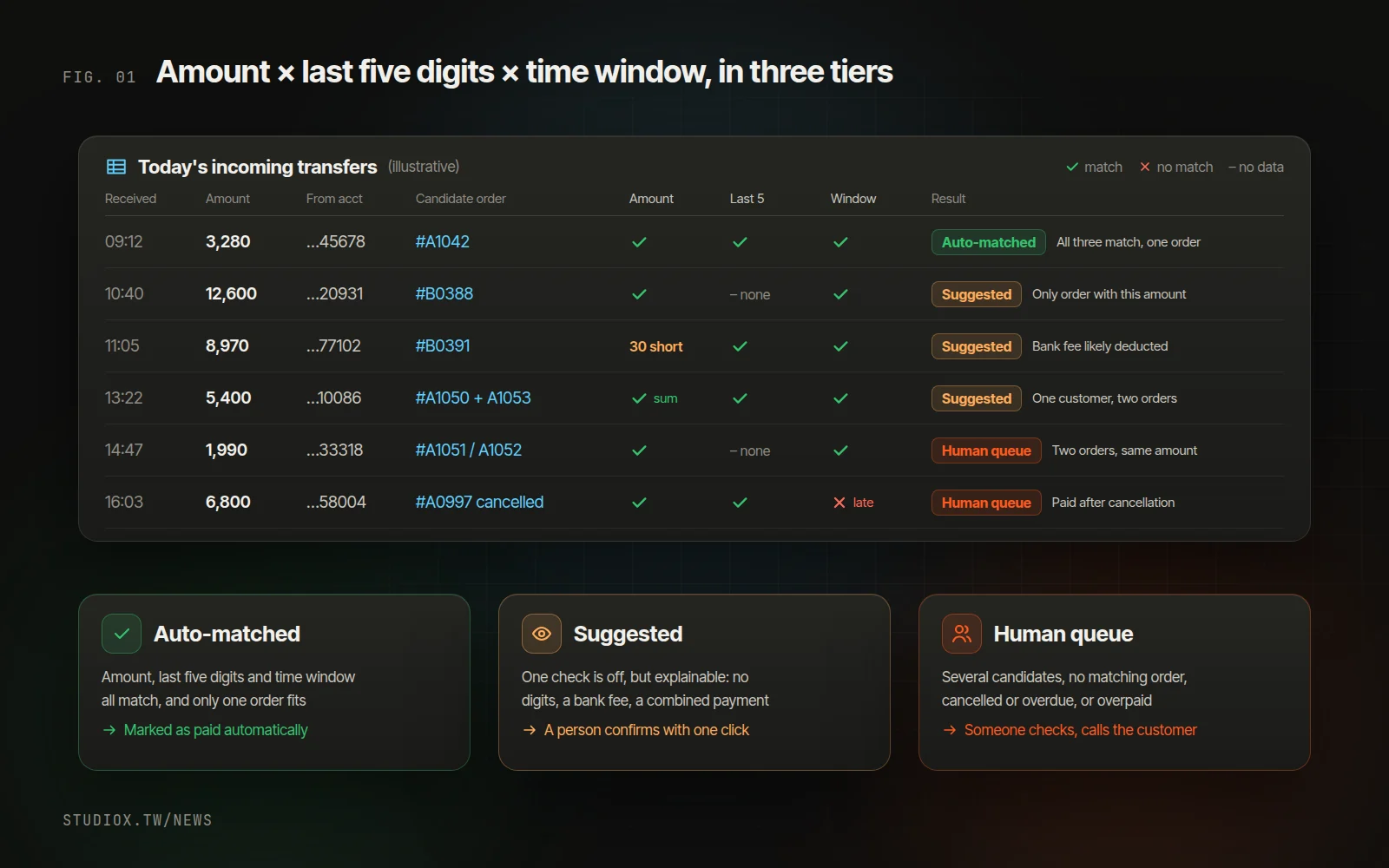
- Auto-matched: all three checks pass, and only one order fits. The order is marked as paid under the rules you set; at first, you can have a person confirm every one.
- Suggested: one check fails, but there's a reasonable explanation. For example, the customer didn't report the digits, but only one order has that amount. AI proposes the match with its reasoning, and a person confirms with one click.
- Human queue: two or more orders fit, no order fits, the order was cancelled or is overdue, or the customer overpaid. Someone looks into it and contacts the customer if needed.
Your handling sheet is where these rules start. Add a few more: shortfalls within your tolerance go only to "suggested," never straight through; never auto-match when several orders fit; each statement line is used once; and every match is logged (which line, who confirmed it and when). The review screen puts the deposit, the candidate orders and the reasons on one page (for how to design human checks, see where to put human checks in automation). If your back office has a built-in AI assistant such as Xena AI, you can simply ask it which of today's payments haven't matched yet. It lists its suggestions, and nothing is written until you confirm.
Once a payment is confirmed, the follow-up can happen on its own:
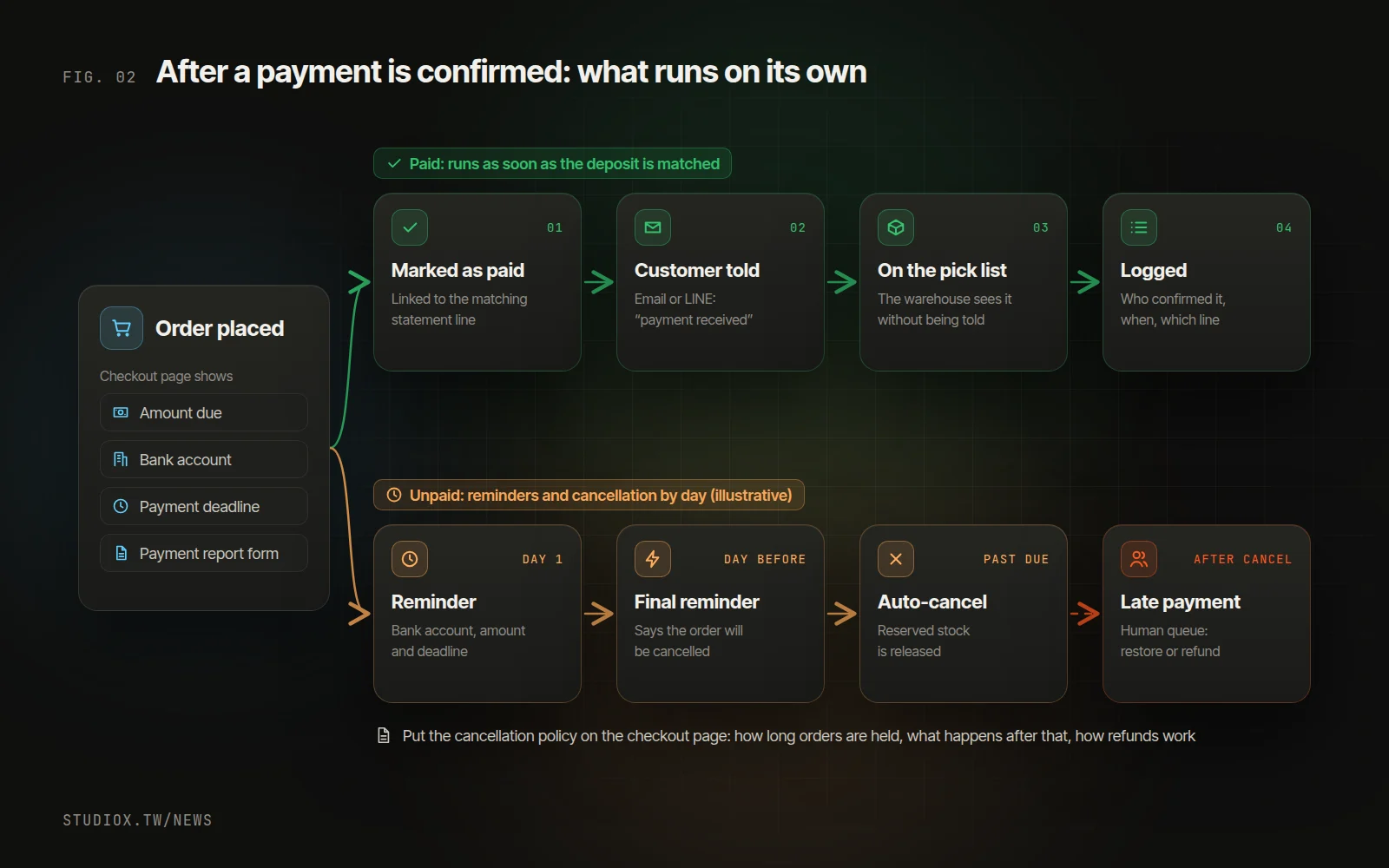
The order is marked as paid and linked to the statement line it matched, the customer is told the payment arrived (for automated replies on LINE, see combining LINE customer service with AI), and the order shows up on the warehouse's pick list. Unpaid orders get reminders under the rules stated on your checkout page and are cancelled once the deadline passes, releasing reserved stock. Any payment that arrives after cancellation goes to the human queue, where a person decides whether to restore the order or refund it.
You can roll this out in phases: start with statement import and AI matching while your spreadsheet keeps running alongside, switch over once both give the same results, then add notifications and shipping. The first phase typically goes live in about 4–6 weeks. Large B2B transfers, payments from customers on monthly terms, refunds and overpayments, and exceptions that need a conversation with the customer stay with people.
To find out which step suits your payment process, start with a free AI Health Check, or look at our retail and brand solution, integration and automation service and custom websites. You're also welcome to talk to us about how you collect payments.