Can AI write your medical device distributor website? It can draft it
Yes, as a first draft. AI can turn your register and approved IFUs into product pages and flag efficacy claims for regulatory review. Prompts to copy, what to check, and Taiwan's ad rules.
Key takeaways
- Ask AI directly: upload your product register and Taiwan-approved IFUs, and have ChatGPT, Claude or Gemini draft product pages, flag sentences that describe efficacy, and check names, numbers and expiry dates on your website against the register.
- Check three things afterwards: names and numbers match the license, regulatory affairs decides on efficacy copy, and AI doesn't know what Taiwan approved. AI's flags are not legal advice.
- Lead product pages with objective facts and approved documents that match the license. Once you describe efficacy, it may be an ad: only licensed medical device firms may run it, and the license holder or registrant must get it approved first.
- When brands multiply and you're updating the register and website every day, move products, licenses and documents into one system, with expiry reminders and updates that reach the website and quote packs together. Licenses last up to five years, and renewal must be filed within six months before expiry.
Table of contents
- Ask AI directly: 3 prompts to copy
- After AI drafts and flags, check these 3 things
- Make it easier: your Excel register and AI working together
- Product page anatomy: facts first, then documents
- What needs review first: how the advertising rules apply to a website
- When to consider the next step
- The next step: products, licenses and documents in one system
- Pre-launch checklist
Yes, as a first draft. Upload your product register (Excel) and the Taiwan-approved instructions for use (IFU, as PDFs) to an AI assistant such as ChatGPT, Claude or Gemini, and ask it to draft product pages with fixed fields. Paste in marketing copy, and it can mark which sentences describe efficacy and should go to regulatory affairs first. AI sorts and flags; whether the copy complies is still for regulatory affairs to decide.
A medical device distributor's website is often an online product catalog. When a hospital's biomedical engineer or buyer has a question, they usually message a sales rep they know on LINE (the chat app most Taiwanese businesses run on), and the rep sends over the license copy and the IFU. It's built on long-term trust, and it works well. What distributors usually want to improve: hospital staff finding the licensed name, license number and latest IFU on the website themselves, marketing copy checked against the advertising rules before it's published, and tender packs going out faster.
This guide starts with prompts, then covers product pages and the rules. The regulatory parts are based on Taiwan's Medical Devices Act, in force since May 1, 2021, and its implementing rules, as of September 2026. (This is general information, not legal advice. Confirm specifics with your regulatory affairs team or the authority.)
Ask AI directly: 3 prompts to copy
Copy these and swap in your own models and fields (the ones below are examples).
Draft a product page
Attached are our product register (Excel, one row per model, with the licensed Chinese and English names, license number, class, license holder, manufacturer and specs) and the Taiwan-approved IFU for model MD-200 (PDF). Please draft a product page for our website with these fields in order: product name, license number and class, license holder and manufacturer, intended use per the IFU, specs and models, and downloads (with version and date). Use only the attached material: keep the product name exactly as licensed, add no uses or effects the IFU doesn't state, and mark anything missing "to be filled in."
Flag sentences for regulatory review
Below is our marketing copy for a product, and attached is its Taiwan-approved IFU. Sort each sentence into one of three types: objective facts (name, specs, materials, price, appearance, company details), efficacy or effect claims, or testimonials, endorsements and press coverage. Then mark any claim that isn't in the IFU. Give me a table with the original sentence, its type, whether the IFU covers it, and why regulatory affairs should look at it. Don't judge whether it's legal; I'll pass it to regulatory affairs.
Check the website against the register
Attachment 1 is the product list from our website (product name, license number, class), exported from the back office or copied from the pages. Attachment 2 is our license register, with expiry dates. Compare them row by row and list names, numbers or classes that don't match, products in the register but not on the website, and anything expiring within 12 months, in a table with the original text from both sides.
After AI drafts and flags, check these 3 things
- Names and numbers must match the license. AI may copy a digit wrong or treat a marketing name as the product name. Before publishing, check each one against the license or listing; hospitals often look up the number in the license lookup run by the Taiwan Food and Drug Administration (TFDA).
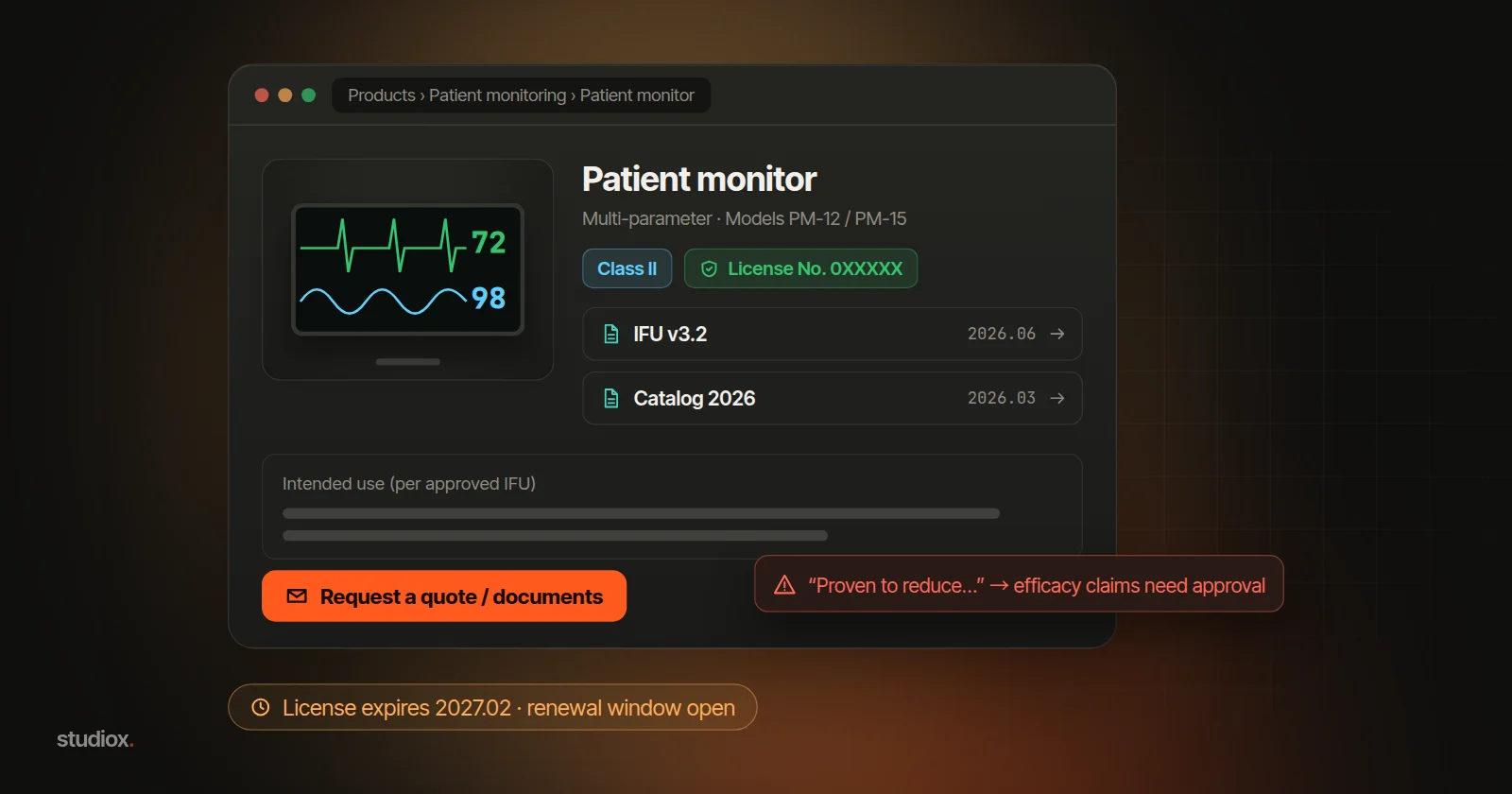
- Regulatory affairs decides on efficacy copy. What AI flags is a "please look at this" list, not a legal opinion, and a sentence it didn't flag isn't necessarily fine. Efficacy claims stay within approved content, and where needed the license holder or registrant applies for ad approval.
- It doesn't know what Taiwan approved. Check the uses and models in a manufacturer's brochure against the license and the Taiwan-approved IFU.
Registers and IFUs are mostly public anyway. Prices, hospital names and dealer terms aren't needed, so delete those columns before uploading, or use your company's enterprise plan.
Make it easier: your Excel register and AI working together
1. Keep one Excel register of products, licenses and documents
One row per model: the Chinese and English product names exactly as licensed, the license or listing number, risk class, license holder, manufacturer and country of origin, expiry date, IFU version and date, ad approval number and expiry, and the expiry of the manufacturer's letter of authorization. Keep it on a shared drive with one person in charge. Attach it every time you ask AI to draft a page or run a check, so it always works from the same data.
2. Use conditional formatting to flag licenses that are about to expire
A medical device license is valid for up to five years. To keep manufacturing or importing after that, you must apply for renewal (Article 27 of the Act). Under the rules on license issuance, listing and annual reporting, renewal must be filed within six months before expiry, and imported products usually need a certificate of free sale from the country of origin. Miss it and you have to apply for registration again. Listed items require annual reporting every year.
In the register, use conditional formatting to turn a row yellow nine months before expiry and orange six months before (illustrative timing): yellow means start gathering documents, orange means it's time to file. Flag ad approvals (valid for three years) and manufacturers' letters of authorization the same way.
3. Review efficacy copy on one sheet before it goes live
Manage any text that describes what the product improves or how well it works separately from specs and documents. Paste the sentences AI flagged straight into a review sheet: the text, the page it's for, regulatory affairs' comments and the ad approval number. Publish only after review, including translations of the manufacturer's brochure.
Product page anatomy: facts first, then documents
Hospital buyers and biomedical engineers visit your website to confirm that a device is legally on the market, meets the spec and comes with complete documents. Matching your license exactly is the baseline of trust. Pages the general public can see need extra care under the advertising rules.
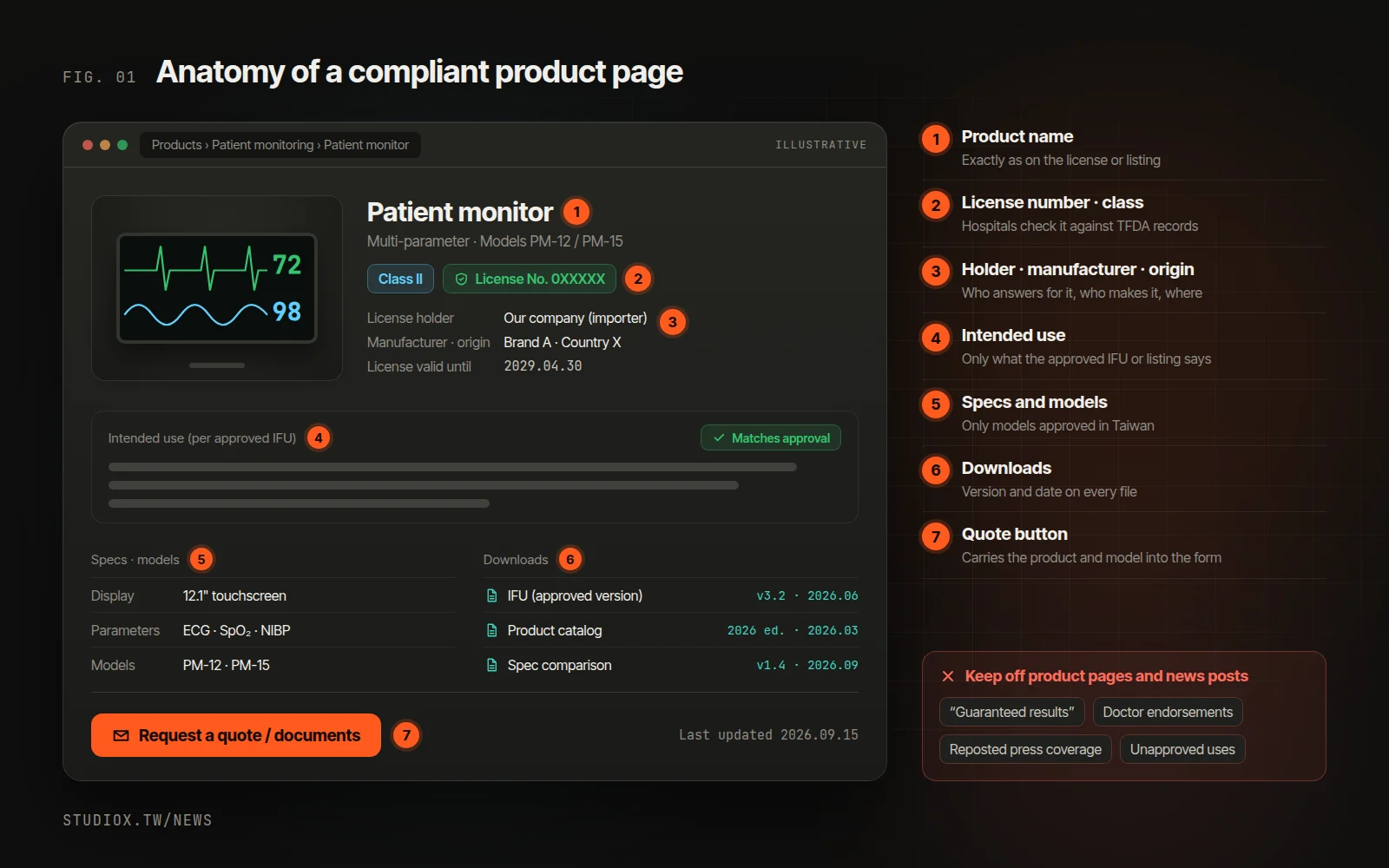
| Field | What goes in it | Watch out for |
|---|---|---|
| Product name | The Chinese and English names on the license or listing | A marketing name doesn't replace the approved name |
| License or listing number | The full number | List each license separately if there are several |
| Risk class | Class I, II or III | Per the approval or listing |
| License holder, manufacturer, origin | Your company, the manufacturer and country | The importer is usually the license holder |
| Intended use | Exactly as in the approved IFU or listing | Don't embellish or extend it |
| Specs and models | Dimensions, materials, compatible consumables | Only models approved in Taiwan |
| Downloads | Catalogs, IFUs | Version and date on each; no old versions on the public site |
| Quote button | A form prefilled with product and model | See "Inquiries from hospitals and dealers" below |
Why facts first? Article 2 of the Enforcement Rules of the Medical Devices Act lists what is not a medical device ad, including content that only gives the product name, price, discounts, specs, materials, product photos and company name, address or phone number, without promoting medical efficacy, and the complete approved label and IFU, without added prices, promotions or sales pitches (see the Q&A from the Center for Drug Evaluation, which supports TFDA). A product page built on objective data and approved documents carries less risk. The part to watch is the copy that explains how good the product is.
If you sell directly on your website
Taking orders on your website counts as a "remote sales channel." Under the rules on items that may be sold through remote sales channels, issued under Article 18 of the Act and in effect since May 1, 2021:
- Only Class I devices and the specific Class II items listed in the annex may be sold this way. The list has been revised over the years, so check the current version.
- The seller must be a registered medical device firm or pharmacy.
- The sales page must show the product name, license or listing number, the name and address of the license holder or registrant, the manufacturer's name and address, and the seller's name, address, business license number and a customer hotline, plus the notice that consumers should read the IFU before use.
These rules target channels where consumers buy without being able to inspect the product. Whether they apply if only hospitals and dealers can order online is a question for your regulatory team. Even if you don't sell online, the list makes a good checklist for every product page.
What needs review first: how the advertising rules apply to a website
What counts as a medical device ad
Under Article 6 of the Act, a medical device ad is any use of a communication medium to promote medical efficacy in order to attract sales of a medical device. Interviews, reports or promotions that imply or suggest efficacy with the aim of selling also count as ads. Websites, social media and newsletters are all ways of communicating with the public; what matters is whether the content promotes medical efficacy.
Who can advertise, and who approves it
- Only licensed medical device firms may advertise medical devices (Article 40).
- Before an ad runs, the license holder or registrant must submit its full text, images or script for approval: to the local health authority if the firm is registered in one of Taiwan's six special municipalities (such as Taipei or Kaohsiung), and otherwise to the central authority (Article 41). Even when a dealer runs the ad, the applicant is still the license holder or registrant.
- The approved content can't be changed while the approval is in effect (Article 41). Approvals are valid for three years and can be renewed within six months before they expire (Article 43).
- An approved ad must show the product name, the license holder's or registrant's name, the license or listing number and the ad approval number. Anything about efficacy, directions for use or precautions must stay within what was approved or listed for the product (Enforcement Rules; see the CDE's explanation).
- Violating Article 40 or 41 can bring a fine of NT$200,000 to NT$5 million (Article 65).
Devices for use by medical professionals only
Article 44 says that for devices whose IFU states they must be used by medical professionals, or that the central authority has designated, ads may only appear in medical publications or media intended exclusively for medical professionals, or at medical academic events for professionals only. A public page anyone can open is hard to call exclusively for professionals. Whether a login-only area qualifies isn't spelled out in the law, so ask the authority first. Article 44 restricts where such ads can appear; the article itself doesn't say they are exempt from Article 41's prior approval.
Four kinds of content to double-check before publishing
- Claims beyond the approval: a manufacturer's overseas brochure may mention uses or models that aren't approved in Taiwan.
- Testimonials and press coverage: Article 45 bans promoting a device in someone else's name, using publications or documents to guarantee its efficacy or performance, and promoting it through interviews or news reports. "Recommended by Dr. So-and-so" and reposted news stories should go past regulatory affairs first.
- Products next to health education articles: health education generally isn't advertising, but Article 4 of the Enforcement Rules treats it as an ad in cases such as running it on the same page as, or on pages continuous with, a device ad (see the CDE's explanation).
- New product announcements: the name, specs and launch date are fine. Add "effectively improves…" and you're promoting efficacy.
When to consider the next step
- You carry more brands and models, and every day you copy register data to the website, document packs and dealers' files.
- Hospital inquiries and tenders grow, and assembling each document pack means looking for the latest versions.
- You'd like sales reps to ask "When does this model's license expire?" and get an answer, and dealers to download the latest catalogs themselves.
- Your product data is already in your ERP, and you'd like the website to sync from it, with every change logged.
The next step: products, licenses and documents in one system

Turn the Excel register into a single source of truth in a system, and have the website, quote packs and dealer portal all draw from it. AI reads the same data directly, with no exporting or uploading. The register's data can usually be cleaned up and imported. Start with the register and expiry reminders, add the rest in phases, and keep Excel running alongside early on.
- Versions: record the version, date and uploader for every catalog and IFU. The public site shows only the latest; older versions stay in the back office.
- Expiry: send reminders before expiry, and flag or unpublish a product page automatically when its license lapses. If your back office has an AI assistant such as Xena AI, you can simply ask, "Which licenses expire in the next six months?"
- Many brands: structure data as "brand → product line → model," let each brand's product manager edit only their own pages, and log every change. If product data already lives in your ERP, the website should sync from it rather than have someone retype it (see connecting to the systems you already have).
Inquiries from hospitals and dealers: spec sheets, tender documents, who answers
A hospital inquiry often arrives with a spec requirement attached, or, for an evaluation or tender, asks for a full pack (license copy, catalog, IFU, spec comparison, letter of authorization). Either way, they want it fast, and in the right version. The inquiry form carries the model over from the product page, asks what it's for and the deadline, lets them tick the documents they need, and routes each question to sales, the product specialist or regulatory affairs.
When a spec sheet comes in, AI compares each requirement with your product specs and marks it "meets / doesn't meet / check," and the system assembles the latest documents from your library. Nothing goes out until the product specialist and sales rep confirm, and every step is logged (see reading and comparing documents with AI). For form fields and routing, see how to design B2B inquiry forms.
Pre-launch checklist
- Product name, license number and class match the license or listing.
- Efficacy text comes only from approved content, or the ad has been approved.
- Devices labeled for professional use aren't promoted for efficacy on public pages.
- Documents carry a version and date, and old versions are off the public site.
- Licenses, listings, ad approvals and letters of authorization all have expiry reminders.
A medical device distributor's website needs to be right more than it needs to be pretty: accurate data is what lets hospitals adopt your products, and accurate claims keep you within the advertising rules. (This is general information, not legal advice.) To find out where to start, try a free AI Health Check, or look at our website design and development, UI/UX design and custom business systems services. You're also welcome to get in touch.