Wholesale reconciliation: when orders, shipments and invoices disagree
At month-end, a few orders, shipments, invoices and payments never match, and accounting digs through paperwork. Why it happens, and how three-way matching leaves people only the real exceptions.
Key takeaways
- When the books don't reconcile, the cause is usually upstream: split shipments, last-minute price changes, or returns nobody passed along.
- Three-way matching (order × shipment × invoice) can do most of the checking automatically and pick out only the differences.
- Every discrepancy needs a clear cause category, so you can cut errors at the source.
- Move reconciliation from a once-a-month job to an automatic daily run, and problems get fixed the same week they happen.
Table of contents
Every month-end, accountants at wholesale and trading companies go through a familiar ordeal: the customer's statement doesn't agree with the company's accounts receivable. Three entries are off, and the totals differ by a few thousand NT dollars. What follows is a hunt through orders, delivery notes and invoices, then calls to the sales team: "Did the price change on this one?" "Did this batch ship in two lots?"
Reconciling isn't hard in itself. The hard part is that the data lives in different places, any of it may have been changed, and nobody kept the rest in sync.
Why the numbers never match
These are the most common causes we see in wholesale and trading. Chances are you've run into every one:
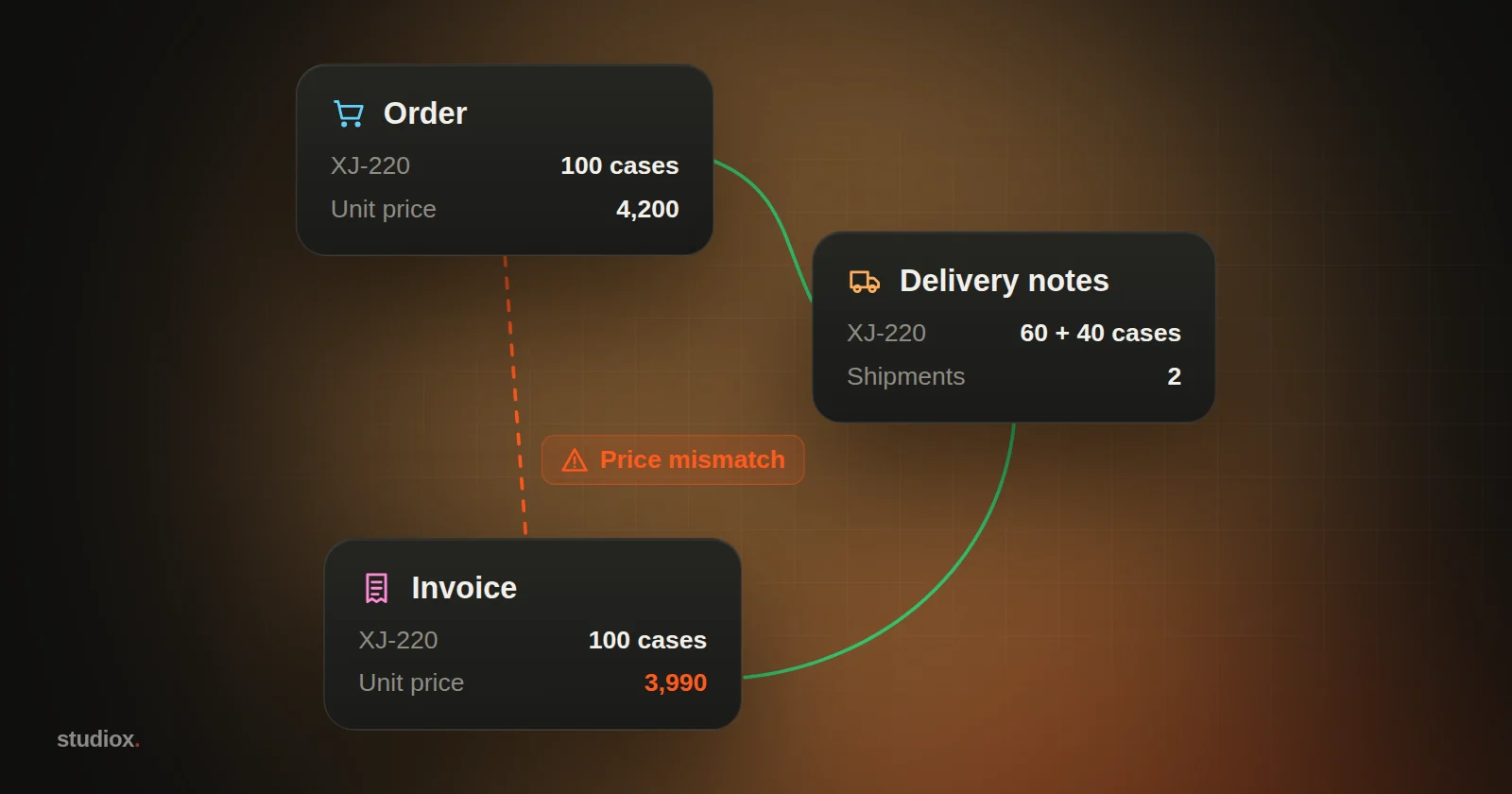
- Split shipments: A customer orders 100 cases. You ship 60 first and 40 later, but issue only one invoice, or two invoices that don't clearly map to the shipments.
- Last-minute price changes or discounts: Sales agreed a discount with the customer verbally, but the order system still shows the original price.
- Returns that never get passed along: The warehouse receives returned goods, but accounting doesn't know, so neither the invoice nor the receivable gets adjusted.
- Mismatched items or units: The order says cases, the delivery note says pieces. The quantities look wrong, but it's really a unit-conversion problem.
- Payments that are hard to apply: A customer pays several invoices in one transfer, minus bank fees or a discount, and the amount matches none of them.
These problems have one thing in common: the error happens upstream but isn't discovered until month-end, in accounting. By then weeks have gone by, and nobody remembers the details.
Three-way matching: let the system do the first pass
Procurement and accounting teams have a well-known technique called three-way matching. The idea is simple: put the order, the delivery note (or goods received note) and the invoice side by side, and check that items, quantities, unit prices and amounts all agree. (In Taiwan, the invoice is the government-format "uniform invoice", now commonly issued electronically through the Ministry of Finance's e-invoice platform.)
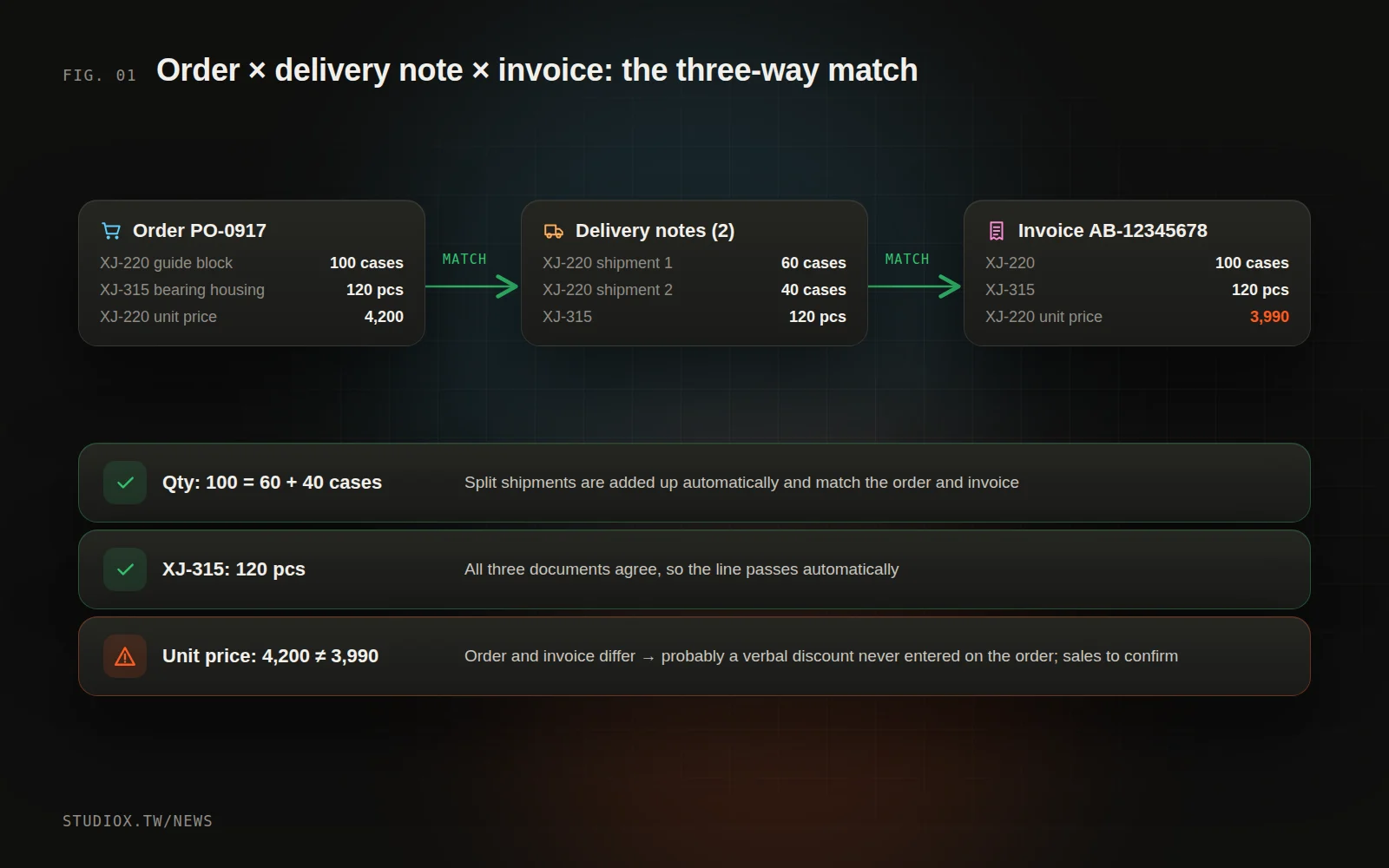
A three-way match is slow to do by hand, but it's exactly the kind of work systems are good at:
- Automatic pairing: find the related delivery notes and invoices by order number, customer, item and date range.
- Line-by-line checks: do the quantities agree (including unit conversion)? Does the unit price match the order or contract price? Do the totals add up?
- Handling split shipments: one order with several delivery notes, or one invoice covering several delivery notes, gets summed and compared correctly.
- Flagging differences: only what doesn't match lands on the to-do list.
Let people handle only the real exceptions
After automatic matching, accounting no longer faces hundreds of transactions to check one by one, just a list of discrepancies. Each one comes with:
- What's different (quantity, unit price, amount, a missing document)
- Links to the related documents
- A likely cause (for example, "the delivery note shows a return, but no credit note was issued against the invoice")
- Who should follow up (sales, the warehouse or accounting)
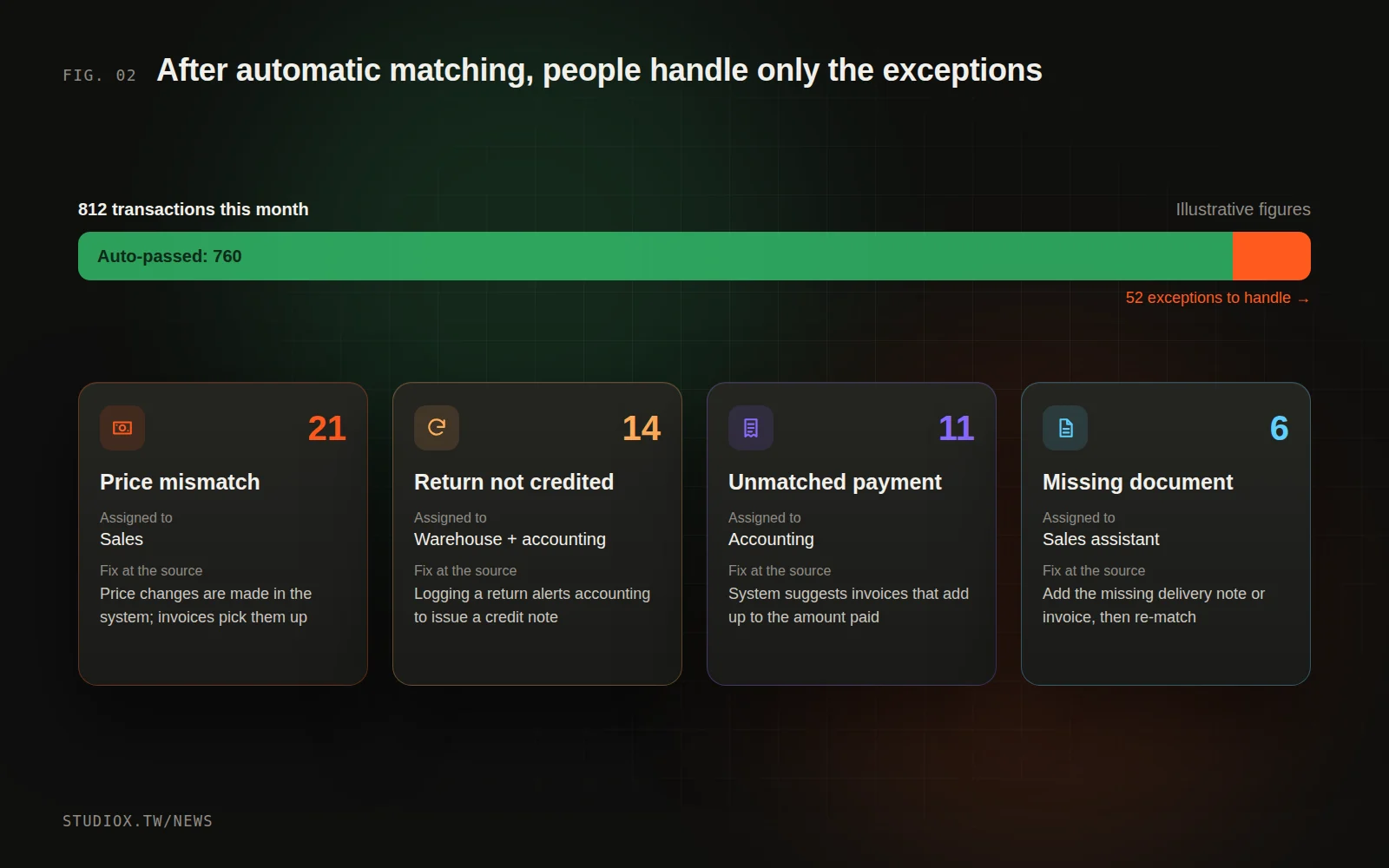
Multimodal AI can help here too. Customer statements and supplier invoices often arrive as PDFs or scans; AI can turn them into structured data before they enter the matching process (see How AI reads orders and quotes).
Cut errors at the source
Automated reconciliation makes month-end far less painful, but the bigger win is keeping errors from happening in the first place. Start by sorting discrepancies by cause:
| Common discrepancy | Where it starts | How to fix it |
|---|---|---|
| Unit price mismatch | A verbal price change never made it onto the order | Price changes must be made in the system, with a record; invoices pick them up automatically |
| Quantity mismatch | Split shipments, unit conversion | Link each shipment to its order lines when it ships; the system converts units automatically |
| Return not credited | Warehouse and accounting out of sync | When the warehouse logs a return, accounting is notified automatically to issue a credit note |
| Payment can't be applied | Combined payments, deducted bank fees | The system suggests matching invoices by combination of amounts and records each customer's payment habits |
Review the causes once a month, and it becomes very clear which part of the process needs the most work.
Three steps to automated reconciliation
Step 1: Make sure you can get data from all three sides
Which systems hold your orders, shipments and invoices? Can you export the data or read it through an API? Is there a field that links them (such as the order number)? If delivery notes don't record the order number, fix that in the process first. This is often what decides whether the automation succeeds.
Step 2: Define matching rules and tolerances
- Must unit prices match exactly, or can they differ by rounding?
- Which unit do you compare quantities in, and what are the conversion rules?
- How do you pair split shipments and consolidated invoices?
- How are freight, bank fees and discounts handled?
Your senior accountants usually already know the answers. Writing them down and handing them to the system is the core of the automation.
Step 3: Run both in parallel for a month
Once the new matching process is live, run it alongside your manual reconciliation for one month and compare the results. Discrepancies the system catches that people missed show what automation is worth; ones people catch that the system misses show where the rules need work. Switch over only once the results agree.
From month-end reconciliation to daily reconciliation
The most noticeable change is moving reconciliation earlier. When the system matches the previous day's shipments and invoices every day, problems surface the same week they happen, while sales still remembers what was agreed with the customer and the warehouse can still find the records for that batch. Month-end close shrinks from several days to reviewing a report.
Reconciliation hell isn't just accounting's problem. It's what happens when orders, the warehouse, sales and accounting aren't connected. Connect the systems and automate the matching, and everyone gets time back for more valuable work. To see how your order, warehouse and accounting systems could be connected, take a look at our systems integration service, or talk to us about your reconciliation process.