Can AI help with your B2B inquiry form and replies? Yes, here's how
Yes. Give ChatGPT, Claude or Gemini your past inquiries for form questions, sorted new leads and a first reply that shows you read them. Three prompts to copy, what to check, and the next step.
Key takeaways
- Ask AI directly: upload six months of inquiries and have it suggest form questions; paste in this week's inquiries and have it sort them by your rules and draft the first reply.
- Check three things afterwards: the reasons for each category hold up, replies don't promise delivery dates or prices AI can't know, and the questions fit your customers. Replace names and contact details with codes before uploading.
- Add timeline and budget range to your form (both with “Not sure yet”), break the “Message” box into easy questions, and keep required fields to three or four. Fixed choices help AI sort accurately too.
- As inquiries grow, connect AI to your form and inbox: it classifies, summarizes and drafts replies, confident calls follow your rules, and quotes, large deals and anything it can’t decide always stay with a person.
Table of contents
Yes. Give an AI assistant such as ChatGPT, Claude or Gemini the last six months of inquiries (the responses sheet from your form, a spreadsheet you've put together, or pasted text). It can pull out the reasons deals didn't go ahead and suggest which questions to add to your form. Paste in this week's new inquiries, and it can sort them by your rules and draft a first reply that clearly shows someone read the inquiry, which your sales rep can send after changing a few lines.
On many B2B websites, the inquiry form asks for a name, a phone number and a “Message” box. That makes sense: it's easy to fill in and doesn't put anyone off. Once an inquiry arrives, your sales reps call back, set up a meeting and visit with a catalog, drawing on years of experience. What companies usually want to improve is getting to the point on the first call, replying first to buyers with a near-term deadline, and letting the engineers who prepare estimates start as soon as the drawings arrive. This article starts with prompts you can copy, then covers what to check after AI sorts and drafts, how your form can help, and the next step once inquiries grow.
Ask AI directly: 3 prompts to copy
Copy these and swap in your own products, amounts and rules (the ones below are examples).
Design your form from past inquiries
Attached are the last six months of inquiries (source, need, whether it closed, and if not, why). We do metal machining and contract manufacturing of aluminum enclosures. Find the most common reasons deals didn't go ahead, and based on them, suggest questions for our inquiry form: for each one, the wording, the answer choices, why we ask it, and whether it's required. Use ranges for timeline and budget, each with a “Not sure yet” option, and no more than four required questions. Give me the result as a table.
Sort this week's inquiries
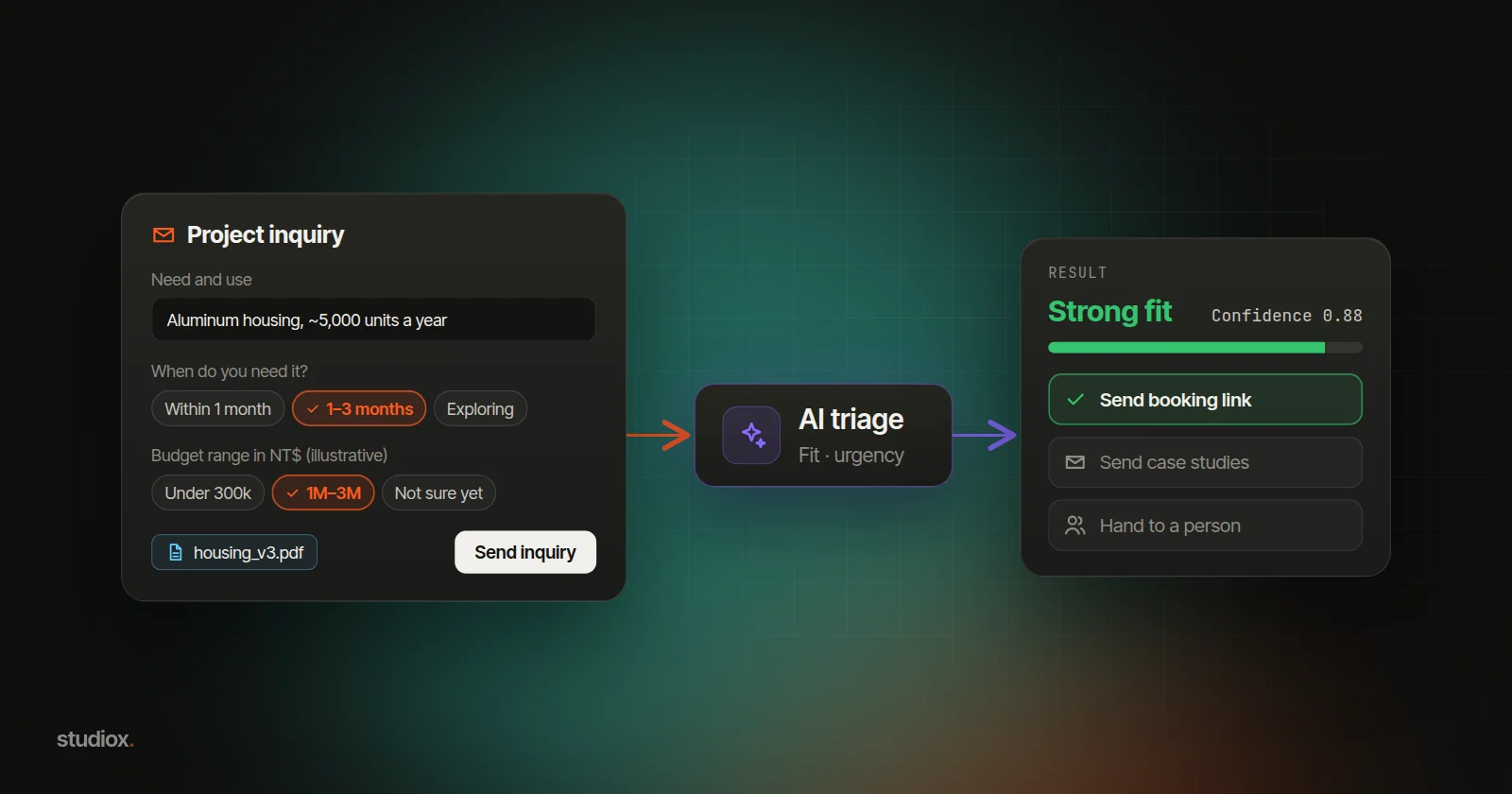
Attached are the 15 inquiries we received this week (form answers and messages). Sort them by these rules: timeline within 3 months, budget NT$300,000 or more, and a need for CNC machining or enclosures is a “Strong fit”; still exploring or six months or more out is “Early stage”; a very large deal, an unusual request or answers that contradict each other is “Hand to a person”; a budget or need clearly outside what we do is “Not a fit”; list sales pitches and spam separately. Give each one a one-line reason and a suggested next step, as a table. If you can't decide, put it under “Hand to a person.”
Draft the first reply
Below is an inquiry (pasted); attached are the buyer's drawing and our list of past projects. Draft a first reply: greet them by name, mention one detail from the drawing, ask one or two key questions (for example, does the surface need anodizing, and could the first batch ship in 8 weeks), pick two relevant projects from our list, and end with a link to book a 30-minute call [booking link]. Polite and short; don't mention prices or promise a delivery date.
After AI sorts and drafts, check these 3 things
- Do the reasons hold up? Spot-check a few, especially the ones marked “Not a fit” or spam, so you don't turn away a real inquiry.
- Facts in the reply. Whether you can make it, how long it takes and what it costs: AI doesn't know your capacity or your pricing. Keep these out of the reply until a sales rep confirms them.
- Do the questions fit your customers? AI suggests a general version. Base the budget ranges on the size of deals you've actually closed. The more questions, the fewer people finish, so keep required fields to three or four.
Inquiries include the buyer's name, email and phone number. Use your company's enterprise plan, or replace names and contact details with codes and delete columns you don't need before you upload.
Make it easier: your form, inbox and AI working together
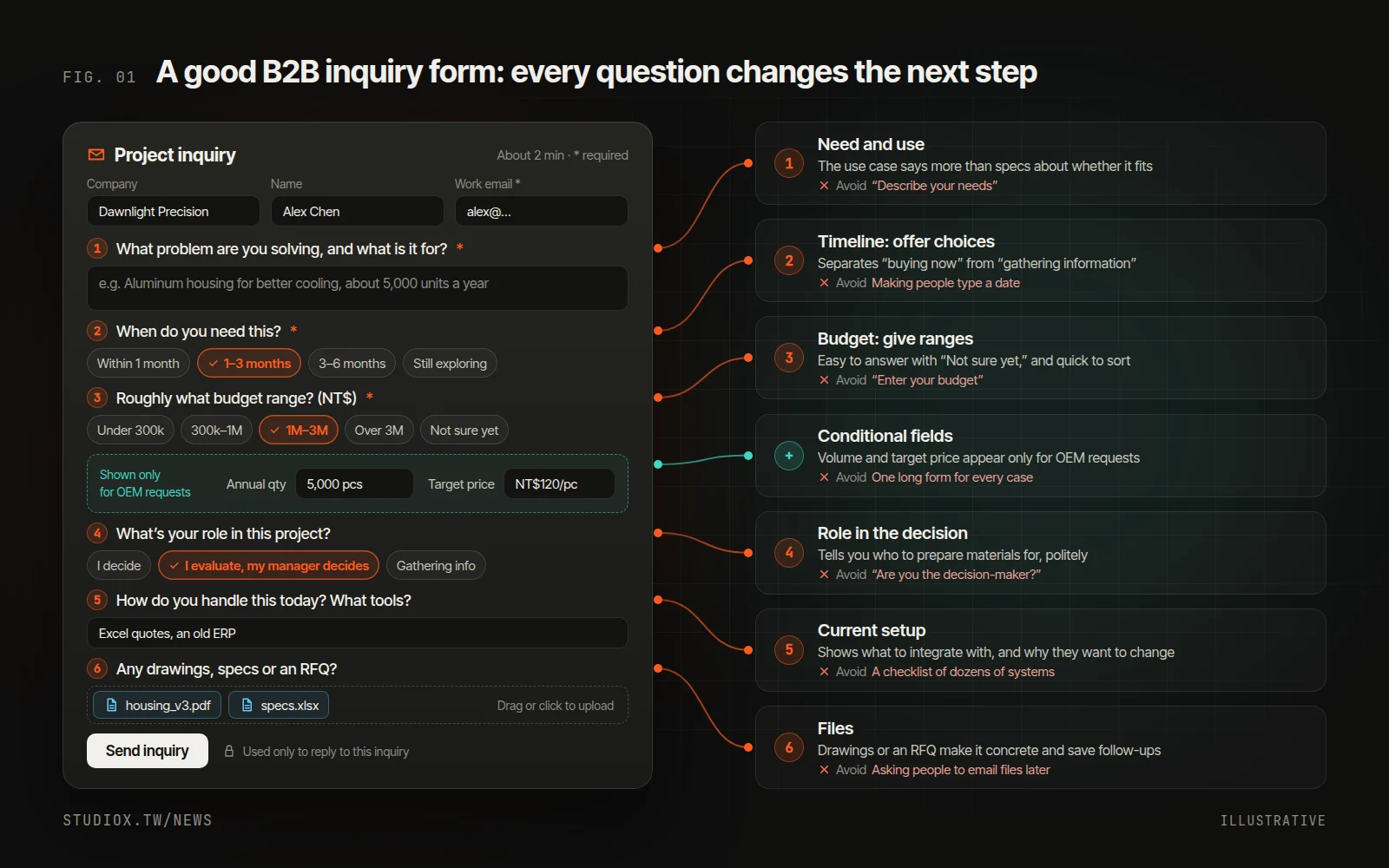
1. Add two questions: timeline and budget range
Offer timeline as choices: Within 1 month / 1–3 months / 3–6 months / Still exploring. This one question separates “buying now” from “gathering information.” Don't ask buyers to type in a budget figure. They don't want to show their hand first, and often they genuinely don't know yet. Switch to ranges, add “Not sure yet,” and include a line like “This helps us recommend the right approach.”
Base the ranges on the size of the deals you've actually closed, for example under NT$300,000, NT$300,000–1 million, NT$1–3 million and over NT$3 million (illustrative). You can deliberately set the lowest bracket below your minimum project size: anyone who picks it is someone to gently set expectations with, or point to another option. For contract manufacturing, ask for annual volume and target unit price instead. With fixed choices, AI doesn't have to guess when it sorts.
2. Break the “Message” box into a few easy questions
| Field | Suggested phrasing | Why ask |
|---|---|---|
| Need and use | “What problem are you trying to solve, and what will this be used for?” | The use case shapes the solution and tells you more than specs alone about whether it's your kind of project |
| Role | “What's your role in this project?” I decide / I evaluate, my manager decides / I'm gathering information | Tells you who your materials need to convince, without being rude |
| Current setup | “How do you handle this today? What tools or systems do you use?” | Shows what you'll need to integrate with, and why they want to change |
| Files | “Do you have drawings, specs or an RFQ (request for quotation)? Upload them here” | Inquiries with files tend to be more concrete, and you skip the back-and-forth asking for them |
Different kinds of requests need different details, so show fields based on earlier answers (in Google Forms, use “Go to section based on answer”). For example, only ask about annual volume, target unit price and existing tooling or samples when someone picks “OEM / contract manufacturing.”
Require only three or four fields: work email, need, timeline and budget (the last two both include “Not sure yet”), and make everything else optional. Tax ID number, company address and a full spec sheet can wait until the conversation is going somewhere. Add a short note next to the form explaining how the information will be used. Taiwan's Personal Data Protection Act (Article 8) already requires you to tell people why you're collecting their data and how it will be used.
3. Prepare a reply for each group, and send the first one fast
For each category, prepare a confirmation email, a case-study pack, a polite decline template and a booking link, and keep them in one document. Attach it every time you ask AI to draft a reply, and the draft will use your tone and your materials. The confirmation should say when, and who, will follow up (for example, “Someone from our team will contact you within one business day”), and then you keep that promise.
Speed matters. A 2011 Harvard Business Review study, The Short Life of Online Sales Leads, looked at online inquiries to US companies and found that firms that tried to reach the buyer within an hour were nearly seven times as likely to have a meaningful conversation with a key decision-maker as those that waited even an hour longer. Among the more than 2,000 companies the authors audited, those that replied within 30 days took 42 hours on average. The study is old and isn't about Taiwanese companies, but the direction is clear: B2B buyers often ask several suppliers at once, and the first one to reply thoughtfully often shapes the rest of the conversation.
4. Log the outcome of every inquiry
Record the source, the form answers and the outcome for every inquiry in a spreadsheet (Inquiry → Qualified → Meeting → Proposal or quote → Won). After three to six months, use a PivotTable, or ask AI, to see which answers go with closed deals. The numbers below are illustrative; every company's will differ:
| Form answer | Inquiries | Won | Win rate |
|---|---|---|---|
| Timeline: within 1 month | 20 | 6 | 30% |
| Timeline: still exploring | 35 | 1 | 3% |
| Uploaded drawings or an RFQ | 18 | 5 | 28% |
| No files | 37 | 2 | 5% |
Then act on it: keep the questions that predict a win and use them to tune your sorting rules; drop the questions that never change how you handle an inquiry; and if most people pick “Not sure yet,” your ranges may be off, or you may be asking too early. Also watch time to first response and form abandonment rate. A review once a quarter is enough.
When to consider the next step
AI plus a spreadsheet and a shared inbox can serve you for a long time. It's worth looking at the next step when:
- You copy new inquiries into AI and paste the categories and replies back into your inbox every day.
- More inquiries come with RFQs and spec sheets, and you'd like AI to read the form and attachments directly.
- You'd like inquiries submitted after hours to get a first reply that clearly shows someone read them.
- You need a record of how every inquiry was sorted, who replied and when.
The next step: connect AI to your form and inbox, and let people make the calls
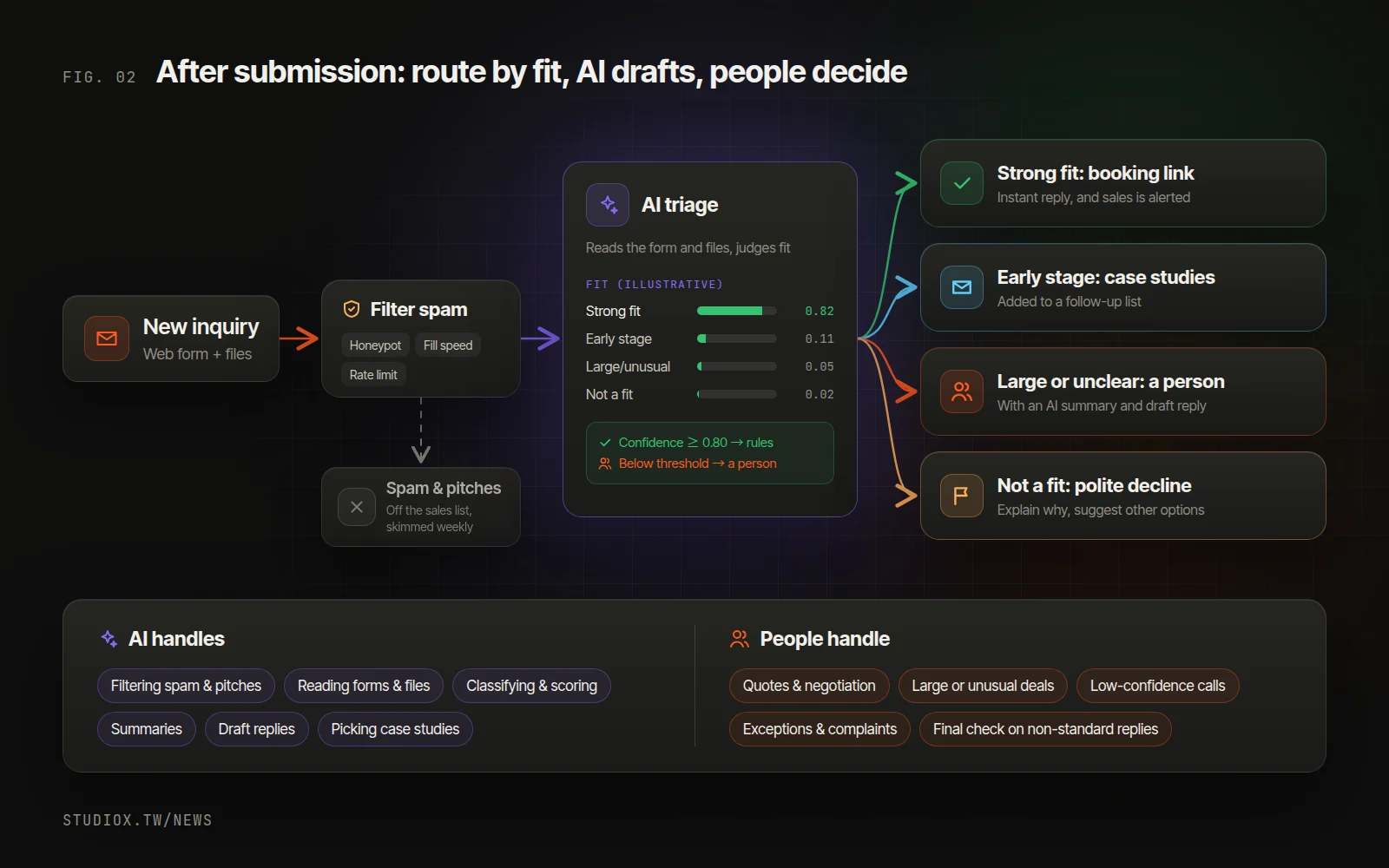
Once an inquiry is submitted, it goes straight to AI, with no copying and pasting. AI reads the form and the message, pulls the key points out of an attached RFQ or spec sheet (see reading orders and quotes with AI), judges the type, fit and urgency, drafts a reply and picks relevant case studies. Decision models like Jev return a classification with a confidence score: confident calls follow the rules, and uncertain ones go to a person.
People stay on anything that needs a quote, large deals, unusual terms, and whatever the AI can't decide. It's the same principle as hybrid customer service on LINE (the messaging app most people in Taiwan use): repetitive work goes to AI so people can spend their time on the customers who need judgment.
In the back offices StudioX builds, you can tell Xena AI, “Handle site inquiries like this from now on, and send refunds to me,” and it creates a draft automation: Jev classifies each new inquiry, general questions get an AI-written reply by email, and refunds and complaints go to a person to confirm. It only runs once you switch it on, and every step is logged. B2B inquiries can follow the same pattern with your own sorting rules.
Roll it out in stages. At first, AI only drafts and doesn't send, and a person reviews everything for two or three weeks. Once the classification is reliable, let standard confirmations and case-study emails go out automatically. The sorting rules and reply templates you prepared earlier are what the AI drafts from.
Keeping spam out
- Start with invisible checks: a hidden honeypot field, a check on how fast the form was filled in, and a limit on submissions from the same source. CAPTCHAs block real people too, so add one only when spam actually becomes a problem.
- File sales pitches separately: let AI sort pitches for SEO services, loans and lead lists into their own folder, and skim it once a week. Don't delete them automatically, or you may lose a real inquiry.
- Don't echo what people typed in your auto-reply: otherwise someone can enter another person's email address, put an ad in the name field, and use your website to send spam.
A good inquiry form doesn't keep people out. It helps the right customers get noticed sooner. To find out which step suits your inquiry process, start with a free AI Health Check, or look at our custom website service and AI services. You're also welcome to just talk to us.