Why local AI? Six reasons companies run AI on their own hardware
Keeping data in-house, meeting rules and contracts, predictable costs, working offline, fixed versions and no vendor lock-in: the business case for local AI, its real costs, and where to start.
Key takeaways
- The most common reasons companies choose local AI are confidentiality and compliance: quotes, formulas, drawings and personal data never have to leave the building.
- When you run the same kind of task in high, steady volume, the fixed cost of local hardware can beat pay-per-use pricing, but the break-even point shifts as cloud prices fall and as your hardware sits busy or idle.
- Going local also means owning the hardware, power, upkeep and model updates, and open models still trail frontier cloud models at complex reasoning, which is why most companies end up with a hybrid setup.
- Start with one sensitive, high-volume task, pilot it on a single workstation, measure the results, then decide whether to scale.
Table of contents
A sales rep pastes a customer's quote into a chatbot and asks for a comparison table. An engineer uploads drawing specs and asks the AI to spot what changed from the last revision. The work gets done fast and well, until the boss asks one question: "Whose servers is all that data sitting on right now?"
That's not paranoia. In 2023, after engineers uploaded internal source code to ChatGPT, Samsung Electronics restricted staff from using generative AI tools on company devices. In 2026, we're hearing a different question more and more often: can we just run AI on our own equipment?
In Small language models and on-premise AI, we compared cloud and on-premise AI and laid out a decision process. This article takes a step back to answer the more basic questions: why would a company want local AI, and does the math work?
What does "local AI" mean?
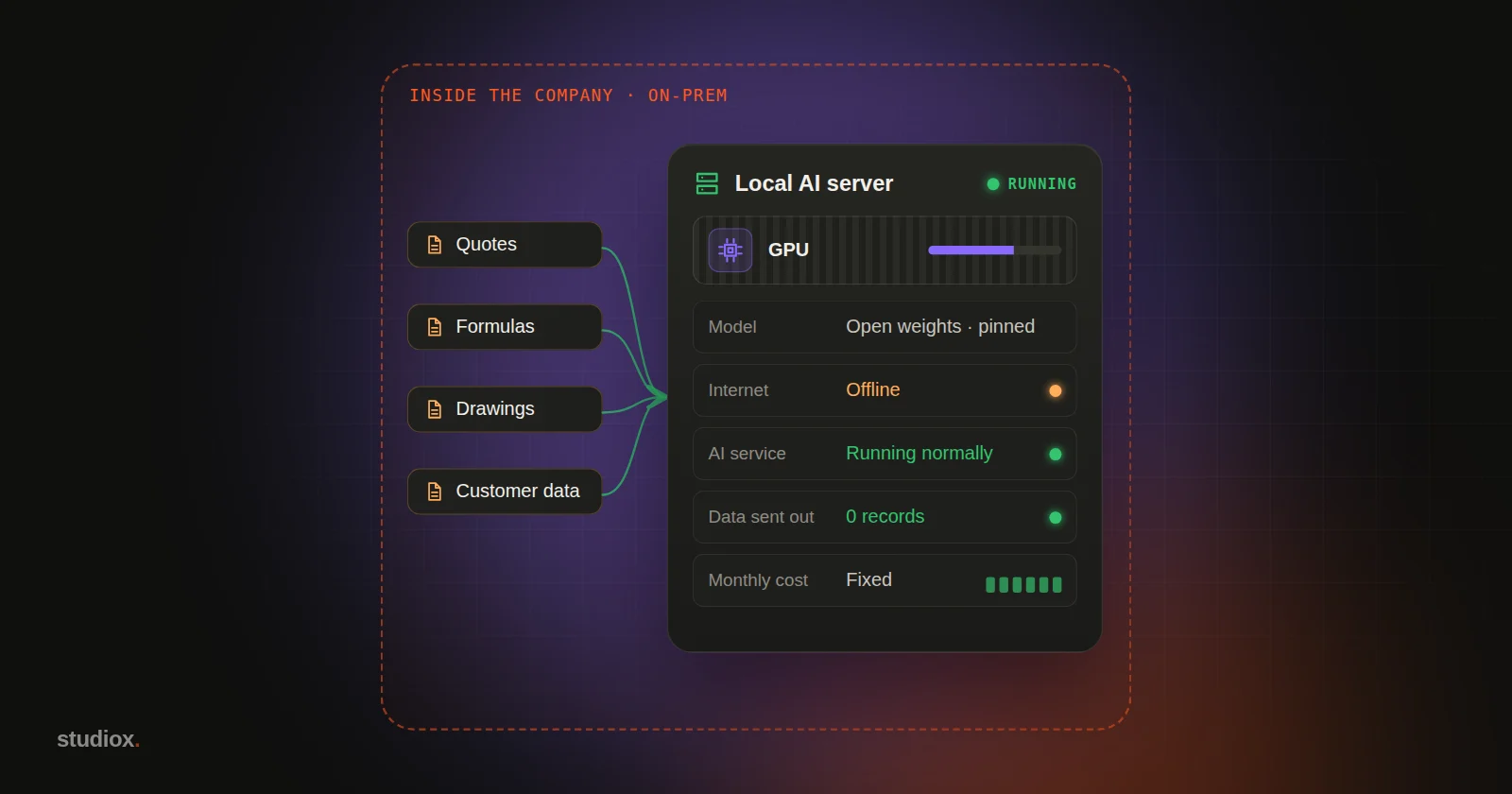
Local AI (also called on-premise AI) means the model files are in your hands and the computing happens on hardware you control: a GPU server in your server room, an AI workstation in the office, or even an employee's laptop. Data goes into the model and results come out without ever passing through an outside AI provider.
The biggest difference from cloud AI isn't capability, it's control: where the data lives, which model version you run, when you upgrade and what you spend each month are all up to you. So is the responsibility.
Six reasons companies are bringing AI in-house
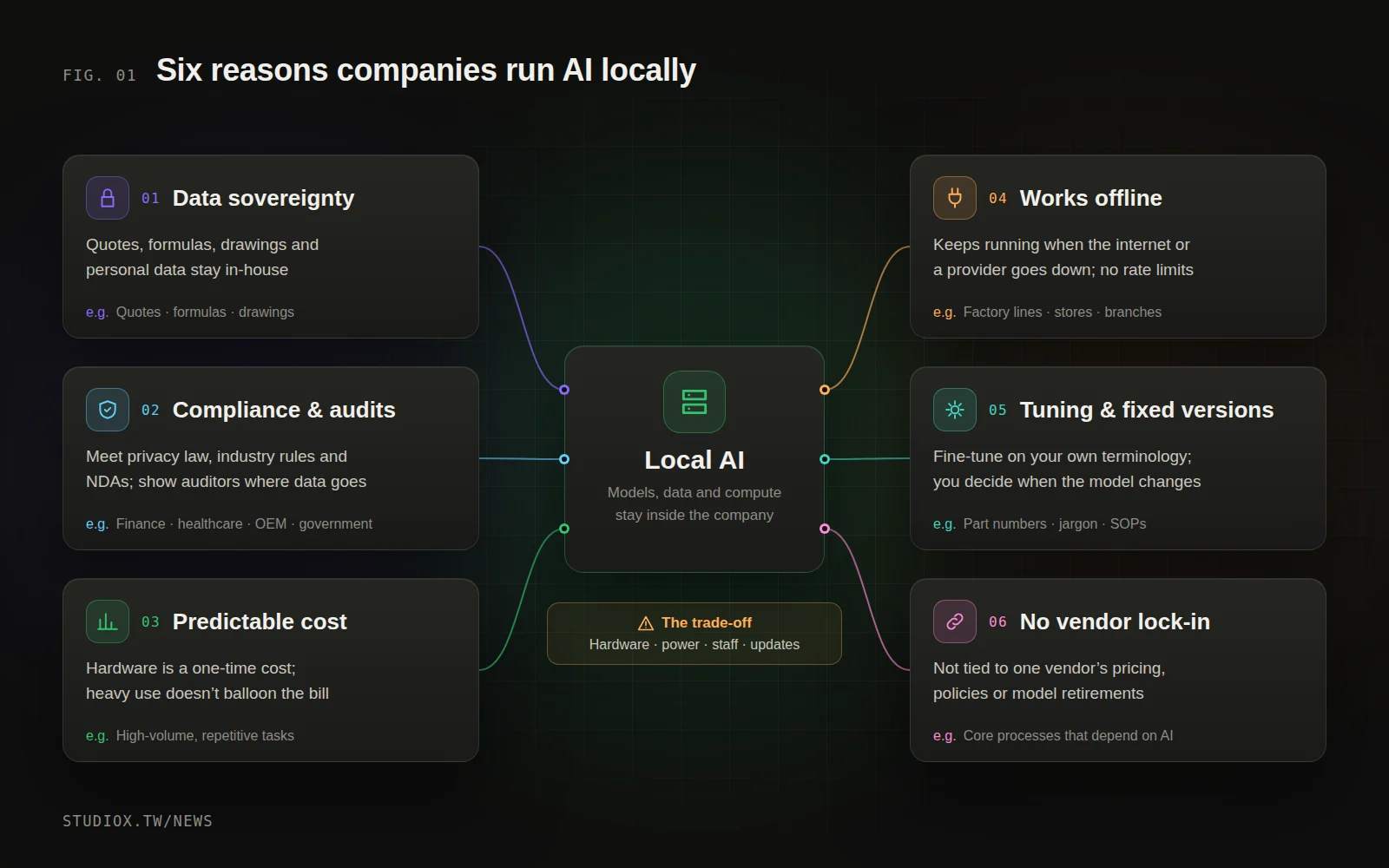
1. Data sovereignty: secrets stay in the building
Quotes and cost structures, formulas and process parameters, design drawings, customer lists and personal data are a company's most valuable assets. Enterprise plans from the major cloud AI providers already offer real protections; OpenAI, for example, says it does not train its models on business or API data by default. But for some data the question isn't whether the provider can be trusted, it's that this data simply shouldn't leave. Local AI makes that question go away.
2. Regulations, customer contracts and audits
Many restrictions aren't ones you set yourself:
- Personal data: Before handing customer data to an outside service, consider whether it counts as "commissioned processing" under Taiwan's Personal Data Protection Act. Article 8 of the Act's enforcement rules requires the commissioning party to supervise the processor, including how data is returned and deleted when the arrangement ends.
- Finance: The AI guidelines for the financial industry from Taiwan's Financial Supervisory Commission call on institutions to oversee third-party AI vendors and recommend a data and system migration plan in case the arrangement ends.
- Government: The generative AI guidelines issued by the Executive Yuan (Taiwan's cabinet) bar civil servants from giving confidential or personal information to generative AI, but allow closed, on-premise models to be used by classification level once the system environment has been verified as secure.
- Customer contracts: NDAs in contract manufacturing, design and similar industries often limit sharing data with third parties, and when a customer audits you, you need to show exactly where their data goes.
Running AI locally makes the answer to "where did the data go?" very short. For a fuller overview of the rules, see AI regulation in 2026.
3. Costs you can predict at high volume
With cloud AI, the more you use, the bigger the bill. Local AI is a one-time hardware purchase plus roughly fixed power and upkeep. When you process the same kind of work in volume every day, that fixed cost can be spread thin. We run the numbers in the next section.
4. Keeps working when the internet or the cloud doesn't
Cloud services go down too. On June 10, 2025, OpenAI saw hours of elevated error rates across its API, ChatGPT and Sora. On November 18 that year, a Cloudflare failure knocked X, ChatGPT and other services offline for a time. For factory lines, retail stores and customer service, a local model keeps running when the connection drops, and its speed isn't affected by someone else's peak hours or rate limits.
5. Fine-tuning and fixed versions
You can fine-tune a local model on your own data so it learns your part numbers, process terminology, internal shorthand and document formats. The part people often overlook: you decide which version runs. Cloud models are retired on the provider's schedule. Anthropic's model deprecation policy promises at least 60 days' notice before a public model is retired, after which requests to it fail. In February 2026, OpenAI retired GPT-4o and other older models from ChatGPT. If your process has been validated and written into an SOP, swapping the model underneath can change both the output and its accuracy. Nobody will swap out a local model for you; when you upgrade, you test first and then switch.
6. No lock-in to a single vendor
Pricing plans, usage policies, regional availability and retirement schedules are all the provider's call. The FSC's recommendation to plan for migration, mentioned above, addresses exactly this risk. Once you download an open-weight model, the files are yours: within the terms of its license you can keep using it indefinitely, or switch to another model whenever you like.
| Reason | Where it matters most | Check before you start |
|---|---|---|
| Data sovereignty | Quotes, formulas, drawings, customer data | Data classification: what truly can't leave |
| Rules and contracts | Finance, healthcare, contract manufacturing, government | What the rules and contracts actually require |
| Predictable cost | High, steady volume of the same task | Monthly volume and how fast it's growing |
| Works offline | Factory lines, stores, remote sites | How much downtime you can tolerate |
| Fine-tuning and fixed versions | Heavy jargon, processes that need validation | Whether you have enough example data |
| No lock-in | Core processes that depend on AI | What switching models costs and how you'd test it |
Running the numbers: when does local pay off?
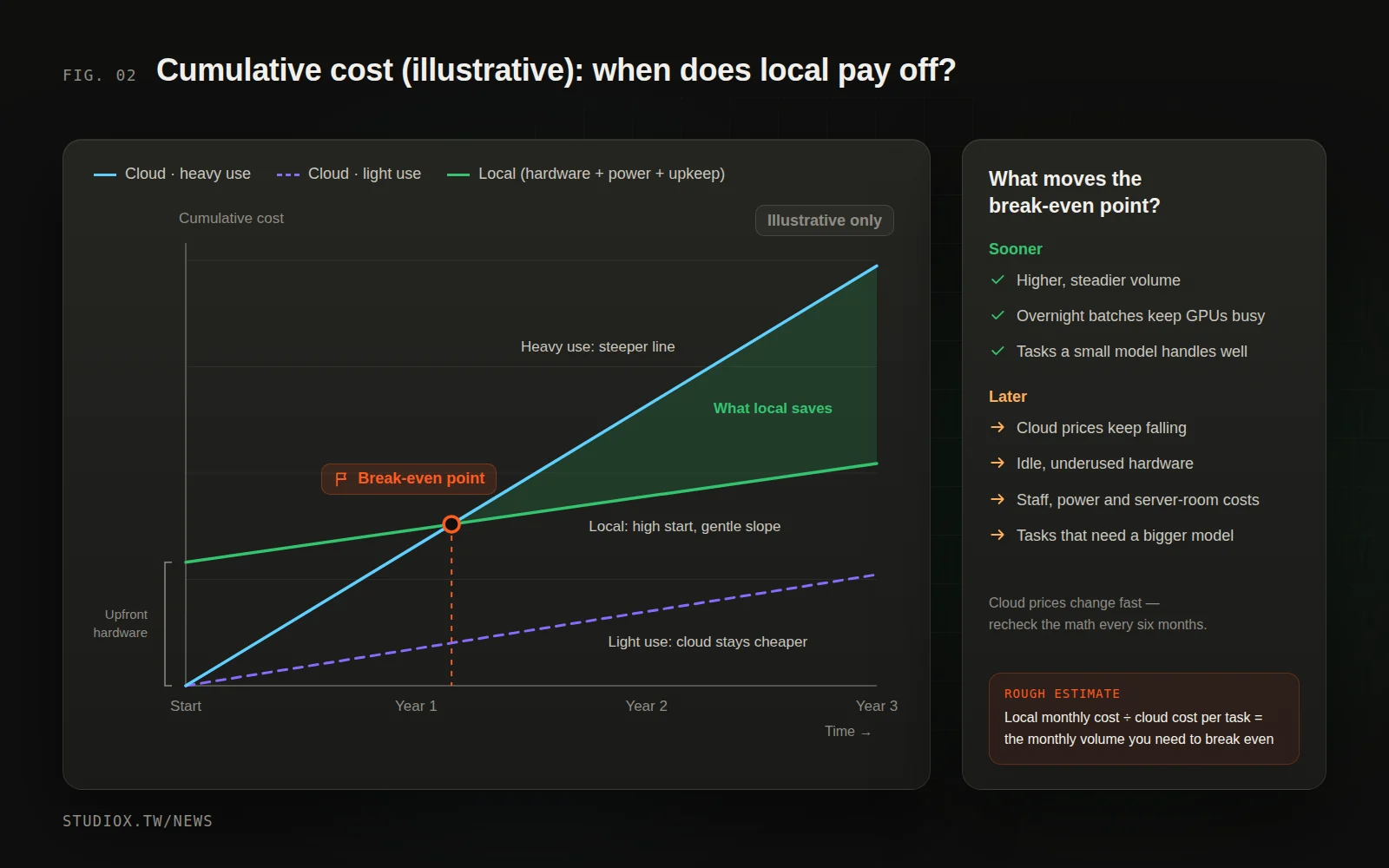
The two cost structures look nothing alike:
- Cloud: cost ≈ volume × unit price. No upfront investment; you pay for what you use, and if usage doubles, so does the bill.
- Local: cost ≈ hardware (bought once, depreciated over several years) + power and cooling + staff time for upkeep and model updates. Within the hardware's capacity, each extra task costs very little.
Plot cumulative cost over time and local is a line that starts high and rises slowly, while cloud starts at zero and rises as steeply as your usage. At high volume the two lines cross at some point: that's the break-even point. At low volume, the cloud may stay cheaper the whole way.
A rough estimate is simple: local monthly cost (including hardware depreciation) ÷ cloud cost per task = the number of tasks per month you need to break even. Three things are easy to miss:
- Cloud prices keep falling. Comparing prices since 2021, a16z found that the cost of LLM inference at a given level of capability has been dropping roughly tenfold every year. Today's break-even point may move out next year, so redo the math regularly.
- Idle hardware still costs money. Local equipment only pays off when it's kept busy; scheduling non-urgent batch jobs overnight raises utilization.
- Usage grows. As AI gets cheaper and more useful, usage tends to grow faster than expected (see Jevons paradox: why cheaper AI means bigger AI bills). That puts pressure on a cloud bill, and it means a local setup needs room to expand.
Why now? Four changes that make local AI practical
A few years ago, local AI meant expensive servers and a dedicated team. The bar is much lower today:
- Open-weight models got much better. Alongside model families such as Llama, Qwen, Gemma and Mistral, OpenAI released gpt-oss in 2025 under the Apache 2.0 license: gpt-oss-120b fits on a single 80GB GPU, and gpt-oss-20b runs within 16GB of memory. For Traditional Chinese, TAIDE, a project backed by Taiwan's National Science and Technology Council, has released models built on open models and tuned for Taiwanese usage.
- Quantization makes models smaller. Compressing a model's weights from 16-bit to 4-bit cuts the memory needed to store them to roughly a quarter. The cost can be some loss of accuracy, and the harder you compress, the more you need to test.
- The software has matured. Ollama, LM Studio and llama.cpp let a single computer run a model, and server engines such as vLLM handle many simultaneous users. Ollama and vLLM both offer interfaces compatible with the OpenAI API, which makes it easier to move an application between cloud and local models.
- The hardware fits in an office. In October 2025, NVIDIA began selling the desktop DGX Spark, with 128GB of unified memory; NVIDIA says it can run inference on models with up to 200 billion parameters locally, and Taiwanese brands including ASUS, Acer, GIGABYTE and MSI sell machines on the same platform. The RTX PRO 6000 Blackwell workstation graphics card has 96GB of memory. On laptops, Microsoft's Copilot+ PCs require an NPU rated at 40 TOPS or more.
The honest part: what local AI costs and where it falls short
Local AI isn't free, and it can't do everything:
| Cost | What it really involves | How to reduce it |
|---|---|---|
| Hardware | GPU servers or workstations, redundancy, capacity planning | Pilot on one workstation before scaling up |
| Power and space | A single workstation graphics card can draw up to 600W, plus cooling and backup power | Pick the right model size; you don't need the biggest |
| Staff for upkeep | System updates, monitoring, backups, access control and security | Use a managed partner, or start with non-critical processes |
| Capability gap | Frontier cloud models are still stronger at complex reasoning, long documents and multi-step tasks | Leave the hard tasks to the cloud |
| Model updates | New models arrive fast; you evaluate and swap them yourself | Keep a fixed test set and run it before every switch |
| Licensing | Every open-weight model has its own license terms | Check commercial-use restrictions before you adopt one |
One last point: local isn't all or nothing. Most companies end up with a hybrid setup: sensitive, high-volume, well-defined tasks run locally, while tasks that need top-tier reasoning or come up only occasionally go to the cloud. To decide how to split them, use the three questions in Small language models and on-premise AI.
How to start: one task, one workstation, one set of numbers
You don't need to buy a server on day one. Follow these four steps:
- Pick one task that is both sensitive and high-volume. The data shouldn't leave the company, the task happens every day, its scope is clear, and you can tell right from wrong. Examples: extracting fields from customer orders and quotes, or classifying customer service logs and masking the personal data in them.
- Pilot it on one workstation. Use an open-weight model and a local runtime, and test it for two to four weeks on real historical data. Run the same set of cases, de-identified, through a cloud model as a baseline.
- Measure. Accuracy, time per task, speed when several people use it at once, and cost per task including hardware depreciation, electricity and staff time. Note where it gets things wrong.
- Then decide. If local performs well and volume is high, plan a proper server. If local handles only part of the work, go hybrid. If the cloud is clearly cheaper, stay in the cloud for now and run the numbers again in six months.
Still deciding which process to try first? Start with Where to start with AI.
The value of local AI isn't in running your own servers for its own sake. It's in taking back control of your data, your costs and your model versions. If you'd like help working out which processes belong on local hardware, how to size it and how to connect it to your existing systems, take a look at our AI integration services and business systems development, or tell us about your needs.