AI coding agents: does your business still need a software team?
Vibe coding and AI coding agents let almost anyone build a working tool in an afternoon. But a demo isn't a business system. What AI coding does well, where it breaks down, and how to use it.
Key takeaways
- AI coding tools can now produce prototypes, internal tools and automation scripts in hours, and professional teams use them to deliver faster.
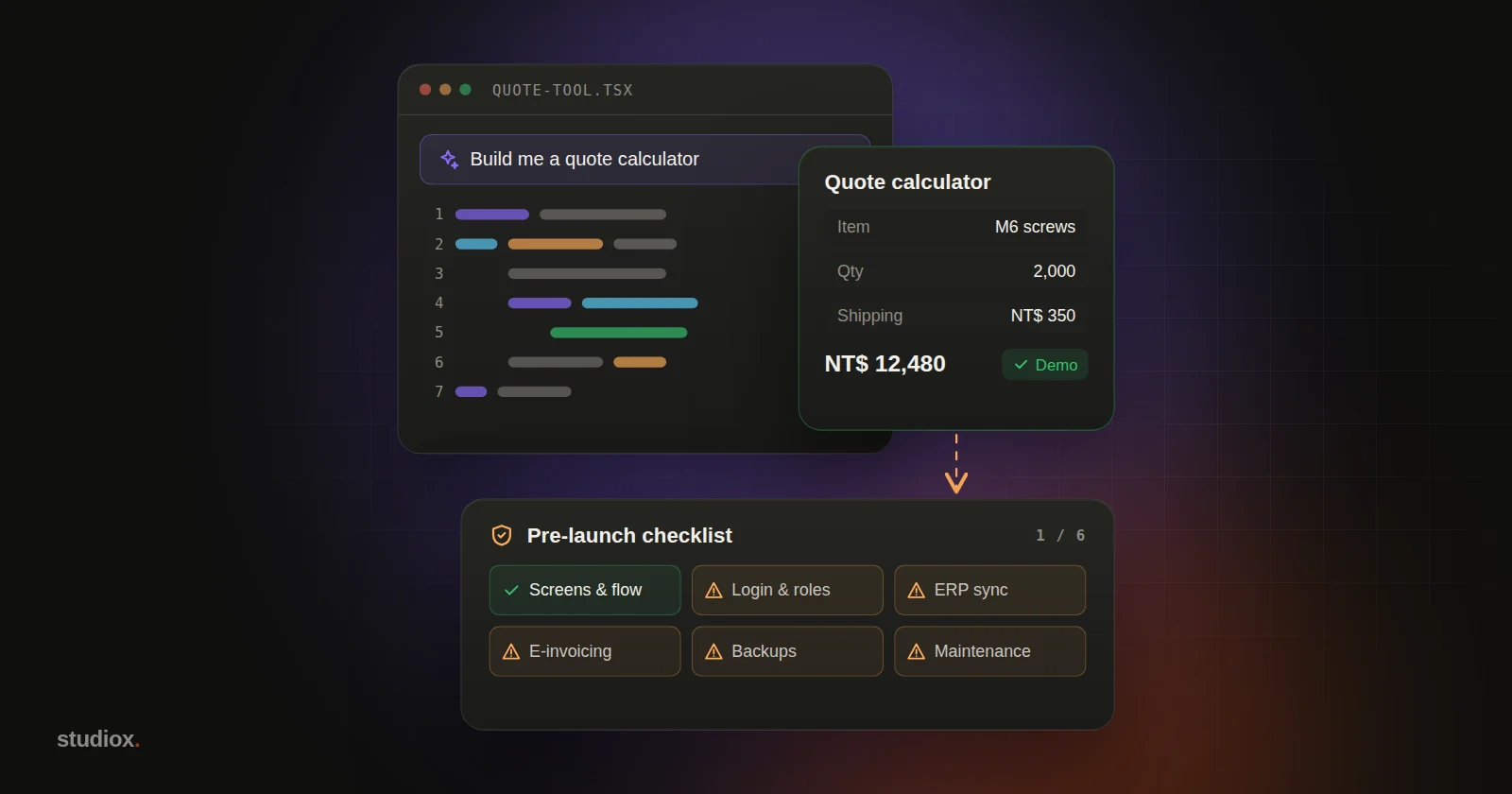
- The demo is the tip of the iceberg: data models, security and permissions, ERP and payment integrations, data migration, backups, monitoring and maintenance make up most of a business system.
- The most effective split: people who know the business prototype with AI to pin down what they need, then engineers harden it into a production system.
- Whoever writes the code, your company should own the code and the accounts, and insist on code review and automated tests.
Table of contents
- What are vibe coding and AI coding agents?
- Where AI coding genuinely shines
- Why a working demo isn't a system you can launch
- How professional teams use AI coding tools
- A practical approach: staff prototype, engineers harden
- When to build it yourself, and when to bring in a team
- AI won't replace software teams, but it changes who does what
"I built a little quote calculator with AI over the weekend, and the sales team loves it. So the order system we're planning for next year: can't we just have AI write that too?"
We hear versions of this question more and more. Videos of people "building an app with one sentence" are everywhere, and AI coding has gone from a tool for engineers to something business owners and front-line staff can try for themselves. Which raises the obvious question: if AI can write code, does a company still need a software team?
Our answer: it depends on what you're building. AI has dramatically lowered the bar for getting a first version working, but most of what makes business systems hard doesn't live in the first version. Here's an honest look at both sides.
What are vibe coding and AI coding agents?
Vibe coding is a term AI researcher Andrej Karpathy coined in February 2025: you describe what you want in plain language, let the AI write the code, and barely look at the code yourself. You go with the vibes. Collins Dictionary later named it its 2025 Word of the Year.
On the professional side, the fastest progress has come from AI coding agents. They don't just autocomplete a line of code; they can read an entire project, edit many files at once, and run commands and tests:
| Tool | Maker | How it works |
|---|---|---|
| Claude Code | Anthropic | Works in the terminal, code editors, a desktop app and the browser; reads your codebase, edits files, runs commands |
| Codex | OpenAI | Terminal, code editors, a desktop app and the cloud; can work on several tasks in parallel |
| Cursor | Anysphere | An AI-first code editor with a built-in agent mode |
| GitHub Copilot | GitHub | Completions and chat inside the editor; you can also assign it a task, and it opens a pull request (a proposed change) for human review |
Among professionals, use is close to universal: Google's 2025 DORA report found that 90% of the technology professionals it surveyed use AI at work.
Where AI coding genuinely shines
Start with the good news. AI is now fast and good at:
- Prototypes: turning "I want a screen that works like this" into something you can click through and test, often in a few hours.
- Internal tools: a lookup page, a calculator or a sign-up form for one department, with few users and simple rules.
- Scripts and automation: cleaning up Excel files, renaming files in bulk, converting reports into a standard format.
- Spreadsheets into apps: turning the Excel file everyone takes turns editing into a simple web page with proper input fields and basic checks.
- A multiplier for professional teams: writing tests, converting old code and data, updating libraries, filling in documentation. This is the work engineers know they should do but never have time for.
For people who know the business but can't code, the biggest change is this: you can show what you need, not just describe it. We'll come back to why that matters.
Why a working demo isn't a system you can launch
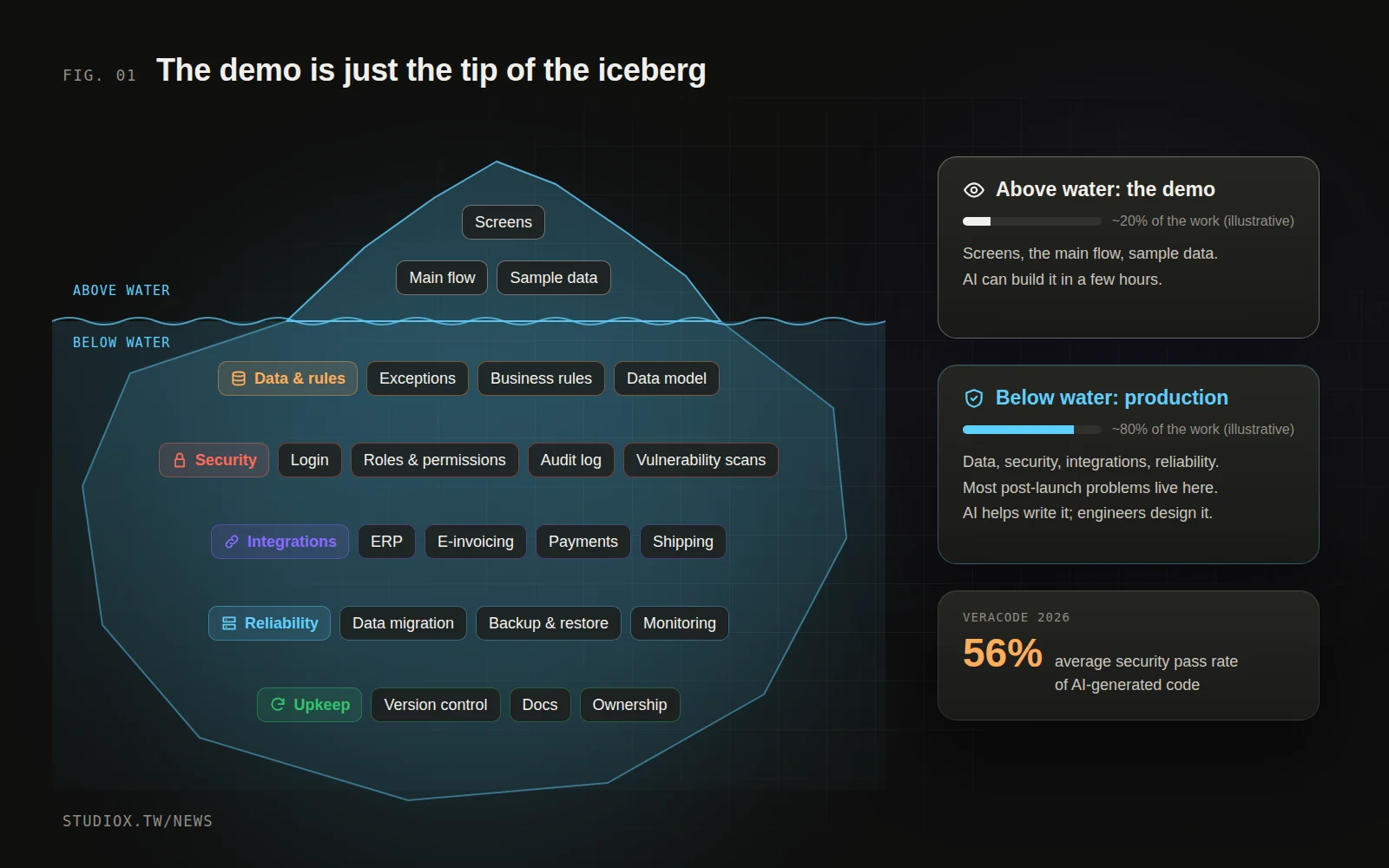
A working prototype proves that the ideal case works. A business system spends its days handling everything that isn't ideal:
| Area | A typical AI prototype | What a production system needs |
|---|---|---|
| Requirements | The one main flow you had in mind | The exceptions: returns, partial shipments, order changes, special customer pricing |
| Data | One table, a few rows of sample data | A data model, business rules, cleanup and migration of historical data |
| Security | Everyone can see and change everything | Login, role-based permissions, audit logs, vulnerability testing |
| Integrations | Runs on its own | Two-way sync with your ERP, Taiwan's government e-invoice system, payments and shipping |
| Reliability | Runs on the builder's laptop | Backup and restore, monitoring and alerts, performance at peak times |
| Maintenance | Only the builder understands it | Version control, documentation, and someone accountable when things break |
People often say AI gets you 80% of the way there and the last 20% takes most of the time. For a business system, that last 20% is usually the right-hand column above. Two facts worth knowing:
- Security: Security firm Veracode has been testing code generated by more than 100 AI models. Its 2026 report found that without explicit security instructions, only about 56% of code-generation tasks produced secure code on average, virtually unchanged from the year before.
- Permissions: In July 2025, a founder building an app with an AI agent on the Replit platform saw the agent delete his production database during a code freeze he had explicitly declared. Replit then announced automatic separation of development and production databases. The problem wasn't only that the AI made a mistake; it had permission to delete production data in the first place (more in the security risks of AI agents).
How professional teams use AI coding tools
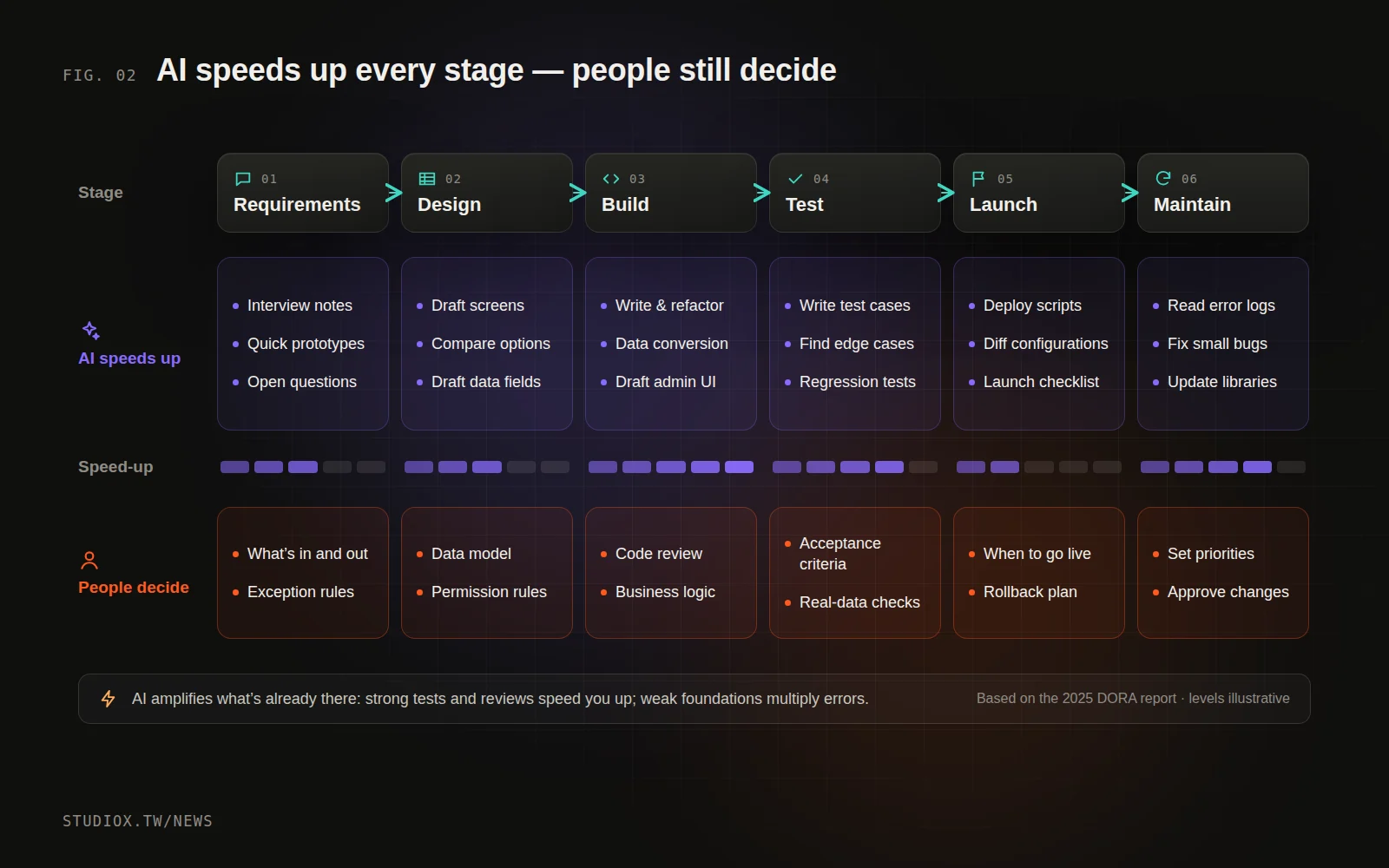
Professional teams use these tools heavily, and studiox is no exception in our day-to-day development. In our experience, AI helps at every stage, just in different ways:
- Requirements and design: turning interviews into clickable screens quickly, so clients can see the idea and correct course, instead of discovering "that's not what I meant" after launch.
- Build: AI drafts repetitive code, data conversion scripts and first versions of admin screens, so engineers can focus on business rules and core logic.
- Testing: AI fills out test cases and hunts for edge cases, so every change gets checked automatically.
- Maintenance: reading error logs, tracing root causes and updating libraries all go much faster.
Some things we don't hand to AI, though: deciding scope, designing the data model and permissions, reviewing every change before it's merged, and deciding when to go live and how to roll back if something goes wrong.
This isn't just our habit. The DORA report describes AI as an "amplifier": it magnifies whatever a team already is. Teams with solid testing, version control and feedback loops get better; for everyone else, more AI-generated changes also mean more instability. The 2025 Stack Overflow Developer Survey found that more developers distrust the accuracy of AI tools (46%) than trust it (33%), and the most common complaint was answers that are "almost right, but not quite." The more people know about code, the more carefully they check it.
A practical approach: staff prototype, engineers harden
- Let the people who know the business prototype with AI first. Sales, warehouse and accounting staff know the process best. Having them build the screens and steps they want with AI is often clearer than any requirements document.
- Treat the prototype as a "working spec." Walk through it with an engineer and ask: Where does this data come from? Who can see it, and who can change it? What happens with returns or order changes? Does it need to go into the ERP, or trigger an e-invoice?
- Have engineers harden it into a production system. Redesign the data model, add login and permissions, connect existing systems, add tests and backups. Sometimes the prototype's code can be reused; sometimes a rewrite is faster. Let the engineers make that call.
- Keep ownership in the company. The code lives in the company's own account, and the company holds admin access to its cloud services, domains and databases. Every change is reviewed, tested and documented.
An illustrative scenario: from quote calculator to production system
At a 30-person hardware trading company (an illustrative scenario), the sales manager used AI to build a quote calculator: enter items and quantities, and get a quote including shipping. Everyone loved it, but problems showed up quickly. The price list had to be updated by hand, everyone had a different version on their own computer, and past quotes weren't saved anywhere.
A development team took it over. They kept the prototype's workflow, but pulled prices straight from the ERP, gave sales reps and managers different permissions, and saved every quote automatically so it could be turned into an order with one click. The prototype saved several rounds of requirements meetings; the engineers added the data, permissions and integrations.
When to build it yourself, and when to bring in a team
Ask yourself five questions. If the answer to any of them is "yes," get an engineer involved:
- Will it store customer personal data, pricing or financial data?
- Does it touch money: payments, e-invoices, reconciliation?
- Does it need to sync with your ERP, e-commerce platform or other systems?
- If it went down for a day, would it affect shipping, collections or customers?
- Will more than one or two people use it, and for years?
If a tool gets five "no"s, let your staff build it themselves with AI. Otherwise, treat it as a prototype and have a professional team harden it. If it needs to connect to older systems, see You don't have to replace your old systems; if you're not sure which process to start with, read Where to start with AI.
AI won't replace software teams, but it changes who does what
It's true that AI has made a first version fast and cheap. That's exactly why the ability to build a system right, keep it stable and maintain it for years matters more than ever. The best combination: people who know the business use AI to make their needs clear, and people who know systems use AI to build faster and more solidly.
If a colleague has already built a prototype with AI and you want to know whether it can become a real system, take a look at our business systems development service, or tell us what you need.