Can AI work out your AI automation ROI? Yes, on one page
Yes. Paste in your volumes, handling times, wages, error counts and the vendor's quote, and AI can do the one-page math. Three prompts to copy, what to check, and how to track it monthly.
Key takeaways
- Ask AI directly: paste your volume, minutes per item, fully loaded hourly cost, error cost and the vendor's quote into ChatGPT, Claude or Gemini, and have it lay out monthly value, monthly cost, net benefit and payback.
- Check three things afterwards: the calculations and units, whether review time is counted twice or left out, and whether you measured the numbers yourself. Paste only summary wage figures, or use an enterprise plan.
- Prepare the numbers in Excel: a two-week log of the current process, the fully loaded hourly cost (employer contributions are about 20% of the insured salary), the cost per error from the last three months, and a pilot on 100 real items.
- If the numbers work, connect AI to your existing systems for a small pilot. Every step is logged, so you can compare volume, automation rate, review hours and error rate with the plan each month.
Table of contents
- Ask AI directly: 3 prompts to copy
- After AI does the math, check these 3 things
- Worked example: keying in 1,200 orders a month
- Make it easier: Excel and AI working together
- Four costs that are easy to leave out
- If the numbers don't work yet
- When to consider the next step
- The next step: a small pilot connected to your systems, checked monthly
Yes. Take the numbers from a two-week log (volume, minutes per item, wages and error counts), add the vendor's quote and pilot results, paste them into an AI assistant such as ChatGPT, Claude or Gemini, and ask it to apply the formula below. In a few minutes you'll have a one-page calculation: monthly value, monthly cost, net benefit and payback period. To see what happens if only 60% can be handled automatically, ask it to run the numbers again with that assumption.
Before bringing in AI, the owner's first question is usually: "So is it worth it each month?" It's exactly the right question to start with. "It saves two hours a day" is a good starting point, but to decide, you also need to know whose two hours they are, what they're worth, and what it costs after launch. This article starts with prompts you can copy, then covers what to check, how to prepare the numbers in Excel, and a full illustrative example based on order entry.
Ask AI directly: 3 prompts to copy
Copy these and swap in your own numbers (the ones below are examples).
The one-page calculation
Please work out whether an AI automation project pays off each month. Today: about 1,200 orders a month, 6 minutes of manual entry per order, about 24 orders with errors a month, about NT$800 to fix each error, and a fully loaded hourly cost of NT$350. The proposal: a build cost of NT$360,000 spread over 24 months; model usage of about NT$2.5 per order; NT$7,000 a month for hosting and upkeep; in the pilot, 80% were handled automatically with a 1-minute spot check each, and 20% went to a person at 5 minutes each; errors are expected to fall to 6 a month. Use these two formulas: monthly value = hours saved × fully loaded hourly cost + errors avoided × cost per error; monthly cost = build cost ÷ months spread over + model usage + hosting and upkeep + remaining review hours × fully loaded hourly cost. Count all of the original manual time as hours saved, and put review time on the cost side only, so nothing is subtracted twice. Show each line's calculation and amount in a table, then give the monthly net benefit and the payback period = build cost ÷ (monthly value − monthly running costs).
The fully loaded hourly cost
Please work out the fully loaded hourly cost and show the calculation: a monthly salary of NT$36,000, paid 14 months a year; employer insurance and pension contributions estimated at 20% of the monthly salary for 12 months; NT$3,000 a month for desk space, computer and software; about 1,800 hours actually worked a year.
Other assumptions
Using the same formulas, run three more cases: an automation rate of only 60%, only 300 orders a month, and the build cost spread over 12 months instead. Put them side by side with the original result in one table, and tell me which assumption moves the monthly net benefit the most.
After AI does the math, check these 3 things
- Are the calculations and units right? Check that minutes became hours and that monthly and yearly figures aren't mixed. Ask it to show each line's calculation, and recheck one or two in Excel. AI can get arithmetic wrong too.
- Is anything counted twice or left out? Subtract review time on one side only. Use the fully loaded hourly cost, not the payroll shortcut many Taiwanese companies use, monthly salary ÷ 240 (30 days × 8 hours). Error cost, review time and upkeep are the items most easily left out.
- Did you measure the numbers yourself? AI only uses the numbers you give it. Volume and time per item should come from your two-week log, and the automation rate from a pilot on your own data. Leave out speed and revenue effects you can't measure yet, and list them as an upside.
Wages and orders are internal data. Use your company's enterprise plan, or paste only summary figures (volume, average minutes, average hourly cost) instead of individual pay records or customer names.
Worked example: keying in 1,200 orders a month
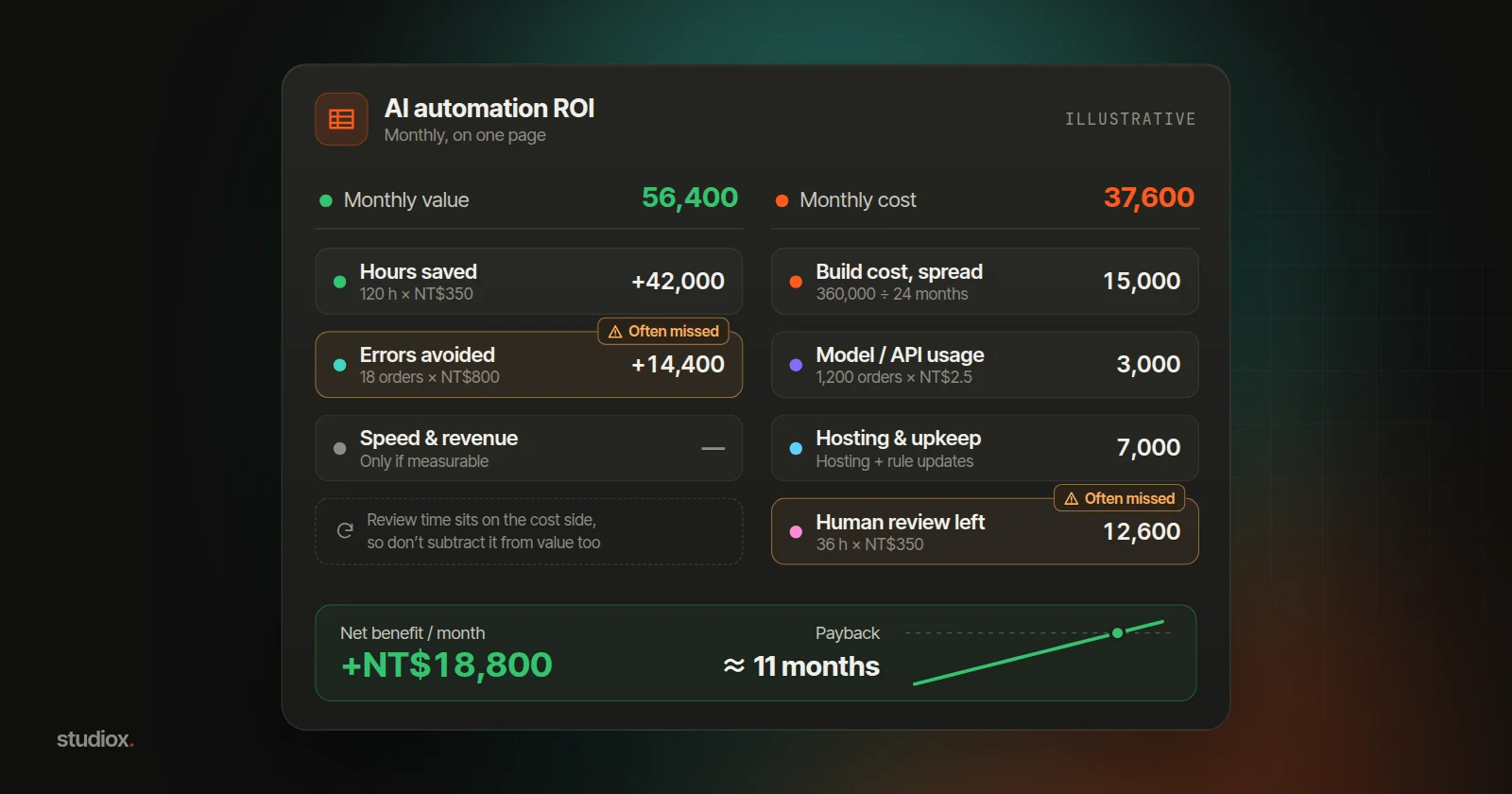
Give AI the first prompt, and the table it returns should look roughly like this. The scenario is illustrative: a trading company receives about 1,200 customer orders a month (PDFs, emails and faxes). Sales assistants key each one into the ERP, which takes 6 minutes on average, with an error rate of about 2%. The company switches to AI that reads each order, matches it against the master data and creates the order (see reading orders and quotes with AI). In a pilot on real orders, 80% can be created automatically with only a spot check, and 20% are passed to a person.
| Item | Calculation (illustrative) | Per month |
|---|---|---|
| Manual entry saved | 1,200 orders × 6 min = 120 hours × NT$350 | NT$42,000 |
| Errors avoided | Errors fall from 24 to 6: 18 × NT$800 | NT$14,400 |
| Speed and revenue effects | Not measurable yet, so not counted | — |
| Monthly value | NT$56,400 | |
| Build cost, spread out | NT$360,000 ÷ 24 months | NT$15,000 |
| Model/API usage | 1,200 orders × about NT$2.5 | NT$3,000 |
| Hosting and upkeep | Hosting 2,000 + about a day a month of rule updates 5,000 | NT$7,000 |
| Remaining human review | 960 automatic × 1 min + 240 exceptions × 5 min = 36 hours × NT$350 | NT$12,600 |
| Monthly cost | NT$37,600 | |
| Monthly net benefit | NT$18,800 |
Payback period = build cost ÷ (monthly value − monthly running costs) = 360,000 ÷ (56,400 − 22,600) ≈ 11 months.
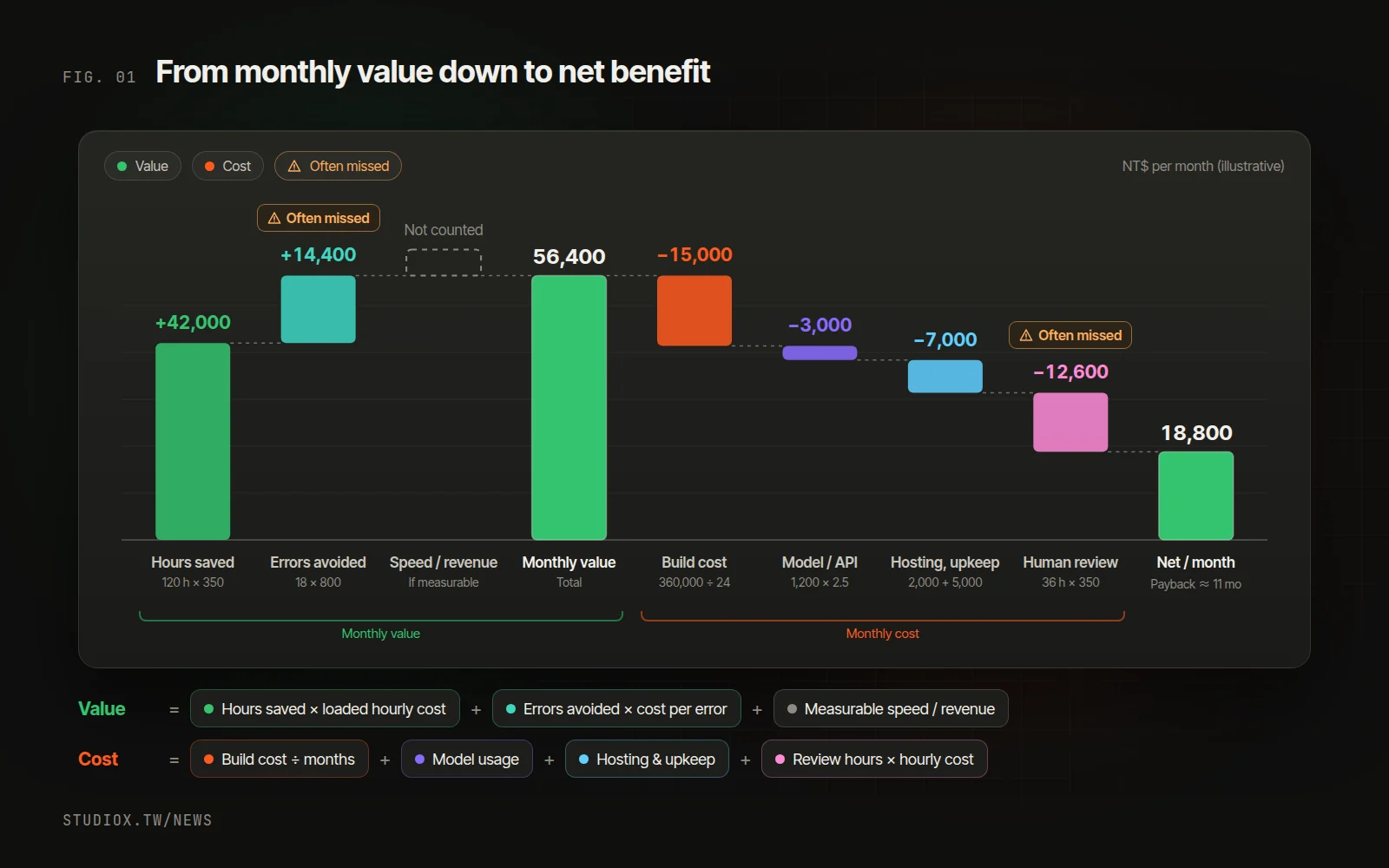
Two things stand out in this table:
- It's easy to get it wrong in both directions. Use "salary ÷ 240" for the hourly cost and leave out the cost of errors, and the value drops to about NT$18,000, so the project looks like it doesn't pay. Leave out review time and upkeep, and the cost drops to NT$20,000, so the benefit looks bigger than it is.
- The automation rate is the most sensitive assumption. If only 60% can be handled automatically, review time rises to about 52 hours, the monthly net benefit falls to about NT$13,200, and payback stretches to about 13 months. That's why you should pilot with your own data, not just look at a demo.
Make it easier: Excel and AI working together
You can prepare every number in the formula in Excel or Google Sheets, and attach the sheet each time you ask AI to run the calculation.
1. Log the current process for two weeks
Pick a process you'd like to improve, such as order entry. For two weeks, record each day how many items you handled, roughly how long each took and how many mistakes happened. A Google Form your team fills in before leaving each day works well: responses land in a sheet automatically, and after two weeks a PivotTable adds them up. Those are the numbers you paste into AI, and the baseline you compare against after launch.
2. Work out the fully loaded hourly cost
Fully loaded hourly cost = (monthly salary × months paid per year + employer insurance and pension contributions + overhead such as desk space, computer and software) ÷ hours actually worked per year.
At 2026 rates in Taiwan, employers pay 70% of Labor Insurance and Employment Insurance (12.5% combined), 60% of National Health Insurance (5.17%, calculated on the employee plus an average 0.56 dependents), and a pension contribution of at least 6%. Together that comes to about 20% of the insured salary, plus occupational injury insurance at a rate that depends on the industry. With the sample numbers in the second prompt (14 months' pay is 12 months plus a two-month year-end bonus), that gives a fully loaded cost of about NT$350 an hour, more than double the "salary ÷ 240" figure.
3. Work out the cost of an error from the last three months
An error's cost includes reshipping, processing returns, the time sales and customer service spend on it, and any credit you give the customer. And the later you catch it, the more it costs: at data entry it's one field to fix; after shipping it's a whole recovery process. Work back to an average from the last three months of returns, credit notes and complaints; that average is the cost per error in the first prompt.
4. Ask for a pilot on 100 of your own items
When you look at any AI option, ask for a pilot on 100 of your own real items, and record three numbers: the automation rate, the model cost per item, and the time spent on spot checks and exceptions. Put those three into the first prompt and the result will reflect your actual situation.
Four costs that are easy to leave out
- Human review and exceptions: AI automation rarely reaches "no one needs to look." Exceptions are usually the hardest cases, and each one often takes several times longer than a spot check, so estimate them separately.
- Model fees that grow with usage: unit prices fall, but volume rises and the work gets heavier, so the total bill often goes up rather than down. That's the Jevons paradox playing out inside your company. Watch the cost per item, not the total. If your volume is large and steady, it may be worth moving some of the work to an on-premise model (see what to consider with local AI).
- Upkeep whenever the inputs change: a new customer's order format, changed ERP fields, renumbered part codes and model version updates all push the automation rate down. Set aside maintenance time every month, and make sure someone owns it.
- Settling in at the start: for the first month or two, people usually double-check the AI's work while the automation rate is still climbing. Reaching payback a month or two late is normal.
If the numbers don't work yet
Take the same system with only 300 orders a month: the value is about NT$14,100 and the cost about NT$25,900, so the monthly net benefit is negative. After running costs, only about NT$3,000 a month is left to pay back the build cost, which would take more than nine years. In that case, a different approach fits better:
| Situation | Sign | What to do instead |
|---|---|---|
| Volume is still low | A few hundred items a month can't cover the build cost | Start with an off-the-shelf tool or semi-automation (AI drafts, a person pastes it in) |
| A lot of variation | Every case looks different, and the automation rate won't climb | Standardize forms and how orders come in, and write down the rules first |
| No owner yet | No one handles exceptions or updates the rules | Name an owner and a monthly check before you automate |
| AI isn't needed | The data is already structured | Connect the systems directly, which is often cheaper and more reliable |
If you haven't settled on which process to start with, see where to start with AI and choose again.
When to consider the next step
- The calculation shows a monthly net benefit, and the process has high volume and clear rules.
- You export, upload and paste the same orders and files every day.
- You'd like AI to read the customer and part-number master data in your ERP without attaching it each time.
- You need a record of every item handled, and you'd rather not tally volume and review hours by hand each month.
The next step: a small pilot connected to your systems, checked monthly
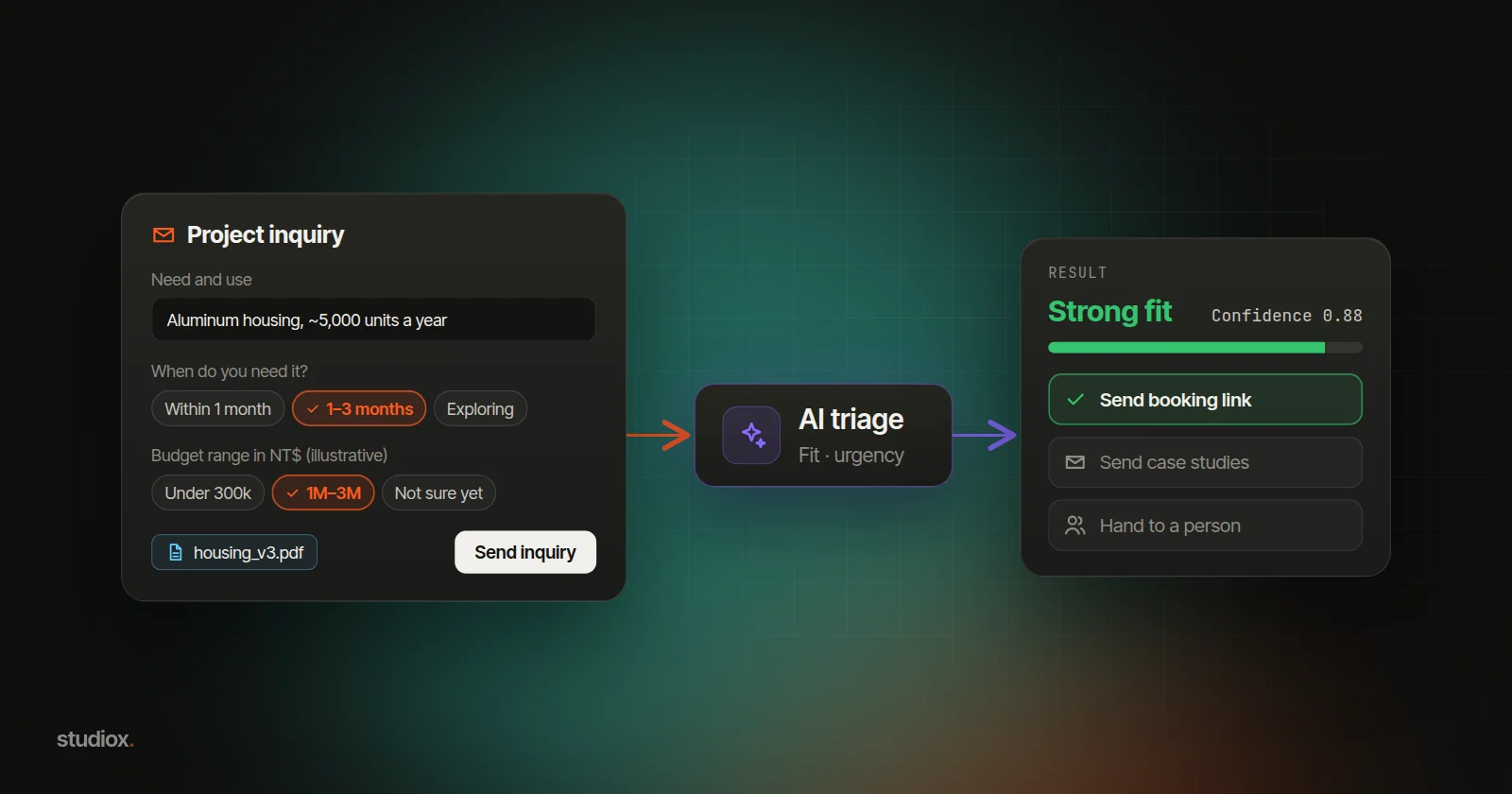
The steady approach is to pick one process and start small, with AI connected to the email and ERP you already use. Orders come in on their own, and AI reads each one, checks it against your master data and drafts the order. What it's sure about gets a spot check; anything that doesn't match, or that it isn't sure of, goes to a person. Nothing is written to the ERP until a person confirms, and every step is logged. The first phase typically goes live in about 4–6 weeks, running alongside your current manual process until you're happy to switch.
Because every step is logged, you can compare these numbers with your assumptions each month after launch:
- Volume: is it in line with the plan? Model fees will move with it.
- Automation rate: a drop usually means the inputs changed, such as a new customer or a new format.
- Review hours: if they stay high, the rules or confidence thresholds need adjusting.
- Error rate: compare it with the pre-launch baseline to see whether quality really improved.
- Cost per item: model and hosting fees ÷ volume tells you more than the total.
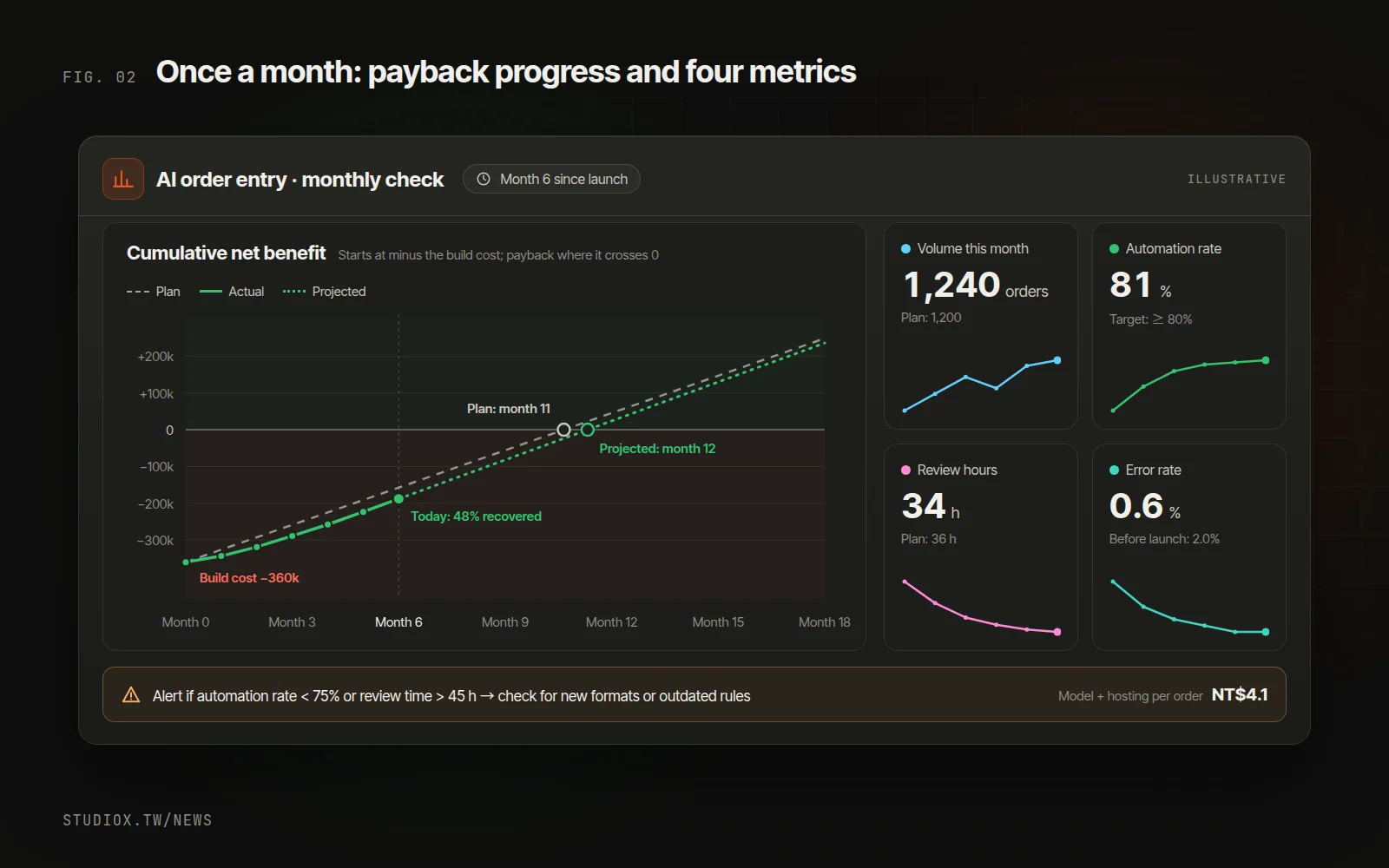
One or two alert thresholds are enough, for example "automation rate below 75%" or "review time above 45 hours" triggers a look at the cause. If your back office has a built-in AI assistant, such as Xena AI in the back offices StudioX builds, you can simply ask it to pull these numbers together each month.
Whether AI automation is worth it comes down to a one-page calculation and a monthly check. If you'd like help measuring your current process and piloting with real data, start with a free AI Health Check, which gives you an automation blueprint, or take a look at our AI integration services. You're also welcome to tell us about your process.