MCP explained: the open standard for safely linking AI to your systems
MCP (Model Context Protocol) gives AI like Claude and ChatGPT one standard way to connect to your ERP, website admin and databases. What it solves, how it works, and how to keep permissions in check.
Key takeaways
- MCP is an open standard for connecting AI to outside systems: build one MCP interface for a system, and every AI that supports MCP can use it.
- It packages what each system can do as “tools”; the AI reads the tool descriptions and decides for itself when to use them.
- Connections use OAuth, so the AI can only act with the signed-in person's own permissions, and the company can revoke access at any time.
- Tools that write data need “propose first, a person confirms” and activity logs before they're ready for real use.
Table of contents
If you've used Claude or ChatGPT, you've probably had this feeling: the AI is smart, but it can't see your company's data. To have it analyze orders, you first export to Excel and copy and paste. To have it update your website, you still have to log in to the admin panel and make the change yourself.
MCP (Model Context Protocol) was created to solve exactly that. It's an open standard that gives AI a uniform way to connect to outside systems: your ERP, website admin, databases and cloud drives. Once they're connected, you can simply say "List this week's orders that haven't shipped yet" in the chat, and the AI goes and looks it up in the system itself.
What was the problem before MCP?
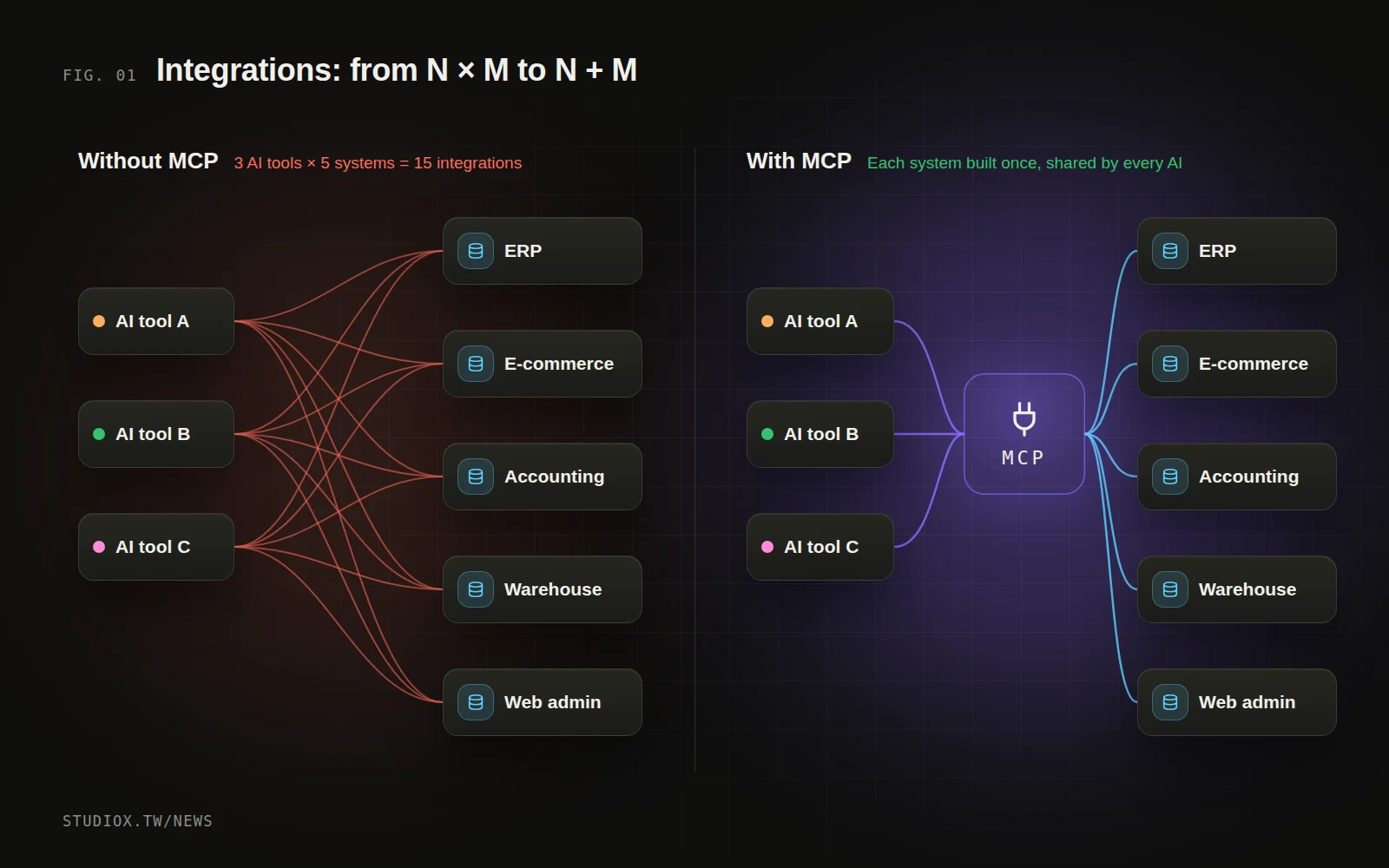
Before MCP, every AI tool that wanted to connect to every system needed its own integration code. Say your company has 5 systems and the team uses 3 AI tools: in theory that's 15 separate integrations, each with its own permissions, formats and error handling, and an update on either side could break any of them.
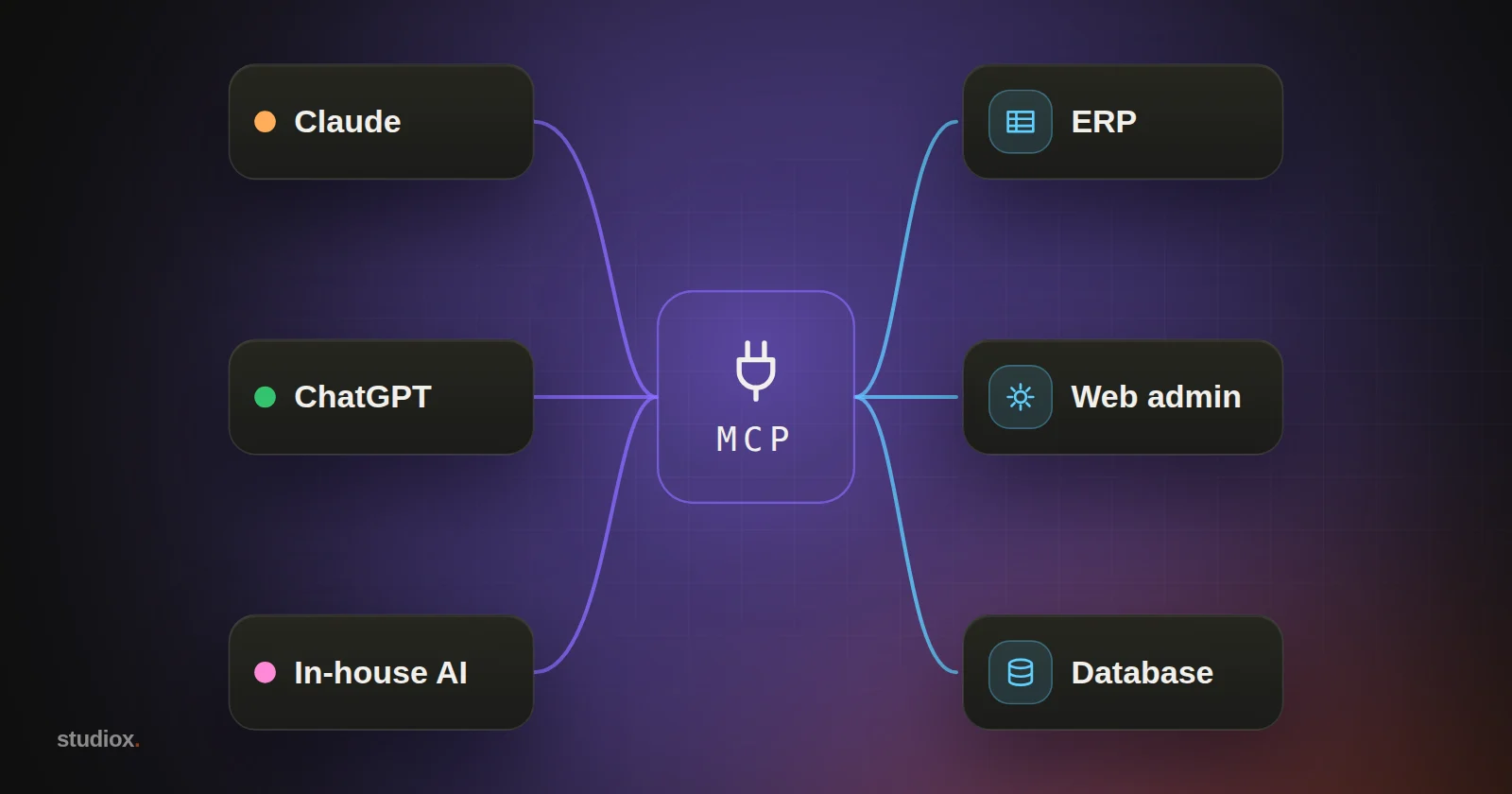
MCP works a lot like USB: build one MCP interface for a system, and every AI that supports MCP can plug in. What used to be "systems × AI tools" becomes "systems + AI tools."
How does MCP work?
MCP has three roles:
- Host: the AI application you're using, such as the Claude desktop app, ChatGPT or your company's in-house AI assistant.
- Client: the part of the host that talks to MCP servers.
- Server: an interface layer wrapped around your system that describes what the system can do in a format AI understands.
An MCP server mainly offers three things:
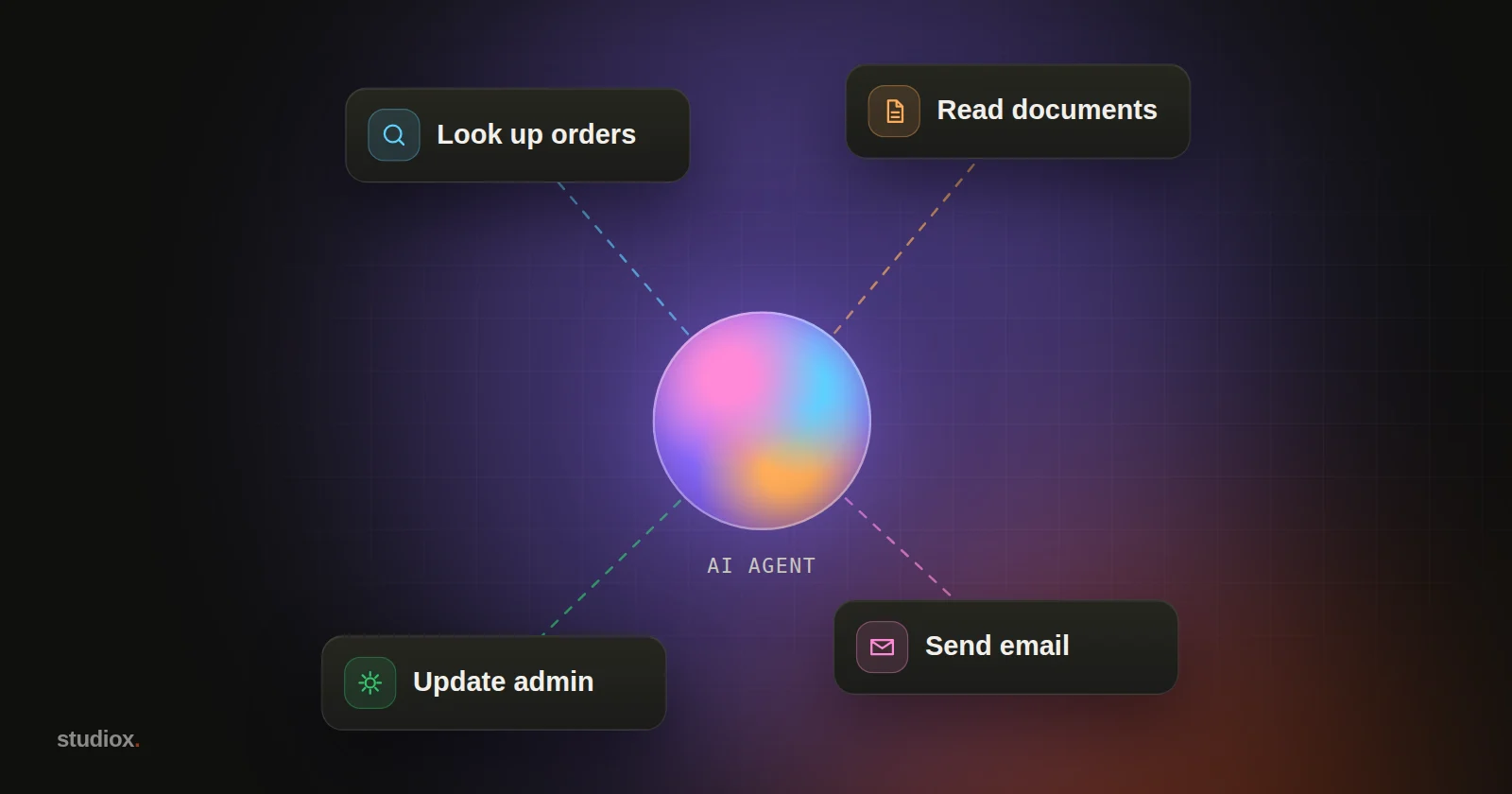
- Tools: actions the AI can call, such as "look up orders," "create product" or "send notification." Each tool comes with a description and a parameter format; by reading the description, the AI knows when and how to use it.
- Resources: data the AI can read, such as a product catalog or an operations manual.
- Prompts: ready-made task templates, such as "generate this week's operations report."
When a user asks for something in the chat, the AI uses the tool descriptions to decide which tool to call and with which parameters. The server runs it and returns the result, and the AI turns that into an answer or decides on the next step. This is the foundation that lets AI agents "do things on their own."
Permissions: what businesses care about most
The first question anyone asks about letting AI into company systems is: "Is it safe?" MCP's design includes several key mechanisms, but real security depends on how the server is built.
OAuth authorization instead of shared passwords
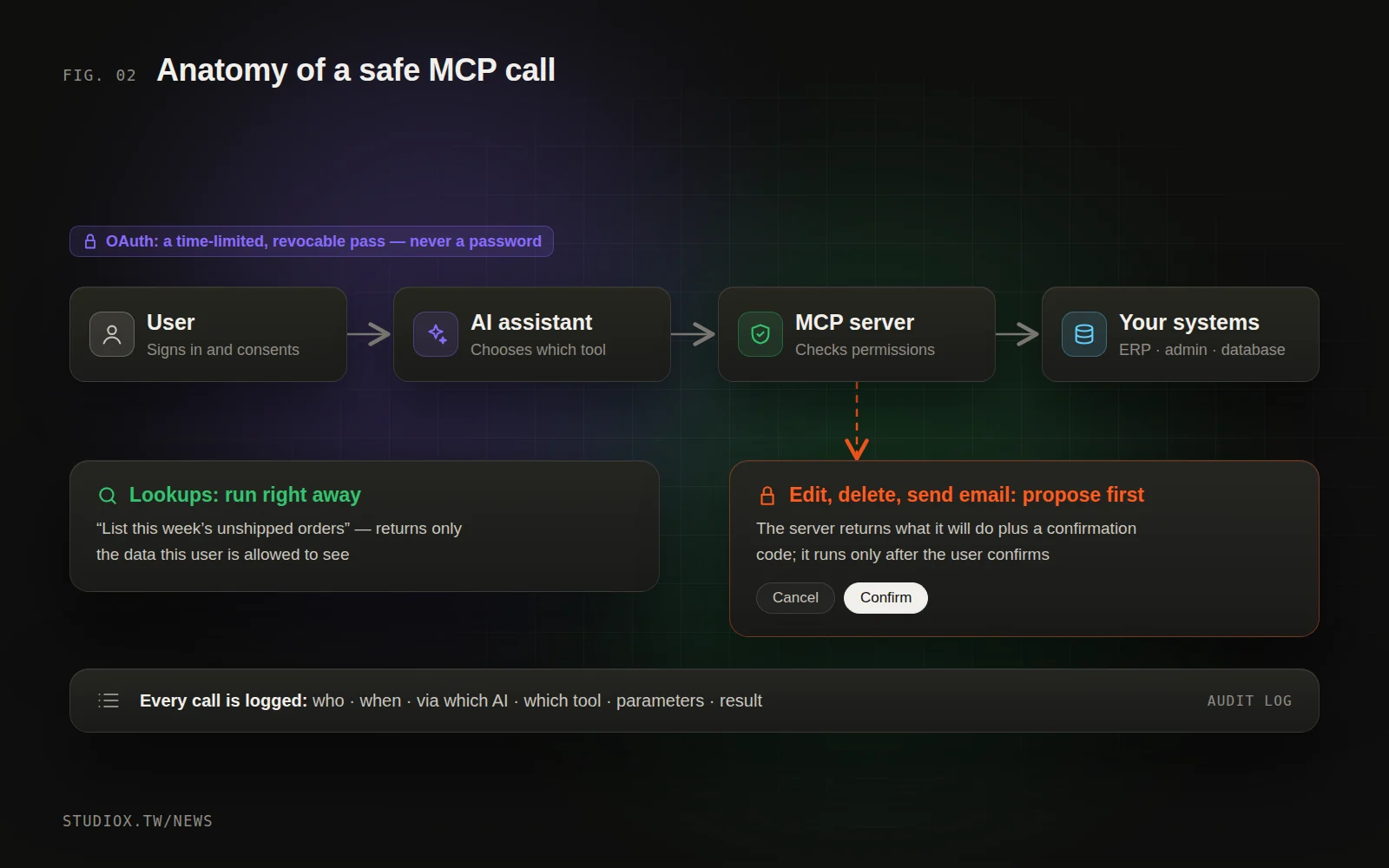
Remote MCP servers use OAuth for authorization. The first time a user connects, a sign-in and consent screen asks them to confirm which scopes they're granting (read-only, for example, or also permission to make changes). What the AI receives is a time-limited, revocable pass, not a username and password.
The AI only gets "this person's" permissions
A well-built MCP server ties permissions to whoever is signed in: sales reps see only their own customers, and only accounting can see receivables. However smart the AI is, it can't do anything that person couldn't already do.
Write actions need a person's confirmation
Lookups can run right away. But creating, changing or deleting records, sending email and issuing refunds should be designed as two steps: the AI first proposes "here's what I'll do," and it only actually runs after the user has reviewed and confirmed it.
Every call is logged
Who, when, through which AI, which tool, with which parameters and with what result: all of it is recorded. When something goes wrong you can trace it, and you can use the logs to fine-tune permissions.
How is MCP different from a regular API?
A common first reaction to MCP is: "Our system already has an API. Why do we need MCP?" The answer: APIs are for engineers; MCP is for AI.
| Regular API | MCP | |
|---|---|---|
| Who uses it | Engineers write code that calls it | The AI decides to call it based on the conversation |
| Documentation | Written for people, in all sorts of formats | Every tool has a machine-readable description and parameter format |
| Integration | Each application integrates separately | Any AI that supports MCP can connect directly |
| Authorization | Varies by vendor (API keys, passwords…) | Remote connections use standard OAuth, and users authorize access themselves |
| Best for | System-to-system integration with fixed flows | Work that requires understanding the request and flexibly combining several actions |
MCP doesn't replace APIs. In practice, an MCP server is usually built on top of existing APIs: it wraps the API as tools AI can understand, then adds permission checks and confirmation steps. Systems that already have an API can get MCP running much faster; for systems without one, you can build both at the same time.
How should tools be designed so AI uses them accurately?
A few principles we follow when designing MCP tools:
- One tool, one job: keep "look up order" and "update order" separate, so their permissions can be controlled separately too.
- Write names and descriptions for the AI: spell out what the tool does, when to use it, and what each parameter means and how it's formatted.
- Return lean results: send back only the fields that are needed instead of dumping the whole database on the AI, which also lowers the risk of data leaks.
- Make error messages understandable: "Customer not found. Please check the customer code" helps the AI correct its next step far better than "Error 404."
How can businesses use MCP?
A few scenarios we've built ourselves or that clients ask about most:
- Website admin: tell Claude "Swap the homepage banner for the fall campaign" or "Check the SEO descriptions on every page," and the AI works directly in the admin panel, asking you to confirm before it changes anything.
- Orders and inventory: "Which orders are paid but not yet shipped?" "How much stock is left for this item?" No more logging in to the ERP and hunting page by page.
- Customer service records: "Summarize the questions customers asked most this week," and the AI reads the support conversations and gives you a summary plus suggested FAQ entries.
- Cross-system reports: query orders, accounting and website traffic together and produce one combined weekly report.
Recommended steps for adopting MCP
- List the data you look up and change most often: start with lookups, which usually save a lot of "log in, search, export" time right away.
- Design tools instead of opening up the whole database: one tool per job, with clear descriptions, so the AI uses them accurately.
- Build permissions and confirmation into the server: don't count on the AI to "follow the rules" on its own.
- Pilot with a few people and adjust based on the logs: the call logs show which tools get used most and where they're easy to misuse.
MCP turns "operating company systems with AI" from a big custom project into a standard approach you can build up step by step. If your system doesn't have an API yet, don't worry: you can wrap an integration layer around it first (see our article on connecting legacy systems without starting over). To find out how your systems could connect to AI, take a look at our integration and automation services or get in touch.